ChatGPT for customer service
- Type
- Guide
- Published
- Nov 11, 2026
- Read
- 8 min
Written by
I always test the tools I write about, and always check prices and features against the official websites.

Use ChatGPT for customer service as your reply drafter: load your policies and best past replies into a Project, paste each ticket in, fix the draft, then send. Solo, Plus at $20 a month is plenty. A team needs Business at $25 per user.
Answering customers is the job that never ends. Where's my order, can I return this, why hasn't it arrived. None of it is hard, but writing the same careful reply for the fortieth time eats the afternoon.
Claude is my daily driver for writing, and I use ChatGPT alongside it. At my e-commerce brand, most order, delivery and refund replies start as an AI draft, and a person reads every one before it goes out. That last part isn't optional.
Below: the ChatGPT setup that works for support, the prompts to copy, and the point where paying for a help-desk AI agent makes more sense.
On this page7 sections
At a glance
- ChatGPT Plus, enough for one person answering customers (OpenAI, Nov 2026)
- $20/mo
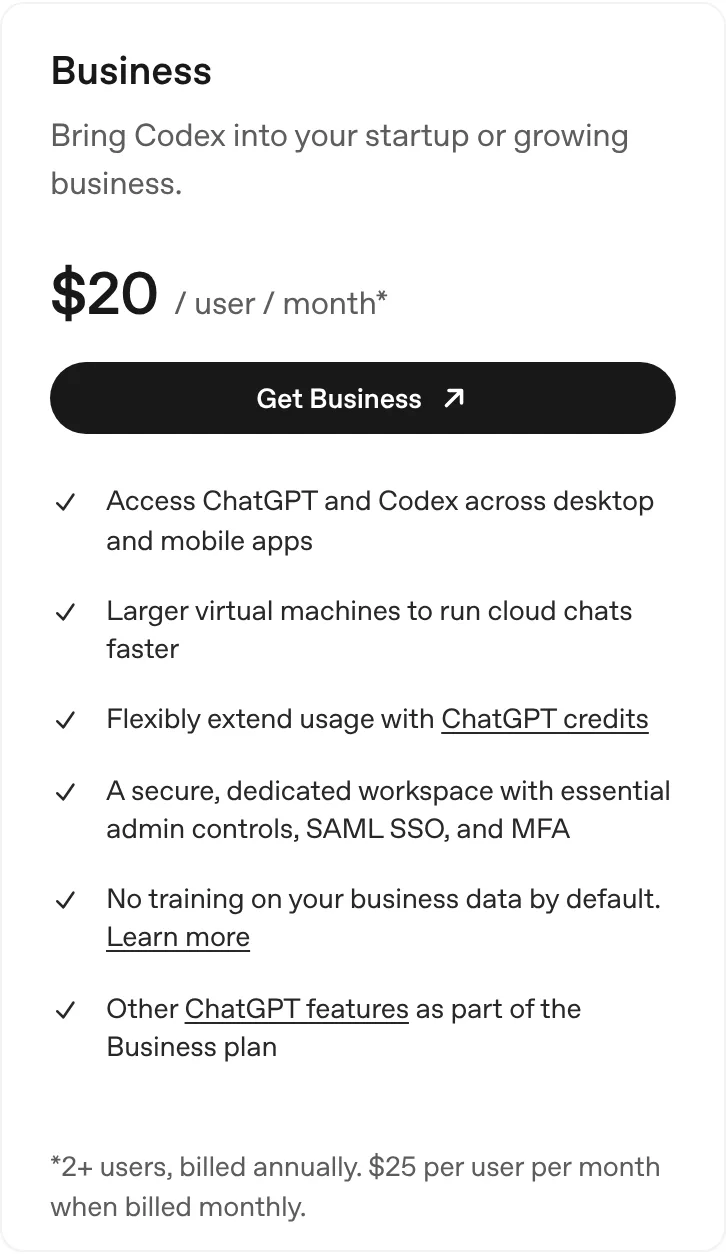
- ChatGPT Business billed monthly, or $20 billed annually, 2+ users
- $25/user
- per outcome for Intercom's Fin AI agent, the pay-per-answer alternative
- $0.99
How do you use ChatGPT for customer service?
Treat it as a very fast writer sitting next to whoever answers customers. It doesn’t plug into your inbox or your order system by default, and it doesn’t reply to anyone on its own. You paste a message in, it drafts the answer, a person checks it and sends it.
Sounds modest. In practice that’s most of the writing in a support job, and the part people dread. This page is part of my AI assistants series, and if you’re still choosing a plan for the wider business, start with ChatGPT for small business.
| Job | What you paste in | What ChatGPT gives back |
|---|---|---|
| Reply drafts | The customer’s message plus the facts (order date, status) | A calm reply in your tone, ready to edit |
| Macros and FAQ answers | Your top questions and policies | Canned replies your team saves in the help desk |
| Angry customers | The complaint and what actually happened | A reply that acknowledges, explains and offers a next step |
| Review replies | The review and the real story | A short public reply |
| Ticket summaries | A long email thread | Three lines: issue, what’s been tried, what’s needed |
| Translation | A message in another language | A plain-English summary and a reply in their language |
The one rule: ChatGPT doesn’t know your refund policy. Left alone, it’ll happily invent a generous one. Everything below is about stopping that.
How to set up ChatGPT for customer service
Skip the one-off chats. The setup that works is a Project. OpenAI’s Projects docs say each project has a Sources section for uploaded files and connected context, and that project instructions apply across its chats. So you load your policies once, and every reply drafted inside the project follows them.
Paste this into the project instructions and fill in the brackets:
You draft customer service replies for [business name], which sells [what you sell] to customers in [country/region].

Facts:
- Use only the policies, prices and dates in this project's sources. Never invent a policy, discount, refund amount or delivery date.
- If the answer isn't in the sources, write [CHECK: what you need to confirm] instead of guessing.

Tone:
- Plain US English, friendly, short. Max 120 words unless asked.
- Use the customer's first name. No "We apologize for any inconvenience."
- One clear next step at the end.

Never:
- Promise a refund, replacement or compensation unless I say so in the message.
- Blame the customer, the courier or a supplier by name.
- Ask for card numbers or passwords.
The [CHECK] line is the one I’d never remove. It turns a confident guess into a visible gap you fill in before sending.
You'll need
- ChatGPT account (Plus for one person, Business for a team)
- Your refund, shipping and warranty policies
- Your 20 most common customer questions
- Five good past replies to copy the tone from
- Your help desk or shared inbox for saving macros
Gather your support facts
Put these in one folder: refund and return policy, shipping times, warranty terms, your top 20 customer questions with the right answers, and five replies you were proud of. ChatGPT can only be as accurate as this pile.
Pick the plan that fits the team
One person answering customers: Plus at $20 a month. Two or more people pasting customer messages in: Business, so the data sits in a work account and isn't used for training by default.
Create a Customer service Project
In ChatGPT, create a new Project, upload your folder to its Sources, and paste the instructions template from above into the project instructions. Every chat inside it now starts with your policies and tone.
Turn your top questions into macros
Run the FAQ macro prompt below on your 20 most common questions. Save the answers in your help desk or email tool as canned replies. These cover most of the day without opening ChatGPT at all.
Draft the rest ticket by ticket
For anything a macro doesn't cover, paste the customer's message (minus card numbers and addresses) into a chat in the Project, pick the matching prompt, and edit the draft. Read every promise, date and amount before you send.
Track two numbers for a month
Time per reply and how many drafts you had to rewrite. If replies got faster and rewrites dropped, keep going. If you're pasting more than a few dozen tickets a day, look at the help-desk AI agents further down.
Copy-ready ChatGPT prompts for customer service
Run these inside your Customer service Project, so ChatGPT already knows your policies. Swap anything in square brackets. Notice that every prompt hands it the decision. ChatGPT writes the reply, you decide the refund.
1. Refund request
Customer message: "[paste]"
Order facts: ordered [date], delivered [date or not yet], item [name], paid [amount].
Our decision: [full refund / partial refund of $X / store credit / no refund because ...].

Write a reply that states the decision in the first two sentences, explains it in one sentence using our refund policy from the sources, and says exactly what happens next and when.
If the decision is no, offer the one alternative our policy allows.
2. Late delivery
Customer message: "[paste]"
Tracking status: [paste status and last scan date]. Normal delivery time: [X business days].

Write a reply that says where the parcel is in plain words, gives a realistic date range (not a promise), and tells them what we'll do if it hasn't arrived by [date].
Don't blame the courier. Keep it under 100 words.
3. Angry customer
Customer message: "[paste]"
What actually happened: [one or two lines of facts].
What I can offer: [options, or "nothing beyond the policy"].

First, list in one line each: what they're upset about, what they want, and anything in their message that's factually wrong.
Then write a reply that acknowledges the frustration in one sentence, corrects any wrong facts politely, and gives a concrete next step.
No groveling, no corporate phrases, under 130 words.
4. FAQ macro builder
Below are our 20 most common customer questions.
For each one, write a saved reply (macro) for our help desk:
- A short title for the macro.
- A reply under 80 words, using only facts from this project's sources.
- Placeholders in {{double braces}} for anything that changes per customer, like {{first_name}} or {{order_number}}.
Mark any question you can't answer from the sources with [CHECK].

Questions:
[paste list]
Public replies need extra care, because everyone sees them. My guide on how to respond to Google reviews covers tone and what never to say.
The angry-customer prompt is the one I’d start with. Splitting “what they want” from “what they said” first gives a much calmer draft than asking for a reply straight away.
Is customer data safe in ChatGPT?
It depends on the plan. Sort this out before anyone pastes a real customer email, not after. On chatgpt.com/pricing, the individual plans (Free, Go, Plus, Pro) say content is used to train OpenAI’s models, with an opt-out available. The Business plan on OpenAI’s pricing docs lists “No training on your business data by default,” plus a dedicated workspace with admin controls, SAML SSO and MFA. Checked Nov 2026.
My rule: one person on Plus with training switched off in Settings > Data controls is fine for a start. Once two or more people handle customer messages, move to Business.
Whatever the plan, strip what the reply doesn’t need. ChatGPT doesn’t need the customer’s card number to apologize for a late parcel.
When a help-desk AI agent beats ChatGPT
The ChatGPT app makes your team faster. It doesn’t answer customers while you sleep. For most small companies that’s fine. For that you need an AI agent inside a help desk, which reads your help center, replies on chat or email, and hands off to a person when it’s stuck. These are the main options, from each vendor’s own pricing page, checked Nov 2026:
| Route | Price | Who answers the customer | Best for |
|---|---|---|---|
| ChatGPT Plus | $20/mo | A person, using ChatGPT drafts | One owner answering everything |
| ChatGPT Business | $25/user/mo, or $20 billed annually, 2+ users | A person, using ChatGPT drafts | Small teams, low to medium volume |
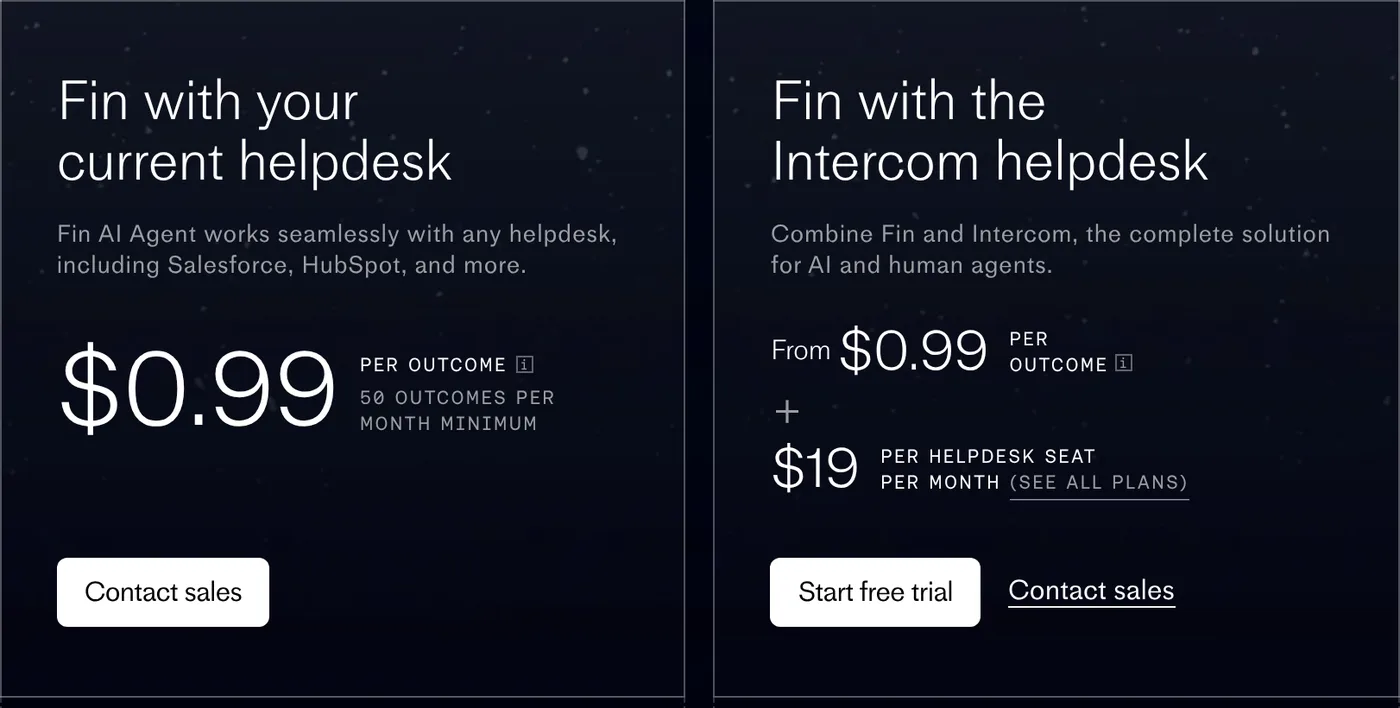
| Intercom Fin | $0.99 per outcome, plus from $19 per seat on Intercom’s help desk; 50 outcomes a month minimum on other help desks | Fin, with handoff to people | Busy chat and email queues |
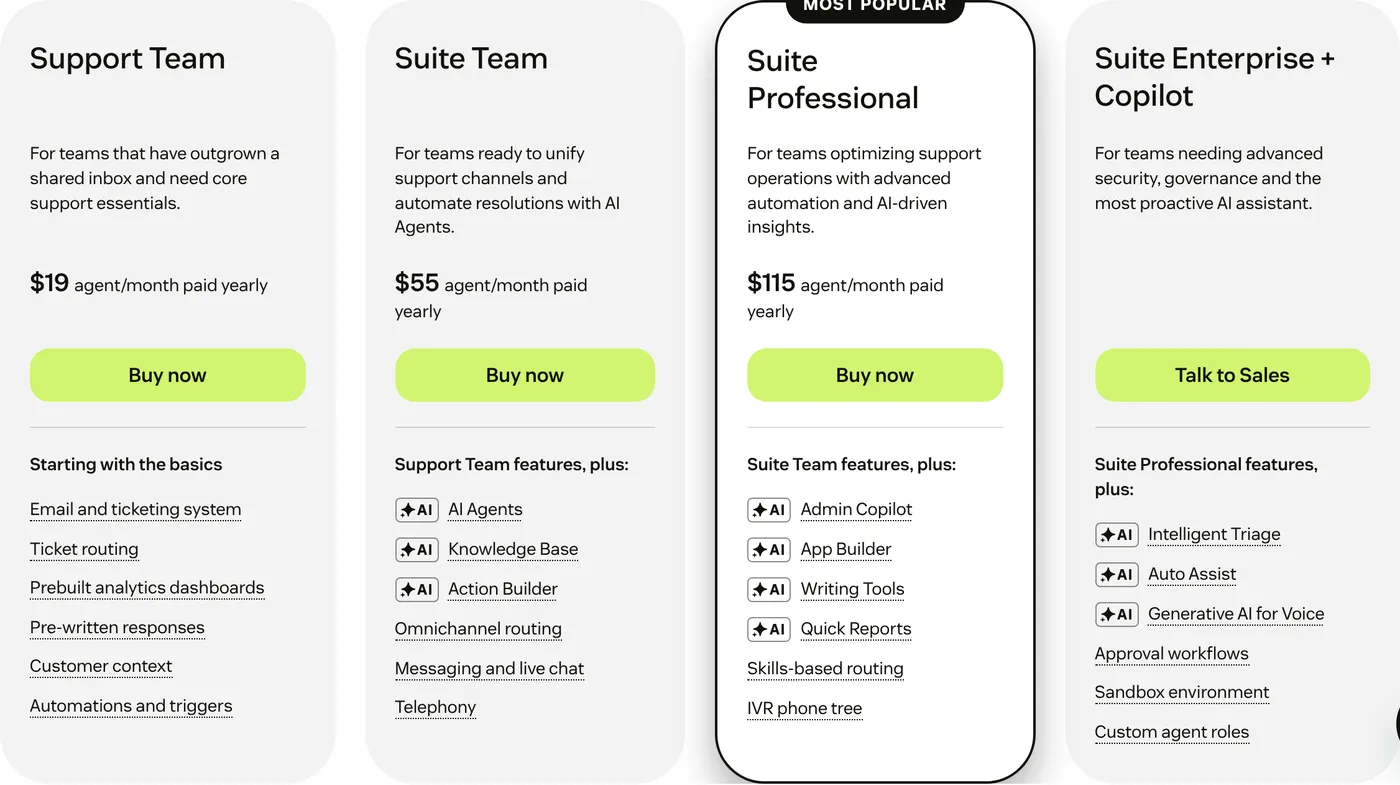
| Zendesk Suite Team | $55/agent/mo billed yearly, AI agents included, billed on automated resolutions | Zendesk AI agents, then your team | Teams already on Zendesk |
| Freshdesk Growth | $19/agent/mo billed annually, 500 Freddy AI Agent sessions (one-time), then $49 per 100 | Freddy AI Agent, then your team | Budget help desk with an AI trial built in |
| Gorgias | AI Agent on every plan, paid per resolved conversation; help desk priced by tickets, not agents | Gorgias AI Agent, then your team | Shopify stores |
Intercom’s Fin pricing is the cleanest example of the pay-per-answer model. Its FAQ says resolutions, procedure handoffs, disqualifications and self-serve routings are $0.99 each, charged once per conversation.
Zendesk’s pricing page says its AI agents are “included in every Suite and Support plan, with pricing based on the successful outcomes they deliver.” Copilot, its assistant for human agents, is an add-on at $50 per agent a month paid yearly. Freshdesk offers its Freddy AI Copilot at $29 per agent a month on Pro and Enterprise. Gorgias says its help desk “scales from 50 to 5,000 tickets a month, never priced per agent.”
Here’s what a two-person support team pays a month on each route. The Intercom bar assumes 200 Fin outcomes a month at the lowest seat price; Zendesk and Freshdesk AI usage beyond their allowances costs extra.
Monthly cost for a 2-person support team, USD
- Freshdesk Growth, annual$38
- ChatGPT Business, annual$40
- ChatGPT Business, monthly$50
- Zendesk Suite Team, yearly$110
- Intercom + 200 Fin outcomes$236
The math is simple. Fin costs more than a ChatGPT seat once it handles a few dozen conversations a month, but every one of those is a conversation nobody on your team touched. If your people spend hours a day on “where’s my order,” the agent wins. If you get 15 emails a day, ChatGPT and a good set of macros is plenty, and buying an agent is solving a problem you don’t have yet.
An AI agent that answers at 2 a.m. is great. One that promises a refund you don’t offer is an expensive pen pal. Whichever you pick, feed it the same policy pile from step 1.
Other ways to wire ChatGPT into support
A few routes sit between “paste into ChatGPT” and “buy an AI agent”:
- Connect your tools. If your help desk or store has an MCP server, you can add it to ChatGPT as a plugin so it can look things up, see ChatGPT MCP.
- Automate the drafting. A Zap can send each new ticket to an AI step and drop the draft back in as an internal note, see Zapier AI automation.
- Build your own agent. OpenAI’s Agent Builder was the obvious DIY route, but it’s shutting down on November 30, 2026, see OpenAI Agent Builder before you start anything there.
- Phone calls. ChatGPT doesn’t pick up your phone. For that, compare AI receptionist pricing.
- A different assistant. Claude handles long policy documents and careful tone well. The setup is the same, see Claude for small business.
If you’d rather someone set the whole thing up for you, some AI automation companies do help-desk AI projects. I’d start with the Project and the prompts above anyway. A month of that and you’ll know exactly what to ask for, and what not to pay for.
Questions people ask
01How has AI improved customer service?
Mostly on speed. AI drafts replies in seconds, answers simple questions at night through help-desk AI agents, translates, and sorts tickets so people handle the hard ones. The catch is accuracy: it needs your real policies, and a human should check anything involving money.
02Can you call ChatGPT support?
Start at help.openai.com, OpenAI's official help center, and only trust contact details linked from openai.com. Be wary of "ChatGPT support" phone numbers in search ads or on random sites.
03What is the use of chatbots?
Answering common questions instantly, any time of day: order status, opening hours, returns, booking. Good ones hand off to a person when they're stuck. Assistants like ChatGPT go further and draft replies, summaries and macros for your team to send.
04What are the top 5 chatbots?
For general work: ChatGPT, Claude, Gemini, Microsoft Copilot and Perplexity. For answering customers on your site, look at help-desk AI agents instead, such as Intercom's Fin, Zendesk AI agents, Freshdesk's Freddy AI Agent and Gorgias AI Agent. The table above compares the routes.
05Can ChatGPT replace a customer service team?
Not on its own. The ChatGPT app can't see your orders or reply to customers by itself. It makes one person much faster. Replacing first-line answers takes a help-desk AI agent, and you still need people for refunds, complaints and anything unusual.
06Is it safe to paste customer emails into ChatGPT?
On Business, OpenAI says it doesn't train on your business data by default. On Free, Go, Plus and Pro, content may be used for training unless you opt out. Either way, strip card numbers, passwords and addresses first.
More in AI Assistants