Claude for small business
- Type
- Guide
- Updated
- Nov 5, 2026
- Read
- 10 min
- Written by
- Max Panych

Claude is one of the most useful AI tools a small business owner can pay $20 a month for, if you use it on the right jobs. This guide covers which plan to pick, what to use it for, prompts you can copy today, and what happens to your data. It is part of my AI for business series.
maxpanychClaude
GuideOn this page10 sections
- Step by step
- Which Claude plan should a small business pick?
- What can Claude AI do for a small business?
- Ready-to-copy prompts for small business owners
- What is the Claude for Small Business plugin?
- Is there Claude for small business training?
- Claude vs ChatGPT for small business
- Is my business data safe with Claude?
- How to get started this week
- FAQ
- Claude Pro, billed monthly (claude.com, 5 Nov 2026)
- $20/mo
- Claude Team Standard seat, billed monthly, 2 seat minimum
- $25/seat
- ready-to-run workflows in the Claude for Small Business plugin
- 15
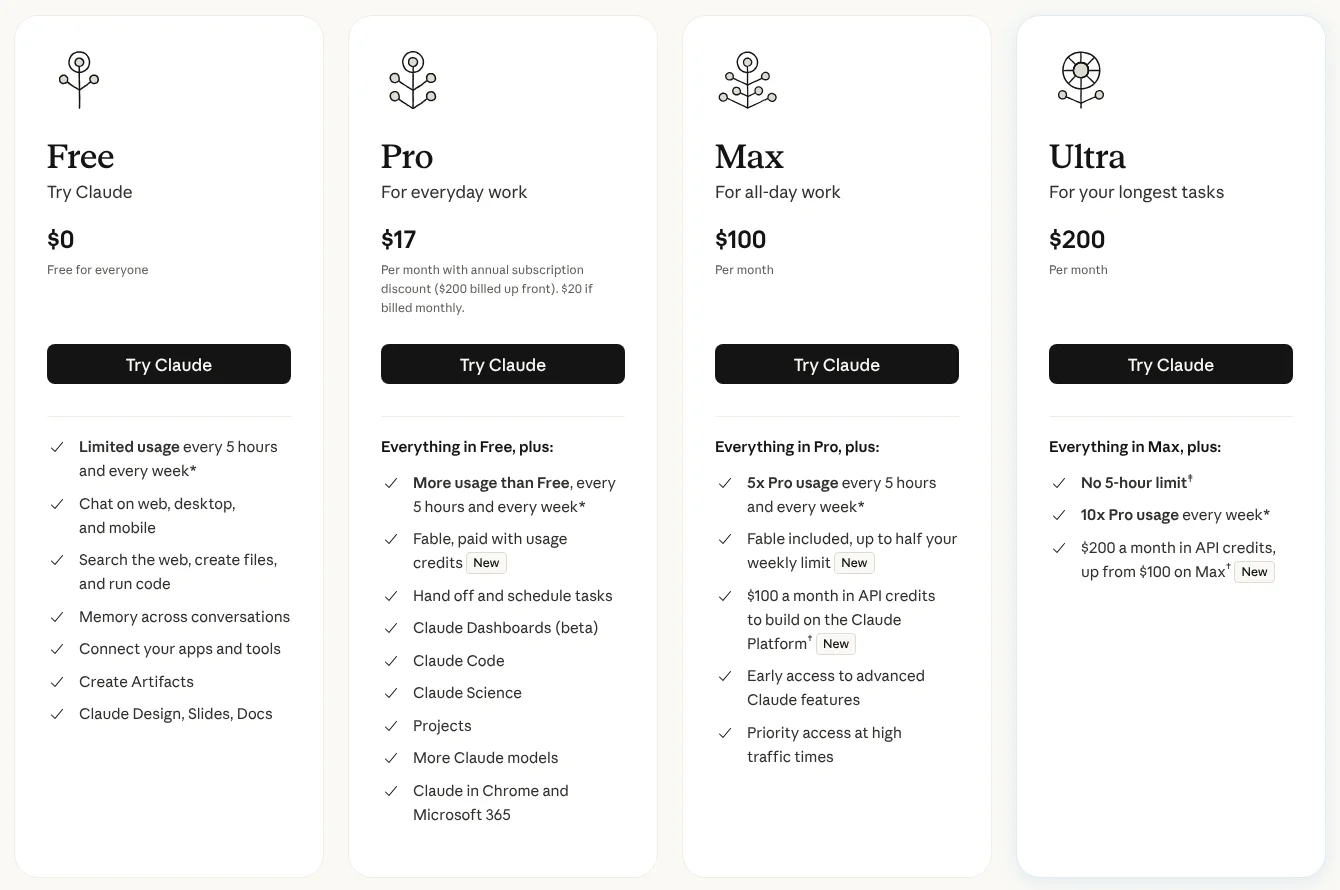
| Plan | Price | Usage | Best for |
|---|---|---|---|
| Free | $0 | Limited usage, resets every 5 hours and weekly | Trying it out |
| Pro | $20/mo, or $17/mo billed annually ($200 up front) | More than Free | Owner using it daily |
| Max | $100/mo | 5x Pro | Heavy solo users |
| Ultra | $200/mo | 10x Pro weekly, no 5 hour limit | Very heavy solo users |
| Team | $25/seat/mo, or $20/seat billed annually (Standard). Premium $125, or $100 annually | More than Pro per Standard seat; Premium is 5x Standard | 2 to 150 people |
Prices from claude.com/pricing, checked 5 Nov 2026. Enterprise (20 seat minimum) is left out because few small businesses need it. Source
- Claude account (Free to start, Pro for daily use)
- Your price list and a few past quotes
- Google Workspace or Microsoft 365 (optional)
- Accounting or CRM tool such as QuickBooks or HubSpot (optional)
Start on Free, then move to Pro
Sign up at claude.ai and give it a real job, like rewriting a quote email. The Free plan has limited usage that resets every 5 hours, so once you hit the limit on a busy day, upgrade to Pro ($20 a month).
Set your privacy choice
On Free, Pro and Max you choose whether your chats can be used to train Claude. Check it in Settings > Privacy. Use an Incognito chat for anything sensitive; Anthropic says Incognito chats are not used to improve Claude.
Create a Project for your business
Make a Project called your company name and upload your price list, a past quote, your terms, and a page about how you work. Every chat in that Project starts with that context, so you stop re-explaining your business. Free allows up to 5 Projects.
Connect the tools you already use
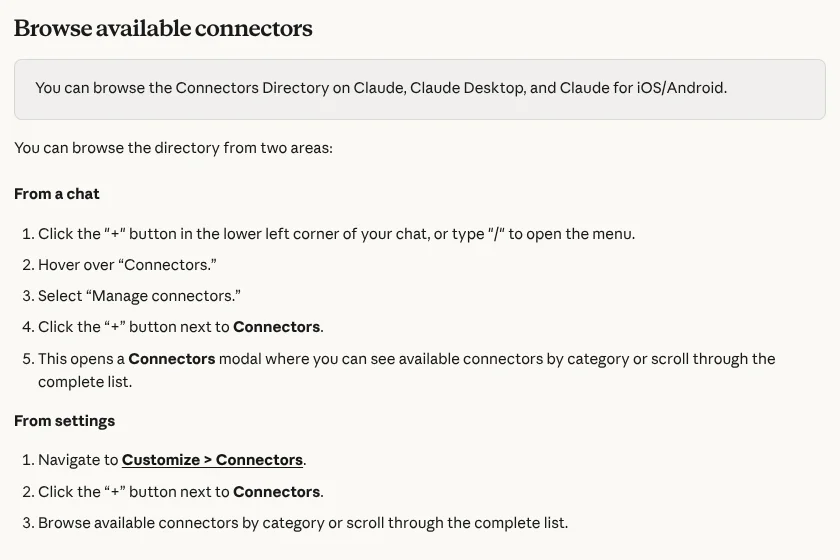
Open Customize > Connectors and connect Google Workspace, Microsoft 365, your CRM or your accounting tool if it is listed. Turn connectors on per chat from the + button.
Add the Claude for Small Business plugin
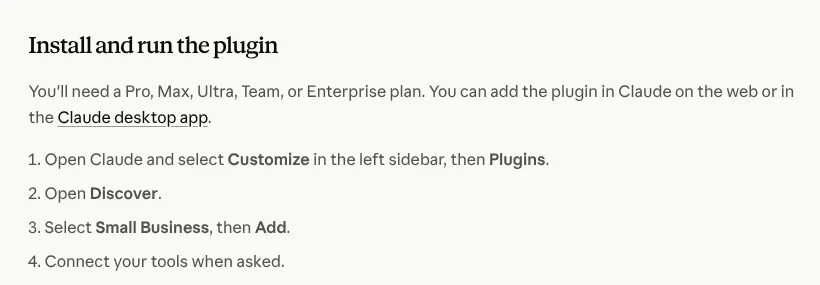
On Pro, Max, Ultra, Team or Enterprise: Customize > Plugins > Discover, select Small Business, then Add, and connect your tools when asked. Run the onboarding skill so it learns your business.
Review everything before it goes out
Treat Claude like a fast new hire. Check prices, measurements and names in every draft. Anthropic says the plugin's skills draft and stage work, and nothing is sent, posted or paid until you approve it.
Claude for small business means using Anthropic’s AI assistant for the paperwork and messages that eat an owner’s evenings: quotes, proposals, emails, SOPs, marketing and spreadsheets. For most owners, the $20 a month Pro plan is enough, and Team at $25 per seat a month makes sense once staff share it.
I run a construction company, Buildme, so this guide is written for owners who are busy on site, not for people who want to learn prompt engineering. It is part of my AI for business series, and if you work in the trades, my guide to AI for construction goes deeper on that side.
At Buildme, I use Claude mostly for the writing around jobs: turning my site notes into a first proposal draft, replying to customer emails, and writing up how we do things as simple SOPs for the crew. I keep a Project with our price list, standard terms and a couple of good past proposals, so drafts come out sounding like us. I still check every number before anything goes to a client. It does not price a job for me, but it takes most of the blank-page time out of the evening paperwork.
Which Claude plan should a small business pick?
The plan table above is from Claude’s pricing page, checked on 5 Nov 2026. In plain terms:
- Free ($0) is for testing. It has limited usage that resets every 5 hours and weekly, but it already includes web search, file creation, connectors and up to 5 Projects.
- Pro ($20 a month, or $17 a month billed annually as $200 up front) is where most owners should be. It adds more usage, unlimited Projects, Claude Code, and Claude in Chrome and Microsoft 365.
- Max ($100 a month) gives 5x Pro usage, and Ultra ($200 a month) gives 10x Pro usage weekly with no 5 hour limit. Only worth it if you hit Pro’s limits most days.
- Team costs $25 per Standard seat a month, or $20 billed annually, for teams of 2 to 150. Premium seats cost $125 a month, or $100 annually, and get 5x the usage of Standard. Team adds central billing, SSO, admin controls and up to $500 a month in pooled API credits.
My rule: one person, Pro. Two or more people touching customer data, Team, mainly because of how data is handled (see the privacy section below). Full plan detail is in my Claude pricing guide.
What can Claude AI do for a small business?
Claude is strongest on jobs where you already know the answer but hate writing it down. Here is where it earns its $20:
| Job | What you give Claude | What you get back |
|---|---|---|
| Quotes and proposals | Site notes, measurements, your price list | A clean scope of work and proposal draft |
| Customer emails | The customer’s message and the facts | A calm reply in your voice |
| SOPs | A voice memo transcript of how you do a task | A numbered checklist your team can follow |
| Marketing | A finished job and a few photos | Posts, website copy, review replies |
| Spreadsheets | A CSV of jobs, costs or invoices | Totals, outliers and a plain-English summary |
| Contracts and PDFs | A supplier contract | A summary of terms worth questioning |
Anthropic’s own small business page uses a construction-style example too: proposals built from a voice memo and site photos, priced from your last three deals. That is the right idea. Claude does not know your prices, so you feed it your real ones.
Warning: Claude can get numbers wrong. Check every price, quantity and measurement before a quote leaves your inbox. My piece on whether ChatGPT can do construction estimates covers the same risk.
Projects: stop re-explaining your business
A Project is a folder of chats that share files and instructions. Put your price list, standard terms, a good past proposal and a short “how we work” note in it. Every new chat inside the Project starts with that context. This one setup step is the difference between generic AI text and drafts that sound like your company.
Connectors: let Claude read your tools
Connectors let Claude read from apps like Google Drive, Gmail, Microsoft 365 or your CRM. Anthropic’s pricing page lists connectors on every plan, including Free. You add them under Customize > Connectors and turn them on per chat. Anthropic’s connector guide explains each type. For images and video, I connect Higgsfield; my Higgsfield MCP guide shows how.
Ready-to-copy prompts for small business owners
Paste these into a Claude Project that already has your price list and terms. Replace everything in brackets.
1. Quote or proposal from site notes
You are writing a proposal for [company name], a [trade] business in [city].
Use only the prices in the attached price list. If a price is missing, write [PRICE NEEDED] instead of guessing.

From these site notes, write:
1. A short intro addressed to [client first name].
2. Scope of work as numbered line items.
3. What is not included.
4. Timeline and payment terms from our standard terms.
Plain English, no sales fluff, under 400 words.

Site notes:
[paste notes or voice memo transcript]
2. Follow-up email after sending an estimate
Write a short follow-up email to [client name] about the estimate I sent on [date] for [job].
Tone: friendly, confident, not pushy. Under 90 words.
Mention one specific detail from the job: [detail].
End with one clear question that is easy to answer, like a yes/no on a site visit time.
Give me 2 versions.
More on this in my guide to contractor estimate follow-up.
3. SOP from a voice memo
Turn this voice memo transcript into a standard operating procedure for my team.
Format: title, who does it, tools needed, numbered steps, common mistakes, and a final checklist.
Keep my wording where it is clear. Flag anything that sounds unsafe or unclear with [CHECK].

Transcript:
[paste transcript]
4. Job cost spreadsheet check
Attached is a CSV of our jobs from [period] with columns for quoted price, labor cost, materials cost and final invoice.
1. Calculate the gross margin for each job.
2. List the 5 jobs with the lowest margin and suggest likely reasons based on the numbers.
3. Tell me if any rows look like data entry mistakes.
Show your working in a table. Do not invent numbers that are not in the file.
What is the Claude for Small Business plugin?
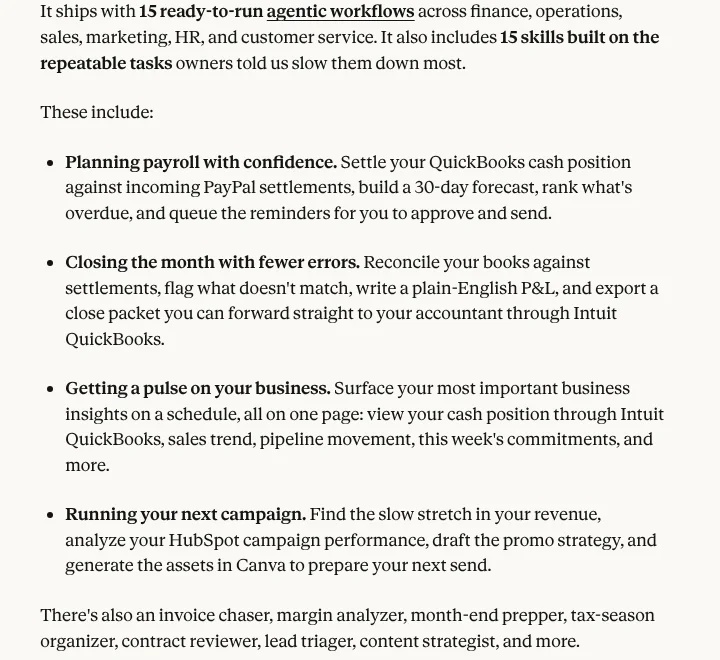
Anthropic launched Claude for Small Business on 13 May 2026. It is “a package of connectors and ready-to-run workflows that put Claude inside the tools small businesses depend on.” The announcement lists 15 ready-to-run agentic workflows and 15 skills, with connectors for PayPal, Intuit QuickBooks, HubSpot, Canva and Docusign, plus Google Workspace and Microsoft 365.
According to Anthropic’s install tutorial (checked 5 Nov 2026), you need a Pro, Max, Ultra, Team or Enterprise plan, so it is not on Free. To add it: open Claude, select Customize, then Plugins, open Discover, select Small Business, then Add, and connect your tools when asked.
It includes slash commands such as /pay-the-bills, /close-month, /plan-payroll, /monday-brief, /speed-to-lead and /reactivate, plus skills for invoices, proposals, reviews, hiring and contract review. Anthropic says skills draft and stage work, and nothing is sent, posted or paid until you approve it. Anthropic’s announcement does not list a separate price for the plugin; you pay for your Claude plan and the tools you connect.
For review replies specifically, my guide on how to respond to Google reviews has prompts that work with or without the plugin.
Is there Claude for small business training?
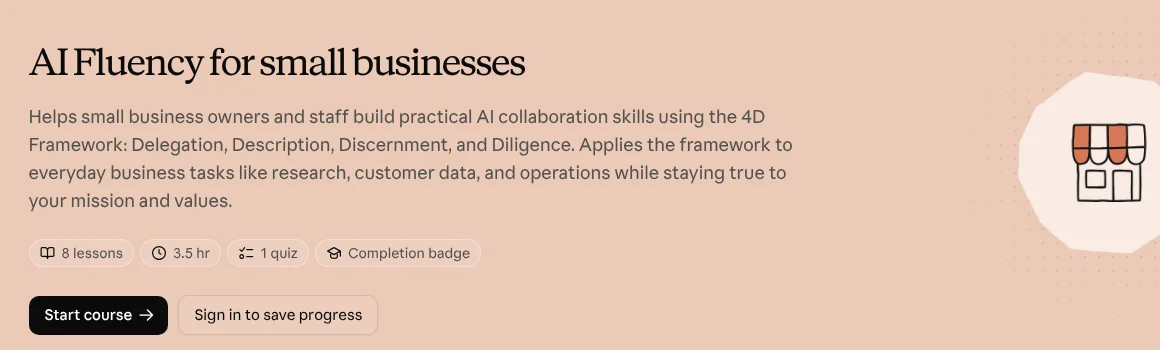
Yes, and it is free. Anthropic built AI Fluency for Small Businesses with PayPal and two small businesses, Prospect Butcher Company and MAKS TIPM Rebuilders. It has 8 lessons, about 3.5 hours of content, a quiz and a completion badge, and you can do the exercises in any AI chat tool.
Anthropic also runs the Claude SMB Tour, free half-day workshops in US cities. Its small business page lists Tampa, FL on 10 Nov 2026 and Raleigh, NC on 12 Nov 2026, plus virtual webinars on 5 Nov and 17 Nov 2026.
Claude vs ChatGPT for small business
Both are good. Here is how they compare on the things owners ask about, from claude.com/pricing, OpenAI’s pricing docs and chatgpt.com/pricing, all checked on 5 Nov 2026.
| Claude | ChatGPT | |
|---|---|---|
| Free plan | Yes, limited usage | Yes |
| Cheapest paid plan | Pro, $20/mo ($17/mo annually) | Go, $8/mo |
| Main individual plan | Pro, $20/mo | Plus, $20/mo |
| Heavy-user plans | Max $100/mo, Ultra $200/mo | Pro from $100/mo, up to $500/mo |
| Team plan | Team, $25/seat monthly or $20 annually, 2 to 150 seats | Business, $25/user monthly or $20 annually, 2+ users |
| Trains on team plan data by default | No | No |
| Trains on personal plan data | Your choice in Privacy Settings | Opt-out available |
| Projects | Up to 5 on Free, more on paid | On Free, Go, Plus and Pro |
| Built-in image generation | Not listed on the pricing page; use connectors like Canva or Higgsfield | Limited on Free; yes on Go, Plus and Pro |
| Small business package | Claude for Small Business plugin (Pro and up) | Not covered on its pricing page |
On price, they are level where it matters: $20 a month for the main individual plan and $25 per seat monthly (or $20 annually) for a team. ChatGPT’s $8 Go plan is cheaper for light use, and ChatGPT has image generation built in. Claude’s edge for owners is connectors on every plan, Projects on Free, and the Small Business plugin. For a deeper test, read my Claude vs ChatGPT comparison or my guide to ChatGPT for small business.
Is my business data safe with Claude?
What happens to your data depends on your plan. From Anthropic’s own policy pages, checked on 5 Nov 2026:
- Free, Pro and Max (consumer plans): in the August 2025 terms update, Anthropic made model training a choice you set in Privacy Settings. If you allow it, data from new chats is kept for five years. If you do not, the 30-day retention period applies. Anthropic’s Claude Code data docs list Ultra under the same consumer rules.
- Incognito chats: Anthropic’s privacy center says Incognito chats are not used to improve Claude, even with Model Improvement on.
- Feedback: if you click thumbs up or down, Anthropic says it keeps that conversation for up to 5 years.
- Team and Enterprise (commercial): Anthropic’s privacy center says that by default it will not use inputs or outputs from commercial products such as Claude for Work and the API to train models.
How long Anthropic keeps consumer chats
- Training not allowed30 days
- Training allowed5 years
- Thumbs up or down feedbackUp to 5 years
My practical rules: do not paste customer card numbers, bank details or passwords into any AI tool. Strip home addresses and full names from anything you do not need them in. If staff use Claude with customer data, put them on Team rather than personal accounts.
How to get started this week
Do not try to automate the whole business on day one. Pick the one job you put off most, usually quotes or follow-up emails, and run it through Claude for a week using the steps and prompts above. If it saves you an hour, keep going. If you would rather someone set it up for you, some AI automation companies do this for small businesses, but you can get most of the value yourself with Pro and a well-built Project. My how to use Claude guide covers the basics if you are brand new.
Questions people ask
01Is Claude good for small business?
Yes, for writing and thinking jobs: quotes and proposals, customer emails, SOPs, job ads, marketing copy and reading spreadsheets or PDFs. It is weaker where you need a guaranteed right answer with no checking, like final prices or legal terms. Anthropic also built a Claude for Small Business plugin in May 2026 aimed at owners, with 15 ready-to-run workflows and connectors to tools like QuickBooks, PayPal, HubSpot, Canva and Docusign.
02How much does Claude cost for a small business?
As of 5 Nov 2026, Claude Pro costs $20 a month billed monthly or $17 a month billed annually ($200 up front). Claude Team costs $25 per Standard seat a month, or $20 billed annually, for 2 to 150 people. Max is $100 a month and Ultra $200 a month for one heavy user. Prices are from claude.com/pricing.
03Should a small business use Claude Pro or Team?
Use Pro if you are the only person using it. Move to Team once two or more people need it, because Team adds central billing, SSO and admin controls, and under Anthropic's commercial terms your business data is not used to train models by default.
04Does Claude use my business data for training?
On Free, Pro and Max it depends on your choice in Privacy Settings. If you allow it, Anthropic keeps that data for up to five years; if you do not, the 30-day retention period applies. On Team and Enterprise, Anthropic says it does not use inputs or outputs to train models by default.
05What is the Claude for Small Business plugin?
It is a free add-on from Anthropic, launched on 13 May 2026, that bundles skills and connectors for jobs like paying bills, month-end close, payroll planning, proposals, reviews and lead follow-up. You need a Pro, Max, Ultra, Team or Enterprise plan. Add it from Customize > Plugins > Discover > Small Business.
06Is there free Claude for small business training?
Yes. Anthropic and PayPal made AI Fluency for Small Businesses, a course of 8 lessons and about 3.5 hours, with a quiz and completion badge. Anthropic's announcement describes it as free and on demand. Anthropic also runs Claude SMB Tour workshops in US cities.
07Is Claude better than ChatGPT for small business?
On price they are level: both main individual plans are $20 a month and both team plans are $25 per seat monthly or $20 annually. Claude's edge for owners is Projects, connectors on every plan and the Small Business plugin. ChatGPT's edge is built-in image generation and a cheaper $8 Go plan. Try both on the same real job before you pay for a year.