Higgsfield MCP
- Type
- Guide
- Updated
- Nov 5, 2026
- Read
- 7 min
- Written by
- Max Panych

Higgsfield MCP lets you generate images and video, cut out backgrounds and check your credits without leaving Claude. Here is how to connect it, what it can do, and what it costs, from someone who uses it.
I may earn a commission if you buy through links on this page, at no extra cost to you. It never changes my verdict. How I make money
maxpanychHiggsfield
 Guide
On this page11 sections
- Step by step
- What is Higgsfield AI MCP?
- How do I connect Higgsfield to Claude?
- How do I connect Higgsfield to Claude Code, ChatGPT or Cursor?
- What can you do with Higgsfield MCP?
- How much does Higgsfield MCP cost?
- Example requests to try
- Higgsfield MCP vs Canva MCP
- Higgsfield MCP vs the Higgsfield API
- Problems and fixes
- FAQ
- one background removal on my Creator plan (5 Nov 2026)
- 1 credit
- one Nano Banana 2.1 image on my Creator plan (5 Nov 2026)
- 3 credits
- a 10 second 720p Seedance 2.5 video, per Higgsfield
- 70 credits
- Paid Higgsfield plan with credits
- Claude account (web or desktop app)
- The MCP URL: https://mcp.higgsfield.ai/mcp
- Optional: Claude Code, ChatGPT or Cursor
Check you have a paid Higgsfield plan
Higgsfield's help center says an active paid subscription is required to connect an AI agent. You do not need an API key. On the Claude side, any plan works, but the Free plan is limited to one custom connector.
Open Customize > Connectors in Claude
On claude.ai or the Claude desktop app, open Customize > Connectors, click + Add, then Add custom connector. (Higgsfield's own help page calls this menu Settings > Connectors.) On a Team or Enterprise plan, an Owner adds it first under Organization settings > Connectors, then members click Connect.
Paste the Higgsfield MCP URL
Name the connector Higgsfield and paste
https://mcp.higgsfield.ai/mcpas the remote MCP server URL. Click Continue, keep the detected sign-in settings, and click Add.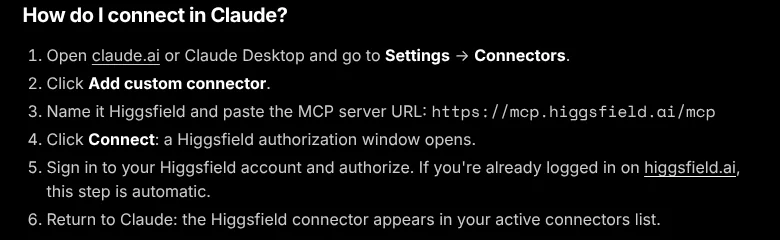
Sign in to Higgsfield and authorize
Click Connect. A Higgsfield authorization window opens. Sign in and approve. If you are already logged in on higgsfield.ai, this step goes through on its own. Then check that Higgsfield shows in your connectors list.
Turn it on in a chat
Start a new chat, click the + button at the lower left, open Connectors and make sure the Higgsfield toggle is on. If Claude does not call Higgsfield, mention Higgsfield by name in your request.
Ask for the price before every generation
Higgsfield says there is no native credit cap on the connector. Its suggested guard is a chat instruction: "Before generating anything, tell me the credit cost and wait for my confirmation." It is not a hard limit, so keep an eye on your balance.
Higgsfield MCP is the official way to plug Higgsfield AI into Claude and other AI assistants, so you can ask for an image, a video or a background removal in plain English and get the result back in the chat. It runs on credits from your paid Higgsfield plan, and it is one of the easiest ways into AI automation for visual content.
This is what I actually do with it: I connect Higgsfield to Claude, generate images, cut out backgrounds and check my credit balance straight from chat. In my own log on 5 Nov 2026, on the Creator plan, one background removal cost 1 credit and one Nano Banana 2.1 image cost 3 credits.
What is Higgsfield AI MCP?
MCP stands for Model Context Protocol, an open standard that lets an AI assistant call tools in other apps. Higgsfield runs a remote MCP server at https://mcp.higgsfield.ai/mcp. Once you connect it, Claude can call Higgsfield’s tools for you instead of you clicking through the Higgsfield website.
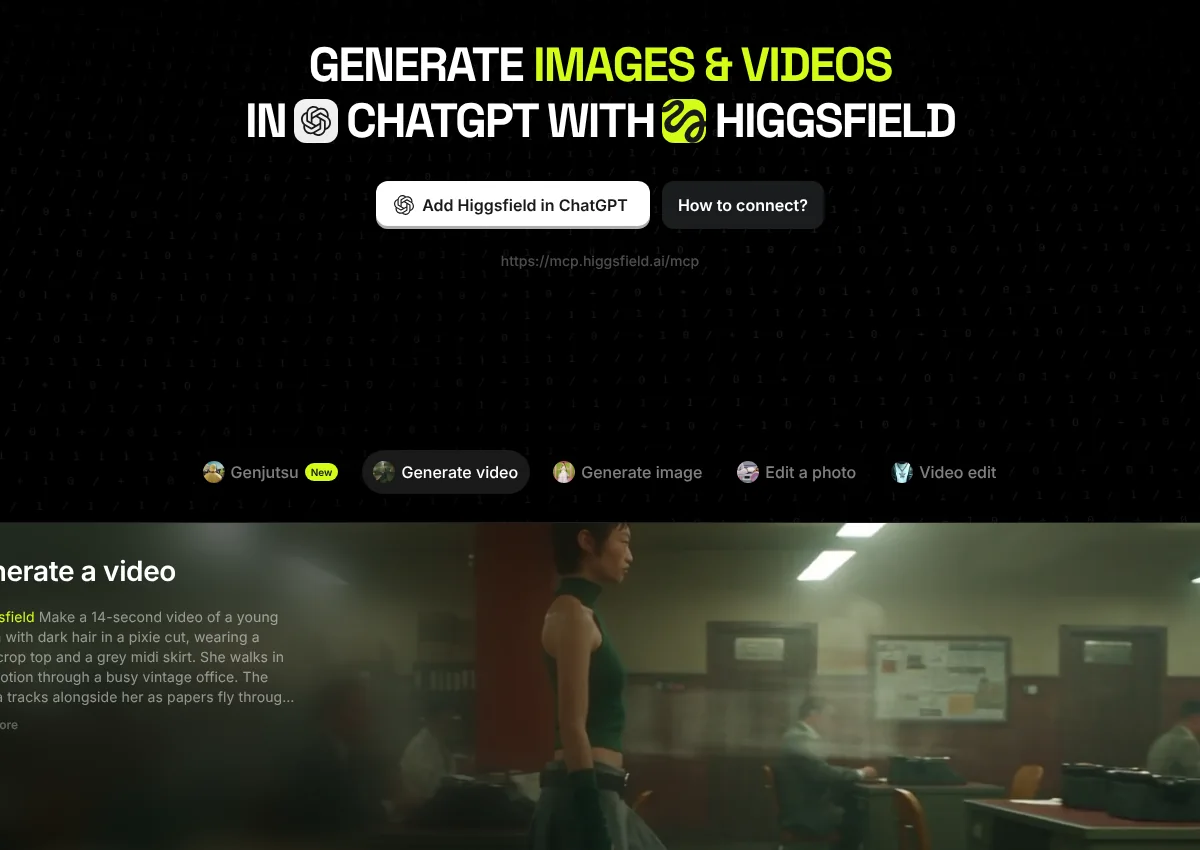
Higgsfield’s MCP page describes it as “35+ models and tools for image and video generation, no API key required” and lists ChatGPT, Claude, Claude Code and other MCP clients. If you are still deciding whether Higgsfield itself is worth paying for, start with my Higgsfield AI review.
How do I connect Higgsfield to Claude?
The steps above follow Higgsfield’s connection guide and Anthropic’s custom connector guide, both checked on 5 Nov 2026. The short version: Customize > Connectors, Add custom connector, paste the URL, sign in, then switch the connector on in your chat.
Tip: Anthropic’s docs say the connection is made from Anthropic’s cloud, not your computer. That does not matter for Higgsfield, which is a public server, but it is why company servers behind a VPN often fail as custom connectors.
How do I connect Higgsfield to Claude Code, ChatGPT or Cursor?
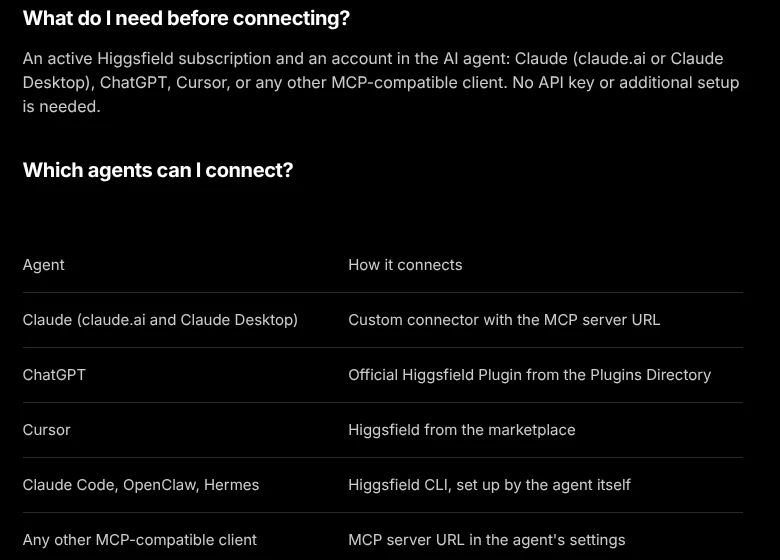
Higgsfield’s help center gives a different route for each client (checked 5 Nov 2026):
| Client | How to connect | Source |
|---|---|---|
| Claude (web and desktop) | Custom connector with https://mcp.higgsfield.ai/mcp | Higgsfield, Anthropic |
| Claude Code | Higgsfield’s recommended route is its CLI: install @higgsfield/cli with npm, run higgsfield auth login, then npx skills add higgsfield-ai/skills | Higgsfield |
| ChatGPT | Plugins Directory, or higgsfield.ai/mcp and Add Higgsfield plugin, then sign in | Higgsfield |
| Cursor | Customize > Marketplace, find Higgsfield, click Add, sign in | Higgsfield |
| Any other MCP client | Add the server URL in the client’s MCP settings | Higgsfield |
If you prefer plain MCP in Claude Code, Anthropic’s Claude Code MCP docs give the general command for a remote server, which with Higgsfield’s URL is:
claude mcp add --transport http higgsfield https://mcp.higgsfield.ai/mcp
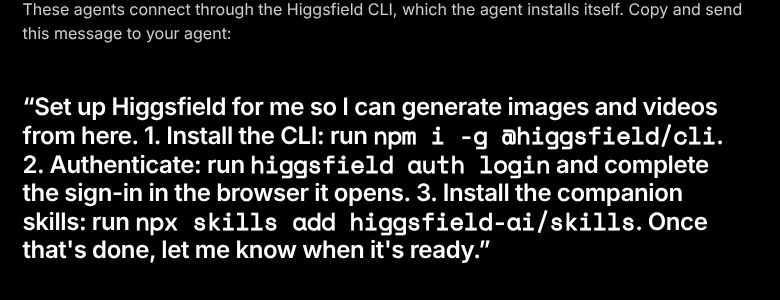
Then run /mcp inside Claude Code and finish the sign-in in your browser. Higgsfield notes that audio generation and the website building skill are not available in ChatGPT. I cover the ChatGPT side in more detail in my ChatGPT MCP guide.
What can you do with Higgsfield MCP?
The connector’s tool list in Claude (checked 5 Nov 2026) includes tools such as generate_image, generate_video, remove_background, upscale_image, get_presets, execute_preset, balance and transactions. In practice that covers:
- Generate images with models like Nano Banana. My how to use Nano Banana guide covers prompting.
- Generate video from text or an image. Higgsfield’s Claude video guide names Seedance, Kling, Veo and MiniMax Hailuo.
- Remove backgrounds, upscale and reframe existing images.
- Run presets, Higgsfield’s ready-made effects and ad formats.
- Check credits and recent spending without opening the website.
One catch from Higgsfield’s guide: Claude cannot pass images attached to the chat straight to Higgsfield. Files go through the Higgsfield upload window that appears in the chat.
How much does Higgsfield MCP cost?
The connector itself has no separate fee, but it is not free to use. Higgsfield says every generation through a connected agent deducts credits from your plan, and that unlimited models and free generations work only on higgsfield.ai, not through MCP. For plan prices and how many credits each plan includes, see my Higgsfield AI pricing breakdown, or Higgsfield’s own pricing page.
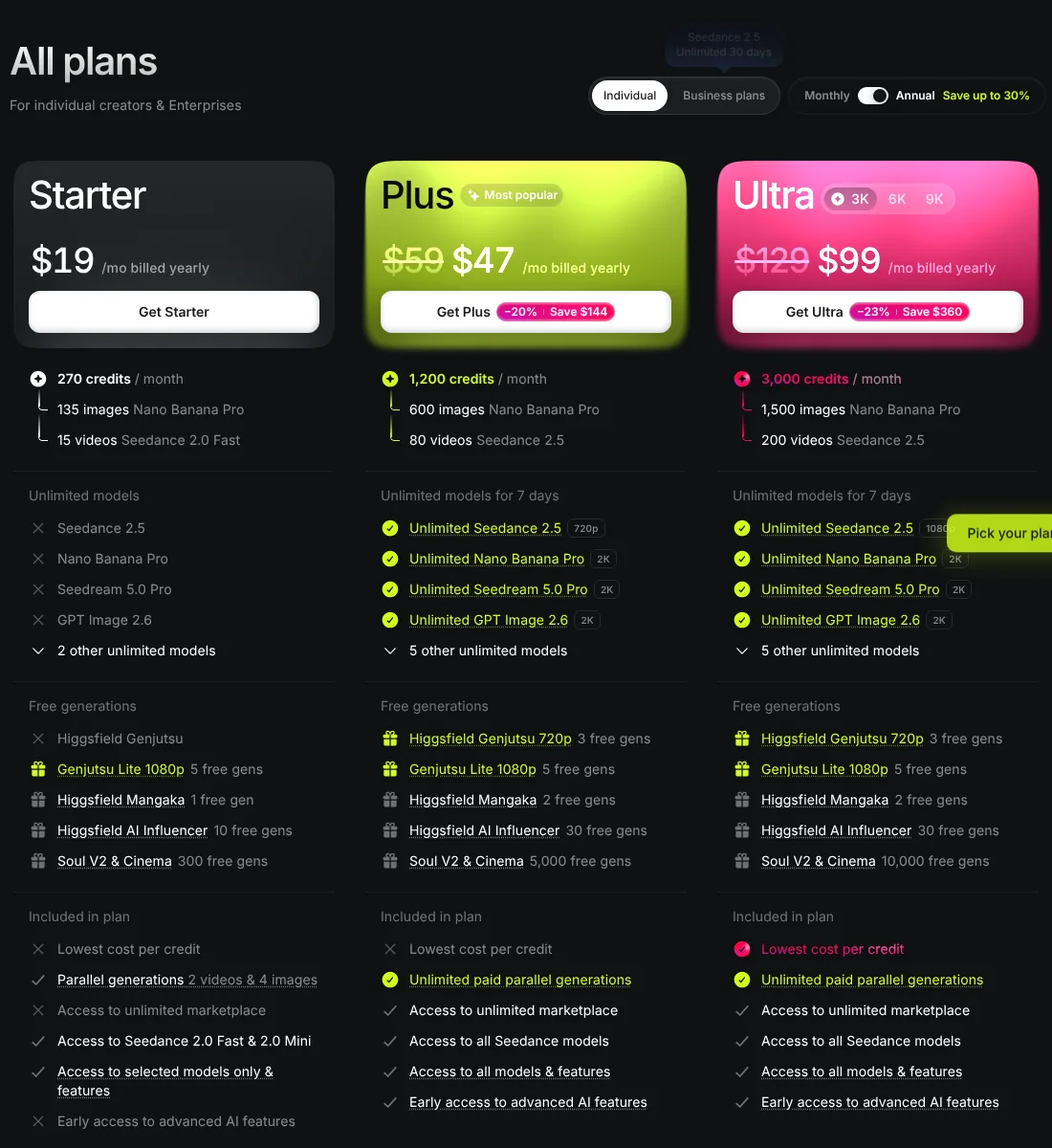
Here is what typical requests cost. The first two rows come from my own log on the Creator plan, 5 Nov 2026. The video rows come from Higgsfield’s Claude video guide, checked the same day.
| What you type in Claude | Tool it calls | Credits |
|---|---|---|
| “Remove the background from this photo” | remove_background | 1 credit (my log) |
| “Make a 16:9 image of a finished kitchen with Nano Banana 2.1” | generate_image | 3 credits (my log) |
| “How many Higgsfield credits do I have left?” | balance | Read-only check, not a generation |
| “10 second 720p video with Seedance 2.5” | generate_video | 70 credits (Higgsfield) |
| Same video at 1080p | generate_video | 160 credits (Higgsfield) |
| “Upscale this image” | upscale_image | Not shown in advance (Higgsfield) |
| “Show me presets for product ads, then run one” | get_presets, execute_preset | Varies by preset, ask first |
Higgsfield’s guide converts credits to dollars at “$49 for 1,000 credits”, which puts the 70 credit video at about $3.43 and the 160 credit version at about $7.84. Your real rate depends on your plan. Video is where the credits go: one 1080p Seedance clip costs the same as 160 background removals at my rate.
Warning: Higgsfield says the connector has no built-in spending limit, and upscaling does not show its cost in advance. Ask for the price first, and check
balanceafter a batch.
Example requests to try
Paste these into a Claude chat with the Higgsfield connector switched on. The first line sets a spending rule for the whole conversation.
Use Higgsfield for everything in this chat. Before you generate anything, tell me the model, the settings and the credit cost, and wait for me to say yes.

1. Check my Higgsfield credit balance.
2. Remove the background from the photo I upload, keep the full product, export as PNG.
3. Generate 2 images with Nano Banana 2.1: a modern kitchen extension at golden hour, wide angle, 16:9, no people, no text.
4. Show me 5 presets that work for a short product ad, with the credit cost of each. Do not run any yet.
5. When we are done, show my balance again and list what this chat spent.
Higgsfield MCP vs Canva MCP
Canva runs its own MCP connector, and people often search for both. They do different jobs. Facts below are from Canva’s connector help page and Higgsfield’s help center, checked 5 Nov 2026.
| Higgsfield MCP | Canva MCP | |
|---|---|---|
| Main job | Generate AI images and video, edit images | Create, search, autofill and export Canva designs |
| Account needed | Active paid Higgsfield subscription | Open to all Canva accounts, including Free; some actions need a paid plan |
| How to add it in Claude | Custom connector with Higgsfield’s URL | Pick Canva from Claude’s connectors list |
| Assistants listed | Claude, Claude Code, ChatGPT, Cursor and other MCP clients | ChatGPT, Claude, Gemini, Microsoft Copilot |
| Cost per action | Credits on every generation | No per-action price on the help page; some actions need a paid Canva plan |
My rule of thumb: Higgsfield makes the raw image or clip, Canva turns it into a branded post or flyer. With both connected, one Claude chat can do both.
Higgsfield MCP vs the Higgsfield API
MCP is for people working in a chat. The Higgsfield API is for developers building their own apps, with documentation at docs.higgsfield.ai and keys managed in Higgsfield Cloud. If you just want images and videos from Claude, you do not need the API or a key.
Problems and fixes
From Higgsfield’s troubleshooting section, checked 5 Nov 2026:
- “Authorization with the MCP server failed”: the token expired. Disconnect Higgsfield in Connectors, then reconnect and authorize again.
- Connected, but Claude ignores Higgsfield: start a new chat, mention Higgsfield by name, and check the connector toggle is on.
- Credits gone but no result: wait up to 60 seconds, check Manage Account > Usage, then contact Higgsfield support with the generation ID and time.
If you run a business and want the bigger picture of where Claude fits beyond image work, read my guide to Claude for small business.
Questions people ask
01Can I use Higgsfield MCP for free?
No. Higgsfield's help center says an active paid subscription is required to connect an AI agent, and that every generation through a connected agent deducts credits, regardless of your plan. Unlimited model access and free generations only apply on higgsfield.ai itself, not through MCP. On the Claude side, the Free plan does allow one custom connector, so you do not need to pay for Claude to try it.
02Which AI supports MCP?
MCP (Model Context Protocol) is an open standard that Anthropic introduced in November 2024. For Higgsfield specifically, its docs list Claude (web and desktop), Claude Code, ChatGPT, Cursor, OpenClaw and Hermes, and say any MCP-compatible client can add the server URL in its settings. Canva's own MCP connector lists ChatGPT, Claude, Gemini and Microsoft Copilot.
03Does Higgsfield have an API?
Yes. Higgsfield has a developer API documented at docs.higgsfield.ai, with keys managed in the Higgsfield Cloud dashboard and an official Python client called higgsfield-client. You do not need it for MCP: the MCP connector signs in with your normal Higgsfield account and needs no API key.
04How much time does Higgsfield take?
It depends on the model and on whether you ask for an image or a video, and Higgsfield does not publish a standard time. Its troubleshooting advice is that if a finished generation does not appear in chat, wait up to 60 seconds, then check Manage Account > Usage to confirm it ran.
05Is it safe to give Claude access to my Higgsfield account?
Anthropic warns that custom connectors are not verified by Anthropic, so only connect servers from companies you trust and review the permissions you approve when you sign in. The real risk with Higgsfield is spending: the connector can use credits, so ask for the cost before each generation and do not click Allow always on tools that spend money unless you are happy for them to run unsupervised.
06How do I disconnect Higgsfield from Claude?
Go to Settings (Customize) > Connectors > Higgsfield and click Disconnect. Higgsfield also recommends this if you see the error "Authorization with the MCP server failed", which means the token expired: disconnect, then reconnect and authorize again.