Higgsfield AI review
- Type
- Review
- Tested / updated
- Nov 5, 2026First published. Credit costs taken from my own Higgsfield transaction log; plan prices checked against Higgsfield's pricing guide and three October 2026 price checks. Full history
- Read
- 10 min
- Written by
- Max Panych

Higgsfield AI is an all-in-one AI image and video studio that puts models like Nano Banana, GPT Image, Seedance and Kling behind one credit balance. I use it every day on the Creator plan for my businesses and Instagram, so this review is built on my own transaction log, part of my AI tool reviews.
I may earn a commission if you buy through links on this page, at no extra cost to you. It never changes my verdict. How I make money
maxpanychHiggsfield AI
ReviewOn this page18 sections
- Verdict
- How I tested it
- What is Higgsfield AI?
- How much do Higgsfield AI images and videos cost in credits?
- Is Higgsfield AI worth it?
- How does Higgsfield handle failed jobs and refunds?
- Is Higgsfield AI a scam? What reviews say
- Can you use Higgsfield AI inside Claude?
- How much does Higgsfield AI cost?
- Is there any AI better than Higgsfield?
- Who should use Higgsfield AI?
- Scores
- Plan calculator
- Pros and cons
- Alternatives
- Higgsfield AI reviews from real users
- FAQ
- Final verdict
My verdict on Higgsfield AI
Higgsfield AI is the most convenient way I know to use the top image and video models from one account. Images are cheap, most cost me 0.25 to 4 credits, and its own Soul V2 images were almost free on my plan. Video is where credits go: a Seedance 2.5 clip cost me 28 to 38 credits. Watch the billing rules, because subscription credits do not roll over.
- Best for
- Creators and small businesses who post AI images and short video clips every week and want every major model in one place.
- Skip it if
- Long-form video, anyone who wants a flat monthly price with no credit maths, or people who use AI video once in a while.
- Price from
- $19/mo
- Free plan
- Free tier with a few models, no credits
- Starter plan a month, 270 credits (Oct 2026)
- $19
- credits for my cheapest GPT Image 2.6 job
- 0.25
- credits per Seedance 2.5 clip in my log
- 28 to 38
- credits for one Genjutsu motion transfer video
- 98
- before top-up credits expire
- 90 days
- Trustpilot score from 5,324 reviews
- 4.0
How I tested it
I use Higgsfield every day on the Creator plan to make AI images and short videos for my businesses and Instagram, on the website and through the Higgsfield MCP inside Claude. The credit costs in this review come from my own transaction log for the two days before publishing, 3 to 5 Nov 2026.
- Plan
- Creator
Higgsfield AI is worth it if you make AI images and short video clips every week. I use it daily on the Creator plan for my businesses and Instagram. Images cost me almost nothing, while video clips cost 16 to 38 credits each, so the plan you need depends on how much video you make.
This review is built on my own transaction log, not a free trial. I pulled every job from the two days before publishing and wrote down what each model actually charged. That is the number most Higgsfield reviews skip, and it is the one that decides your bill. More tools I have paid for are on my AI tool reviews page.
I picked Higgsfield because I was tired of paying for separate image and video tools. For Instagram I reach for Nano Banana and Seedance most, with GPT Image when a post needs clean text on the image.
What is Higgsfield AI?
Higgsfield AI is a web app that gives you many AI image and video models behind one login and one credit balance. Instead of paying separately for Nano Banana, GPT Image, Seedream, Seedance and Kling, you pay Higgsfield and spend credits on whichever model fits the job. It also has its own models, like Higgsfield Soul for images, and its own tools, like Genjutsu motion transfer and a background remover.
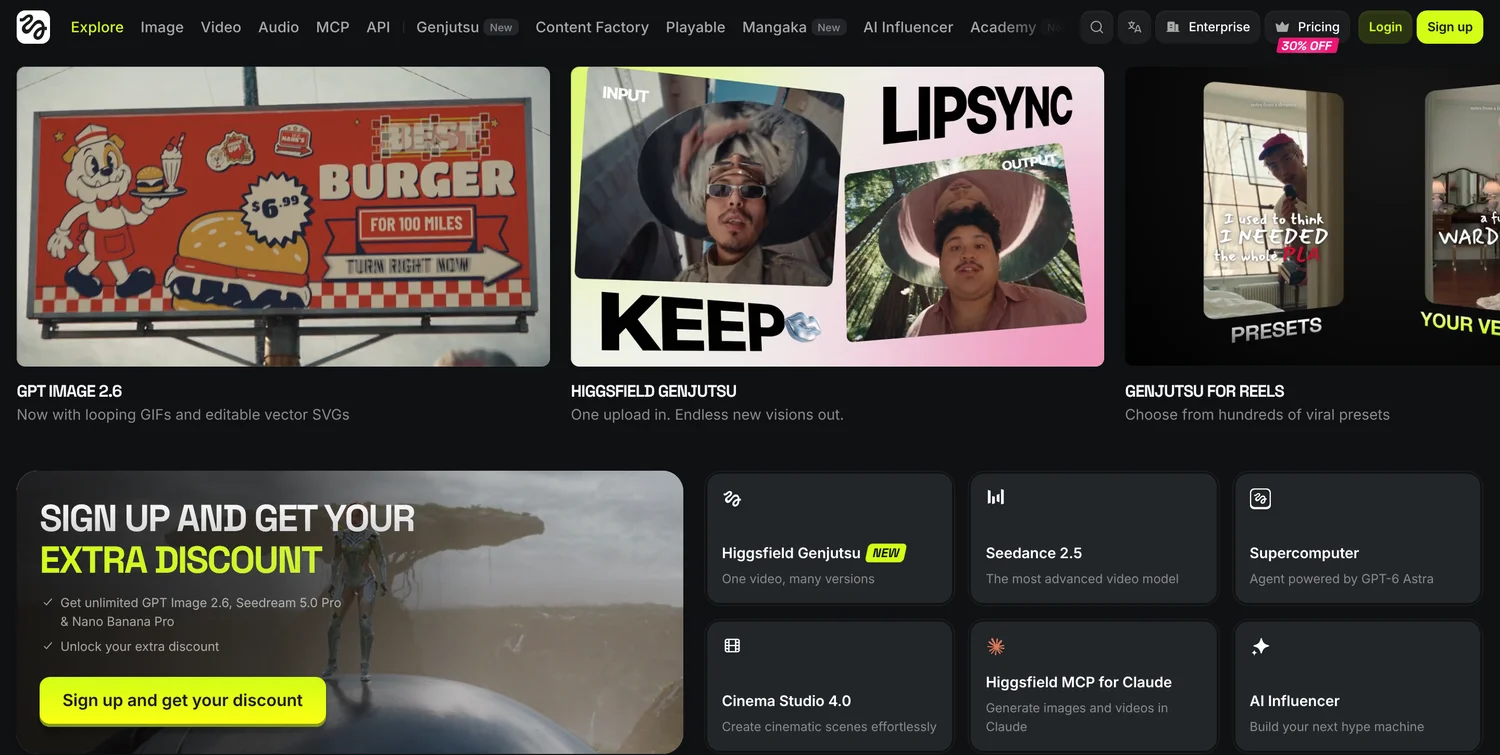
Every job costs credits, and the cost depends on the model, the resolution and the length. Higgsfield shows the cost before you generate, so you can see what a job will take from your balance.
In my log from 3 to 5 Nov 2026 I used ten different models and tools, all from the same balance. That range is the main reason I pay for it.
How much do Higgsfield AI images and videos cost in credits?
Here is what I actually paid per job, straight from my Higgsfield transaction log. The dollar column uses 5 cents a credit, the auto-refill rate shown in my account on 5 Nov 2026 (20 credits per $1), so you can turn credits into money.
| Model or tool | Type | Credits per job (my log) | About in dollars |
|---|---|---|---|
| Higgsfield Soul V2 | Image | 0 to 0.12 | Free to under 1 cent |
| GPT Image 2.6 | Image | 0.25 to 4.25 | 1 to 21 cents |
| Nano Banana Pro | Image | 2 to 4 | 10 to 20 cents |
| Seedream 5.0 Pro | Image | 2.5 | 13 cents |
| Nano Banana 2.1 | Image | 3 | 15 cents |
| GPT Image 2.0 | Image | 11 | 55 cents |
| Image Background Remover | Edit | 1 | 5 cents |
| Kling 4.0 | Video clip | 16 | 80 cents |
| Seedance 2.5 | Video clip | 28 to 38 | $1.40 to $1.90 |
| Genjutsu Motion Transfer | Video | 98 (one video) | $4.90 |
Two things stand out. First, images are cheap. Most image jobs in my log cost 0.25 to 4 credits, and Soul V2 images were mostly free on my plan. Higgsfield’s own blog post on credits and Unlimited says paid plans include free generation pools for Soul V2 and Soul Cinema, which matches what I see.
Second, video is where the credits go. One Seedance 2.5 clip at 28 to 38 credits costs as much as ten or more Nano Banana images. One Genjutsu motion transfer video cost 98 credits, about the same as 30 Nano Banana 2.1 images.
Credits for one job on Higgsfield AI, image vs video
- Nano Banana 2.1 image3 credits
- Kling 4.0 clip16 credits
- Seedance 2.5 clip28 to 38 credits
- Genjutsu motion transfer98 credits
Max’s take: Look at your transactions page after your first week. My images barely moved my balance. My Seedance clips and one motion transfer did. That tells you which plan you need far better than the pricing page does.
If you want the plan-by-plan numbers, my Higgsfield AI pricing guide has every plan, top-up pack and a credit calculator.
Is Higgsfield AI worth it?
For my use, yes. I make AI images and short clips for my businesses and Instagram every day, and having every major model in one place saves me from juggling separate subscriptions. The credit costs above are low for images and reasonable for short clips.
It is less of a deal if you mostly make video. On Starter, which has 270 credits a month according to Higgsfield’s pricing guide in October 2026, you get about seven to nine Seedance 2.5 clips at my rate of 28 to 38 credits each. If video is your main job, you will want Plus (1,200 credits) or Ultra (3,000 credits), or a cheaper single-model plan from Kling.
Monthly credits on each Higgsfield AI plan
- Starter, $19270 credits, about 7 to 9 Seedance 2.5 clips
- Plus, $591,200 credits
- Ultra, $1293,000 credits
My score is 4.3 out of 5. Output quality and model range pull it up. Billing rules and video credit costs pull it down.
On quality, most of my Nano Banana and GPT Image results go out on Instagram with light edits or none, and the Seedance clips work as short Reels. I still re-roll a clip now and then when motion looks off, which is where the automatic refunds and the low image costs help.
How does Higgsfield handle failed jobs and refunds?
Failed jobs were refunded to my balance automatically. I saw two refunds in my log, one of 3 credits and one of 56 credits, without contacting anyone. That matters on video, because a 56 credit failure is real money.
Refunds for the subscription itself are stricter. Higgsfield’s help center page on plans says a refund may be possible within 7 days of your first purchase if no credits were used, with a service fee of up to 6%. Renewals are non-refundable. The same page says subscription credits reset each billing cycle and do not roll over, except on Enterprise.
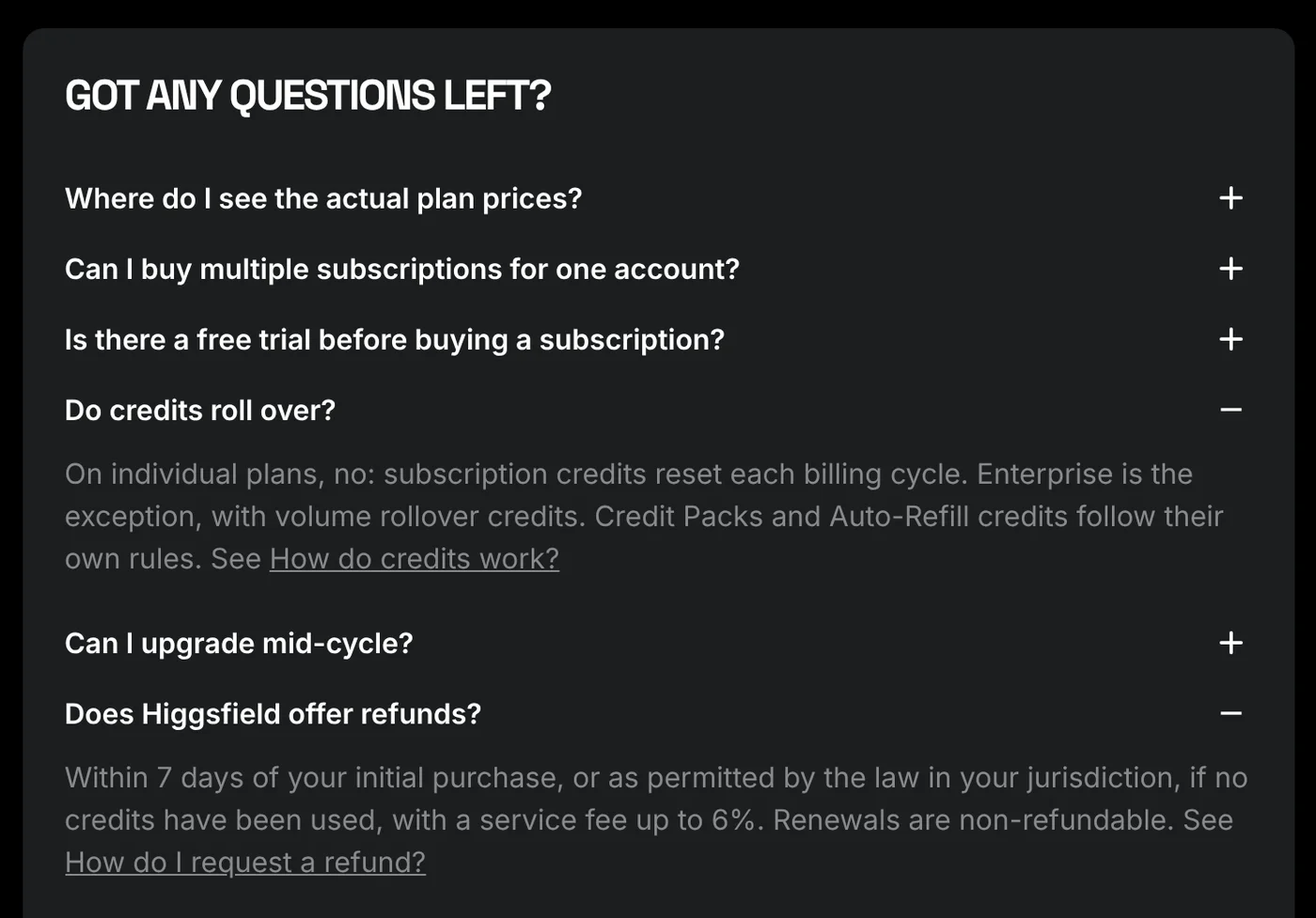
Credit packs and auto-refill credits are different. My account’s billing panel says one-time top-up credits stay valid for 90 days, and Higgsfield’s pricing guide says the same.
Max’s take: Put your renewal date in your calendar and use your monthly credits before it, because they will not carry over.
Is Higgsfield AI a scam? What reviews say
No, it is not a scam, but the reviews explain why people ask. On Trustpilot, Higgsfield had a TrustScore of 4.0 from 5,324 reviews when I checked on 5 Nov 2026. That is a solid score for an AI tool with this many paying users.
The 5 star reviews praise having every tool and model in one place. The low ones fall into three groups:
- Renewals and refunds. Reviewers say they were auto-renewed after a trial or charged for an annual plan they did not mean to buy, and that refunds were refused.
- Unlimited queues. One Ultra user wrote that Unlimited generations sat in processing for over an hour, while paid clips finished in two to three minutes. Higgsfield’s blog says Unlimited runs in the standard queue and only on higgsfield.ai.
- Prompt drift and credit cost on long clips. One user wrote that some 30-second generations cost 480 credits each.
One reviewer said failed generations were not refunded. In my account they were, automatically, and Higgsfield replied to that review saying the same. The quotes are below, word for word, with links.
Can you use Higgsfield AI inside Claude?
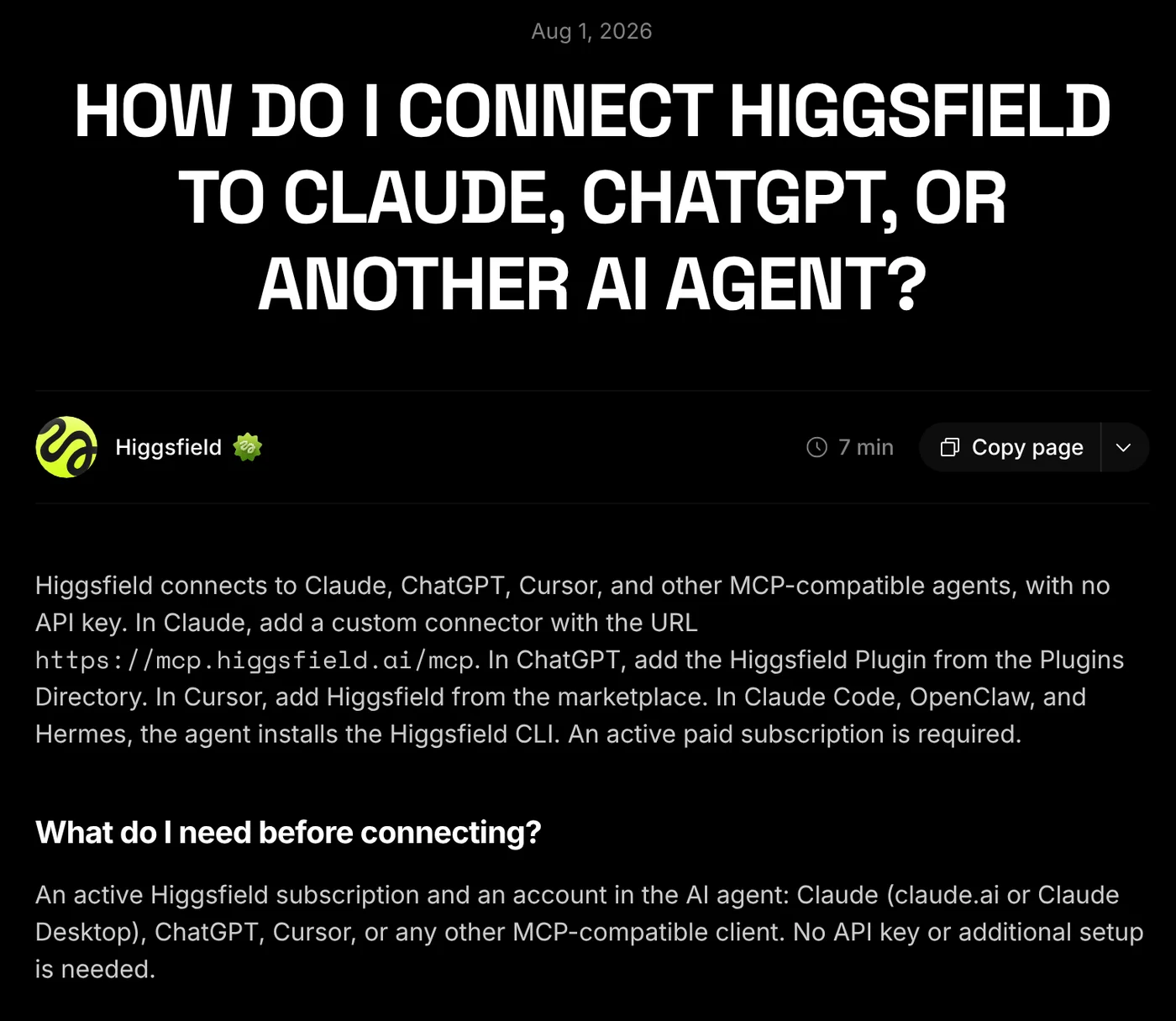
Yes, and it is one of the main ways I use it. Higgsfield has an official MCP connector, and Higgsfield’s guide to connecting Claude or ChatGPT says the only official connector URL is mcp.higgsfield.ai/mcp. You add it as a custom connector, sign in to Higgsfield, and no API key is needed.
From Claude chat I generate images, remove backgrounds and check my credit balance without opening the Higgsfield site. Jobs run on the same credit balance as the website.
Two limits to know. The same help page says MCP needs an active paid Higgsfield plan. And Unlimited offers do not cover MCP: Higgsfield’s blog says MCP, CLI and Canvas jobs always use credits.
Max’s take: The MCP lets me make social images while I write captions in the same chat. If you already work in Claude, it is worth setting up on day one. My Higgsfield MCP guide walks through it.
How much does Higgsfield AI cost?
Higgsfield sells monthly credit plans. In October 2026, Higgsfield’s pricing guide and three independent checks listed:
- Free tier: a small set of models, no credits.
- Starter: $19 a month for 270 credits, with no annual discount.
- Plus: $59 a month, or $47 a month billed yearly, for 1,200 credits.
- Ultra: $129 a month, or $99 a month billed yearly, for 3,000 credits, with bigger 6,000 and 9,000 credit sizes.
- Team, Scale and Enterprise: per seat or custom pricing.
I checked the Higgsfield pricing page on 5 Nov 2026 and it showed the same plans. Prices move, so check it before you buy: Higgsfield’s own blog from September 2026 listed Starter at $15 for 200 credits and Plus at $49 for 1,000 credits.
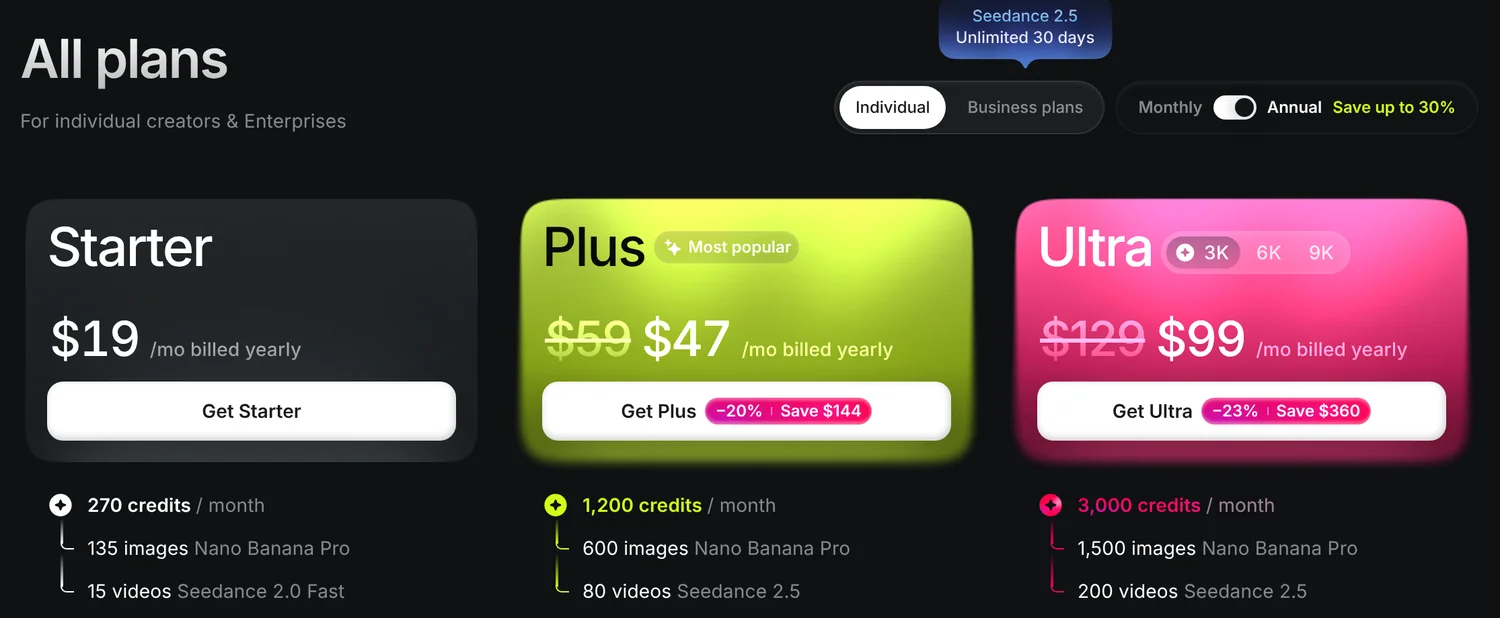
My Creator plan is not on the public pricing page today.
I signed up on Creator before the current plan line-up, and I have kept it because it covers my daily images and a handful of clips a week. If you are starting today, you will choose from Starter, Plus and Ultra instead.
Is there any AI better than Higgsfield?
Better at one thing, yes. Better as an all-in-one, not that I have found. Here is how the main alternatives compare on price, each checked on the vendor’s own page on 5 Nov 2026.
| Tool | Cheapest paid plan | Free option | Best for |
|---|---|---|---|
| Higgsfield AI | $19/mo, 270 credits (Oct 2026) | Free tier, no credits | Many models in one place |
| Runway | $15/mo, or $12 billed yearly, 625 credits | 125 one-time credits | Generation plus editing |
| Kling AI | $6.99 first month, then $8.80/mo, 660 credits | See kling.ai | Kling models only |
| Pika | $10/mo, or $8 billed yearly, 900 credits | Free plan, buy credit packs | Quick effect clips |
| Midjourney | $10/mo, or $8 billed yearly | None listed | Artistic still images |
Choose Kling if Kling is the only video model you use. Its membership page is cheaper than any Higgsfield plan. My Kling AI pricing guide covers the tiers.
Choose Runway if you also want to edit and extend clips in the same app. Its pricing page starts at $15 a month.
Choose Pika for cheap, playful clips. Its pricing page starts at $10 a month for 900 credits.
Choose Midjourney for still images with a strong style. See my Midjourney pricing breakdown.
If you have no budget at all, start with my list of the Best free AI video generator options.
Who should use Higgsfield AI?
Use it if you are a creator, marketer or small business owner who posts AI images and short clips every week and wants the newest models without five subscriptions. It is also a strong pick if you work in Claude, because the MCP is official and it works.
Skip it if you make long-form video, you use one model only, or you want a flat price with no credit maths. My AI video hub covers other routes.
Pick a plan like this. Count your clips, not your images. Multiply your clips per month by about 30 credits for Seedance or 16 for Kling, add a little for images, and choose the plan that covers it. The calculator below does the maths.
How Higgsfield AI scored
The overall score is a weighted average of the six scores below. Output quality and model range count most, because that is why people pay for Higgsfield. Value counts next, using real credit costs from my log.
- Output quality30% of scoreI use the images and clips every day for my businesses and Instagram.4.5/50.2 above overall
What I measured
Whether the images and clips are good enough to post without edits, across the models I use most: Nano Banana, GPT Image, Seedream, Soul V2, Seedance and Kling.
- Model range20% of scoreEvery major image and video model in one account.4.8/50.5 above overall
What I measured
How many current top models are available behind one login and one balance, compared with buying each one separately.
- Ease of use15% of scoreSimple to generate, but the menu of models and apps is long.4.2/50.1 below overall
What I measured
How quickly you get from an idea to a finished image or clip, and how easy it is to see what a job will cost.
- Value for money15% of scoreCheap for images, costly for video and motion transfer.3.8/50.5 below overall
What I measured
Real credit cost per job from my transaction log, turned into dollars at the 5 cents a credit auto-refill rate, against the alternatives.
- Billing and support10% of scoreAuto refunds on failed jobs, but strict renewal rules and many billing complaints.3.2/51.1 below overall
What I measured
Failed job refunds in my log, Higgsfield's refund and rollover rules, and the pattern of complaints on Trustpilot.
- Integrations (MCP, API)10% of scoreI generate and check credits from Claude chat.4.6/50.3 above overall
What I measured
Whether Higgsfield works from the tools I already use: the official MCP connector in Claude, the CLI and the API.
The overall score is the weighted average of these scores. Green is 4 and up, yellow 3 to 4, salmon under 3. The black marker is the overall score (4.3). How I test tools.
Which Higgsfield AI plan do you need?
Plan prices and credits as reported in October 2026 by Higgsfield's pricing guide and independent checks, monthly billing. Credits per clip from my own log: Seedance 2.5 cost me 28 to 38 credits a clip, Kling 4.0 cost 16. Images cost far less, 0.25 to 11 credits each, so add a few clips' worth if you also make images.
What I liked, what I didn't
Pros5
- One account and one credit balance for Nano Banana, GPT Image, Seedream, Seedance, Kling and Higgsfield's own Soul models
- Images are cheap: 0.25 to 4 credits for most jobs in my log
- Higgsfield Soul V2 images cost me 0 to 0.12 credits, mostly free on my plan
- Failed jobs were refunded to my balance automatically (I saw refunds of 3 and 56 credits)
- Works inside Claude through the official MCP connector, so I can generate and check credits from chat
Cons5
- Credit cost swings a lot by model: from 0.25 credits for an image to 98 for one motion transfer video
- Subscription credits reset every billing cycle and do not roll over
- Top-up and auto-refill credits expire after 90 days
- Plan names and prices changed between September and October 2026, so old guides are often wrong
- Many 1 and 2 star Trustpilot reviews are about renewals, refunds and slow Unlimited queues
Higgsfield AI alternatives
Cheapest paid plan per month
What the cheapest paid plan costs on Higgsfield AI and the main alternatives.
- KKling AICheapest paid plan$8.8/mo$4 below average
- PPikabilled yearly$10/mo$3 below average
- MMidjourneybilled yearly$10/mo$3 below average
- RRunwaybilled yearly$15/mo$2 above average
- Higgsfield AIThis review$19/mo$6 above average
Starting price of the first paid plan, checked on each vendor's pricing page. The black marker on each bar is the average of these 5 tools ($13).
Higgsfield AI reviews from real users
My log shows what things cost, so I also checked what other buyers say. On Higgsfield's Trustpilot page it had a TrustScore of 4.0 from 5,324 reviews when I checked on 5 Nov 2026. Happy users praise having every model in one place. Unhappy ones mostly write about renewals, refunds and slow Unlimited queues. I could not load the Reddit and G2 pages for quotes, so every quote below is from Trustpilot, word for word. If you are comparing other AI tools for your business, my Base44 review is next.
“I think it's the best all-in-one in the AI era. The support member also are great”
“Lately, though, many generations don't follow my prompts, even with help from experienced directors. ... some 30-second generations cost 480 credits each, which adds up fast”
“I signed up for the new 7-day Unlimited package with an Ultra subscription, and my generations have been stuck in processing for over an hour. When I pay for individual clips, they finish in two to three minutes.”
“when you purchase the credits from them any failed generation you will not be refunded they do not refund. ... so just be aware and be careful”
“The tools themselves are good, but be careful with the trial auto-renewal.”
Questions people ask
01Is there any AI better than Higgsfield?
Not as an all-in-one, in my experience. Higgsfield gives you Nano Banana, GPT Image, Seedream, Seedance, Kling and its own Soul models from one balance. If you only use one model, buying it direct can be cheaper: Kling's Standard plan is $8.80 a month after a $6.99 first month, and Midjourney starts at $10 a month (both checked 5 Nov 2026).
02What is considered the best AI video maker?
There is no single winner. For short social clips, Seedance and Kling are the models I use most, and Higgsfield is how I reach them. Runway suits people who also want editing tools, and Pika suits quick effect clips. For a wider look, see my AI video hub.
03Is Higgsfield AI legit?
Yes. It is a real paid product that I use daily, and failed jobs in my account were refunded automatically (3 and 56 credits). The complaints you see are mostly about billing: subscription credits do not roll over, renewals are non-refundable, and refunds are only possible within 7 days of a first purchase if no credits were used.
04Does Higgsfield refund credits for failed generations?
In my account, yes, automatically. I saw failed jobs refunded as 3 and 56 credits without asking. One Trustpilot reviewer says she was not refunded, and Higgsfield replied publicly that failed generation credits are returned to the account automatically.
05Can I use Higgsfield inside Claude?
Yes. Higgsfield has an official MCP connector at mcp.higgsfield.ai/mcp. I use it in Claude to generate images, remove backgrounds and check my credits from chat. It needs a paid Higgsfield plan, and jobs run on your normal credits, not Unlimited access.
06Is Ryze AI a legitimate platform?
I have not used Ryze AI, so I cannot vouch for it either way. My rule for any AI tool: check its Trustpilot pattern, read the refund policy before paying, and start on monthly billing so you are not locked in.
07Is Topaz Video AI any good?
I have not tested Topaz Video AI, so I will not rate it. It is a different kind of tool: it upscales and cleans up existing footage rather than generating new clips, which is what I use Higgsfield for.
Should you use Higgsfield AI?
Overall score
4.3/5Based on my own testing
Would I recommend it?
Yes
If you post AI images and short clips every week and want the best models without five subscriptions, Higgsfield AI is worth paying for. Start on a monthly plan, generate for a week, then look at your transactions page to see which models eat your credits. Images will barely move the balance. Video and motion transfer will. Pick the plan from that number, not from the pricing page headline.
- Best for
- Creators and small businesses who post AI images and short video clips every week and want every major model in one place.
- Skip it if
- Long-form video, anyone who wants a flat monthly price with no credit maths, or people who use AI video once in a while.
More in AI tool reviews
Update history
- First published. Credit costs taken from my own Higgsfield transaction log; plan prices checked against Higgsfield's pricing guide and three October 2026 price checks.