Zapier AI automation
- Type
- Guide
- Updated
- Nov 5, 2026
- Read
- 14 min
- Written by
- Max Panych

Zapier is the fastest way for a small business to put AI inside the apps it already uses. This guide covers every Zapier AI feature live today, what it really costs in tasks, five automations worth building, and a full step-by-step build of an AI lead reply. It is part of my AI automation series.
I may earn a commission if you buy through links on this page, at no extra cost to you. It never changes my verdict. How I make money
maxpanychZapier
 Guide
On this page9 sections
- Step by step
- What AI features does Zapier have today?
- How much does Zapier AI automation cost?
- What can a small business automate with Zapier AI?
- How do I connect Zapier MCP to Claude or ChatGPT?
- What are the limits and gotchas of Zapier AI?
- Zapier vs n8n vs Make for AI automation
- Is Zapier AI automation worth it for a small business?
- FAQ
- Zapier Professional, 750 tasks, billed yearly ($29.99 monthly), zapier.com/pricing 5 Nov 2026
- $19.99/mo
- tasks per AI by Zapier run on Standard, Advanced or Premium models
- 1, 3 or 5
- per Zapier MCP tool call from Claude, ChatGPT or Cursor
- 2 tasks
- Zapier account on a Professional plan or the 14-day trial
- A web form (Google Forms, Zapier Forms, Typeform or similar)
- Gmail or Google Workspace
- Slack (optional, any chat app with a Zapier action works)
- A one-page doc with your services and prices (optional, for the Advanced tier)
Start a Professional trial, not the Free plan
Zapier's help center says that on the Free plan you cannot publish a Zap with an AI by Zapier step, only preview it with the Standard tier. New accounts get a 14-day Professional trial with no credit card, per zapier.com/pricing. Use that window to build and test. After the trial, Professional is $19.99 a month billed yearly ($29.99 billed monthly) for 750 tasks.
Create a Zap with your form as the trigger
Click Create > Zap. For the trigger, pick your form app. I use Google Forms > New Form Response in this example, but Zapier Forms, Typeform or your website form plugin work the same way. Connect the account, choose the form, and click Test trigger so Zapier pulls in a real sample lead (name, email, phone, what they need). Zapier does not charge a task for checking the form for new entries.
Add an AI by Zapier step and pick the model tier on purpose
Click +, search AI by Zapier, and open the model dropdown at the bottom right of the Prompt field. New steps on paid plans default to Premium, which uses 5 tasks per run. For drafting a short reply, Standard (1 task) is usually enough. Pick Advanced (3 tasks) only if you want the step to read a knowledge source such as your services and prices doc, because Standard does not support tools or knowledge.
Write the prompt and define output fields
Type your instructions in the Prompt field and press / to insert fields from the form (name, service, message). Then open Settings > Output Fields and add four fields:
reply_subject,reply_body,lead_summaryandurgency. Named fields map cleanly into the Gmail and Slack steps. Click Preview to see the output on your sample lead, edit the prompt until the tone sounds like you, then Finish.Add Gmail > Create Draft, not Send Email
Add an action, choose Gmail > Create Draft. Map To to the lead's email, Subject to
reply_subjectand Body toreply_body. A draft means a person reads every AI reply before it goes out. Once you trust it for a month, you can switch to Send Email, but for new leads I would keep a human in the loop.Ping the team in Slack
Add Slack > Send Channel Message. Pick your sales or leads channel and write a message such as: New lead: {name}, {service}. Urgency: {urgency}. Summary: {lead_summary}. A reply draft is waiting in Gmail. Now the person who answers leads sees it on their phone within minutes.
Test, publish and check the task count
Click Test on each step, then Publish. Open Zap history after the first real lead to see what the run used. With a Standard model this Zap uses about 3 tasks per lead (AI step, Gmail, Slack). With the Premium default it would be 7. Zapier notes that full-Zap tests use tasks the same way live runs do, so do not burn your trial testing 50 times.
Zapier AI automation means putting an AI step, such as “read this lead and draft a reply”, inside a Zap that already moves data between your apps. In 2026 that runs on AI by Zapier, billed in tasks (1, 3 or 5 per run depending on the model), and you need a paid plan, from $19.99 a month billed yearly, to publish one. It is the easiest entry point into AI automation for a small business that does not want to touch code.
Zapier has changed a lot this year. Agents is being folded into AI by Zapier, AI steps moved to a model-tier task system, Zapier MCP lets Claude and ChatGPT run Zapier actions, and on December 1, 2026 new billing rules start for Next Gen Zaps. Everything below was checked on Zapier’s own pages and help center on 5 Nov 2026. I have used Zapier on and off for my projects, mostly to move form leads into CRMs and Slack, so the lead workflow below is the one I would build first.
What AI features does Zapier have today?
Zapier now sells itself as an “AI orchestration” platform. Here is what is actually live on zapier.com and in its help center as of 5 Nov 2026, and what each piece costs:
| Feature | What it does | How it is billed |
|---|---|---|
| AI by Zapier | An AI step inside a Zap: write, summarize, classify, extract. Add tools or knowledge to make it act like an agent | Tasks: 1 (Standard), 3 (Advanced), 5 (Premium) per run, plus per tool call |
| Zapier Copilot | Builds Zaps, Tables, Forms, Agents and Chatbots from a plain-English prompt, and helps troubleshoot | Included, listed on the Free plan |
| Zapier Agents | Standalone AI “teammates” at agents.zapier.com, now migrating into AI by Zapier | Separate add-on, billed in activities |
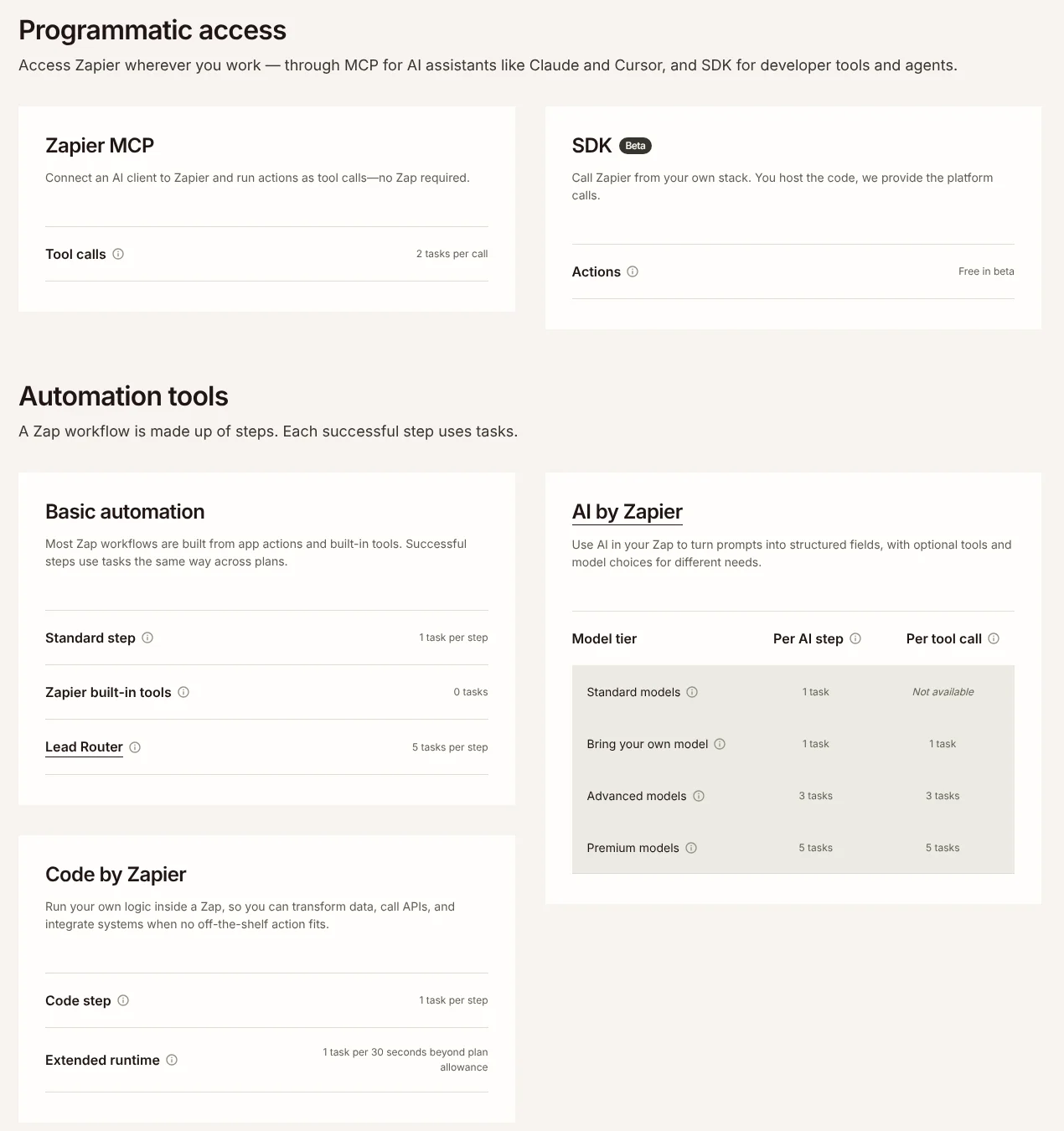
| Zapier MCP | Lets Claude, ChatGPT, Cursor and other AI clients run actions in 9,000+ apps | 2 tasks per tool call, every plan |
| Chatbots | No-code website chatbot trained on your FAQs and docs, can collect leads | Separate add-on, free tier with 2 chatbots |
| Tables (AI fields) | Built-in database. AI fields run a prompt on every row, AI enrichment fills columns | Tables steps use 0 tasks; AI fields listed on Professional |
| Canvas | AI-assisted diagrams of your processes and automations | Included with your Zapier plan |
| Next Gen Zaps | Zaps your AI client builds through MCP (early access) | Free to run until Dec 1, 2026, then tasks |
Sources: zapier.com/pricing, task usage rates, Zapier’s AI tools guide, Canvas, Chatbots, all checked 5 Nov 2026.
AI by Zapier: the step that does the work
AI by Zapier is the feature most people mean when they search for Zapier AI. Zapier’s help article lists five supported providers: OpenAI, Anthropic, Google Gemini, Azure OpenAI and Amazon Bedrock. You can use Zapier’s built-in connection or connect your own API key. You write a prompt, insert fields from earlier steps, and define named output fields that later steps can use. You can also attach up to 20 knowledge sources, such as Google Docs, Notion pages or uploaded PDFs, and give the step app actions as tools so it can look things up or act on its own.
When you pick Auto inside a tier, Zapier’s model tier article says it uses Claude 4.5 Haiku for Advanced and Claude 4.6 Sonnet for Premium.
Zapier Agents: still live, but moving
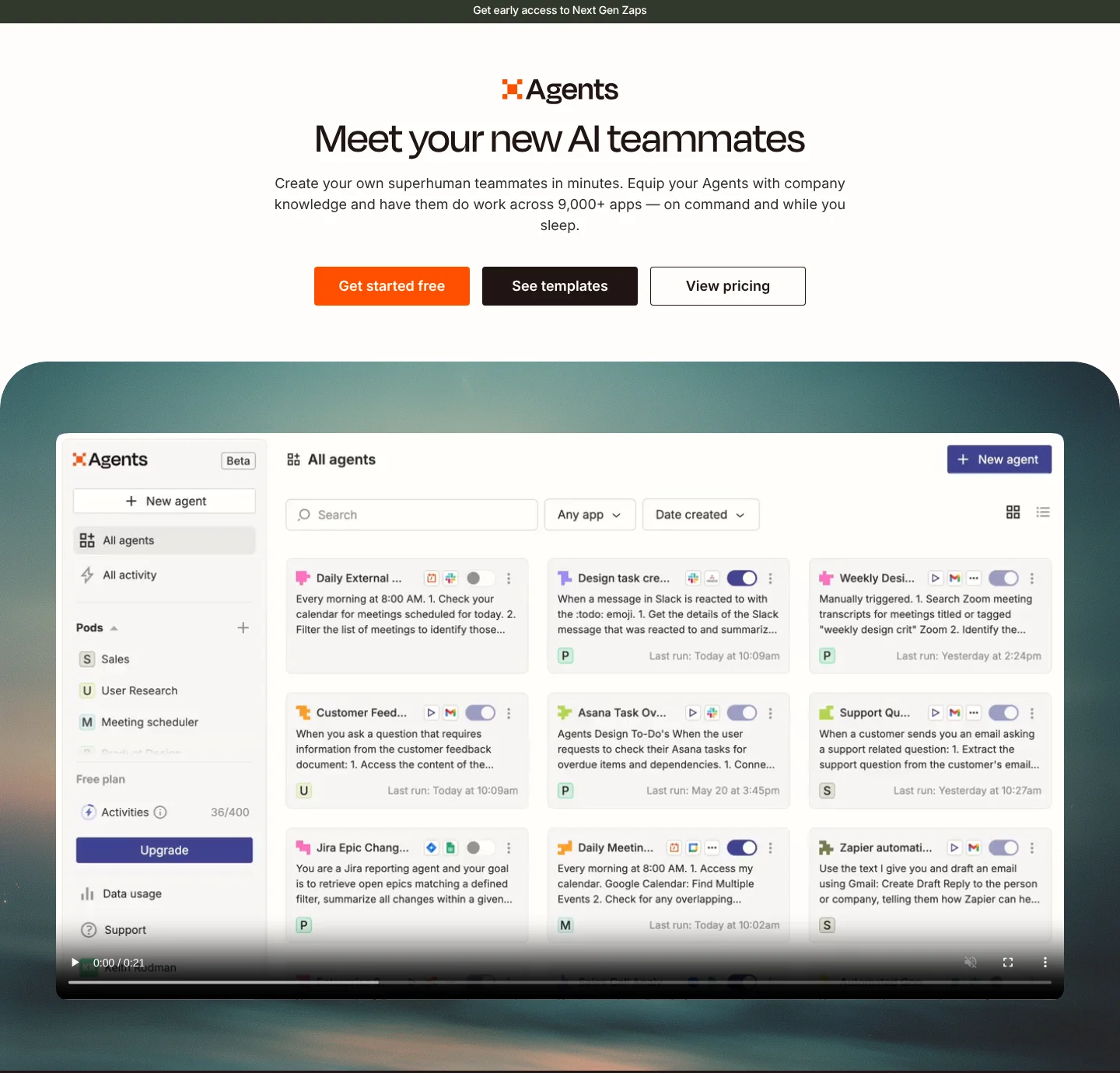
Zapier Agents is still on sale, but Zapier’s help center has a page called Migrating from Agents to AI by Zapier. It says each agent converts into a Zap with a trigger and one AI by Zapier step, and that Zapier “has not set a date to turn off Agents yet” and will email users before anything changes. If you are starting today, I would build in AI by Zapier, not in Agents. That way you are not migrating in six months, and your AI runs show up in Zap history with everything else.
Copilot, Canvas, Tables and Chatbots
Copilot lives on the Zapier home page and inside every product. Zapier’s Copilot guide says you can describe a system in plain English (or by voice) and it drafts the Zap, form or table, then asks you to confirm each step. Canvas maps your processes as diagrams and is “already included with your existing Zapier plan”. Tables is included on every plan, and its AI fields can draft text for every row, for example an intro email per lead. Chatbots gives you a website chatbot; its free tier lists OpenAI’s GPT-3.5 model, and paid tiers let you connect your own API key for more models.
How much does Zapier AI automation cost?
Zapier’s main plans now bill everything in tasks from one shared pool: Zap steps, AI steps, code, MCP and SDK. The pricing page says: “Tasks are shared across your account.” You pick a task tier on a slider, and the price changes with it.
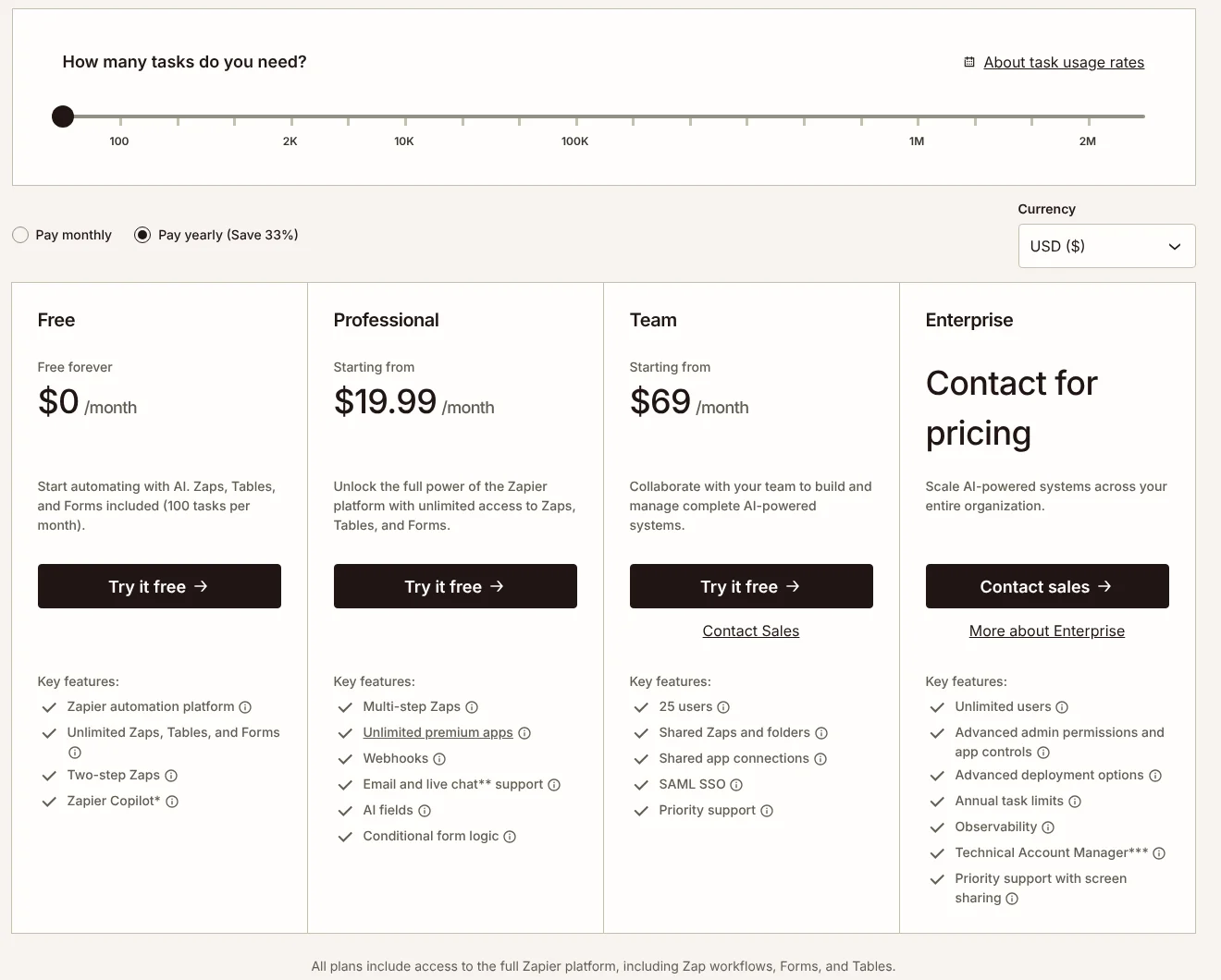
| Plan | Billed yearly | Billed monthly | Tasks included | AI automation notes |
|---|---|---|---|---|
| Free | $0 | $0 | 100 / month | Two-step Zaps, Copilot. Cannot publish a Zap with an AI by Zapier step |
| Professional | from $19.99 / month | from $29.99 / month | 750 at the starting price | Multi-step Zaps, premium apps, webhooks, AI fields |
| Team | from $69 / month | from $103.50 / month | 2,000 at the starting price | 25 users, shared Zaps and connections, SAML SSO |
| Enterprise | Contact sales | Contact sales | Custom, annual task limits | Admin controls, observability, MCP off by default |
Prices from zapier.com/pricing, USD, checked 5 Nov 2026. Yearly billing saves 33%, per the page.
The starting price only covers 750 tasks. I moved the slider through every step on 5 Nov 2026 to see how Professional scales:
Zapier Professional price by monthly task tier, billed yearly (USD per month)
- 750 tasks$19.99
- 1,500 tasks$39
- 2,000 tasks$49
- 5,000 tasks$89
- 10,000 tasks$129
- 20,000 tasks$189
If you hit your limit, Zapier’s pricing FAQ says your Zaps pause until the next period, unless you turn on pay-per-task billing, which is “charged at a higher per-task rate” than your plan’s tasks.
How AI steps use tasks
This is the part most guides get wrong, because Zapier changed it in 2026. AI by Zapier no longer costs a flat 1 task. It depends on the model tier:
| What runs | Tasks |
|---|---|
| App action step (Gmail, Slack, CRM) | 1 per step. Zapier’s FAQ says checking a trigger for new data never uses a task |
| Built-in tools: Formatter, Paths, Filters, Delay, Looping, Tables, Forms | 0 |
| AI by Zapier, Standard model (no tools) | 1 per run |
| AI by Zapier, your own API key | 1 per run, 1 per tool call (you also pay your provider) |
| AI by Zapier, Advanced model | 3 per run, 3 per tool call |
| AI by Zapier, Premium model (the default) | 5 per run, 5 per tool call |
| Zapier MCP tool call | 2 per call |
| Code step | 1 per step |
Source: zapier.com/pricing/rates, checked 5 Nov 2026. Zapier’s formula is: tasks per run = (1 × model rate) + (number of tool calls × model rate).
Warning: New AI by Zapier steps on paid plans default to the Premium (5x) tier. If you do not change it, a simple “summarize this email” step costs five times what it needs to. Check the model dropdown on every AI step you add.
Agents and Chatbots pricing
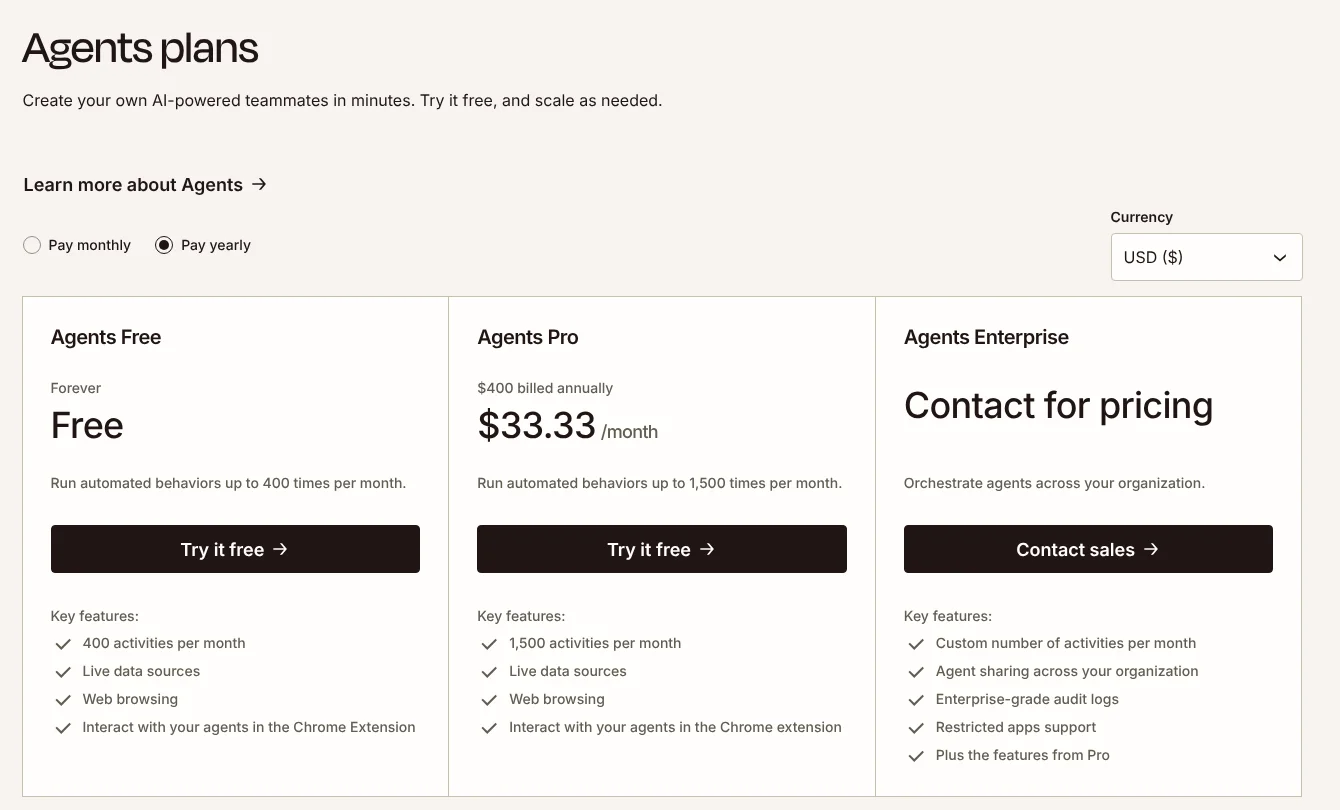
Agents and Chatbots are add-ons with their own pricing tabs on zapier.com/pricing, checked 5 Nov 2026:
| Add-on | Free | Paid tiers |
|---|---|---|
| Agents | 400 activities / month | Pro: $33.33 / month billed annually ($400 a year) or $50 billed monthly, 1,500 activities. Enterprise: contact sales |
| Chatbots | Up to 2 chatbots, GPT-3.5 | Pro: $13.33 / month billed annually ($160 a year) or $20 monthly, up to 5 chatbots, embed on your site. Advanced: $66.67 / month billed annually ($800 a year) or $100 monthly, up to 20 chatbots, remove Zapier logo |
Zapier defines an activity as an action an agent takes in a behavior or in chat, a web browse, or a knowledge lookup. For a deeper plan-by-plan breakdown, see my Zapier pricing guide.
What can a small business automate with Zapier AI?
These are five automations I would actually set up for a service business, with the task cost worked out from Zapier’s published rates. The task numbers are my estimates from those rates, not measured runs.
- New web form lead, AI drafts the reply, Gmail draft plus Slack ping. The full build is in the steps above. About 3 tasks per lead on a Standard model.
- Inbox triage. Gmail New Email trigger, an AI step that classifies the email as quote request, existing job, invoice or spam, then Paths (0 tasks) to label it, with a Slack alert only for quote requests. About 2 tasks per email, plus 1 for each alert.
- Review reply drafts. When a new review arrives, an AI step drafts a short, specific reply and Slack’s Request Approval action asks you to approve it. My how to respond to Google reviews guide has the reply rules to put in the prompt.
- Quote follow-ups. Keep open quotes in a Zapier Table (0 tasks). A scheduled Zap finds quotes older than 3 days and an AI step drafts a polite follow-up as a Gmail draft. I cover the timing in contractor estimate follow-up.
- Ask your apps from Claude. Connect Zapier MCP to Claude and ask: “Find this week’s new leads in my leads table and draft a reply to each in Gmail.” Each action Claude runs costs 2 tasks.
Tasks per lead for the lead reply Zap, by AI model tier
- Standard model3 tasks
- Own API key3 tasks
- Advanced model5 tasks
- Premium (default)7 tasks
- Advanced + 1 knowledge lookup8 tasks
Here is what that means in money. At 100 leads a month, the Standard version uses about 300 tasks, which fits the 750 task Professional tier at $19.99 a month billed yearly. Leave it on the Premium default and the same Zap uses about 700 tasks, right at the edge of that tier. The inbox triage Zap at 30 emails a day is about 900 emails and 1,800 tasks a month, which needs the 2,000 task tier at $49 a month billed yearly.
The prompt I would use for the lead reply
Paste this into the AI by Zapier Prompt field, then replace the bracketed parts with fields using the / key:
You are the office manager at [your business name], a [trade] company in [city].
A potential customer just filled in our website form:

Name: [name field]
Service needed: [service field]
Message: [message field]

Write a short reply email (under 120 words) that:
- thanks them by first name
- repeats back what they need in one sentence
- asks the one or two questions we need to quote (address, timing, photos)
- offers two times for a call this week
- never quotes a price

Also return:
- reply_subject: a plain subject line under 8 words
- lead_summary: one line for our Slack channel
- urgency: high, normal or low, based on their timing
If you would rather not build by hand, type something like this into the Copilot box on the Zapier home page: “When someone submits my Google Form, use AI to draft a reply in Gmail as a draft, and post a summary to my #leads Slack channel.” Copilot drafts the steps and asks you to confirm each one. Check the AI step’s model tier afterwards.
How do I connect Zapier MCP to Claude or ChatGPT?
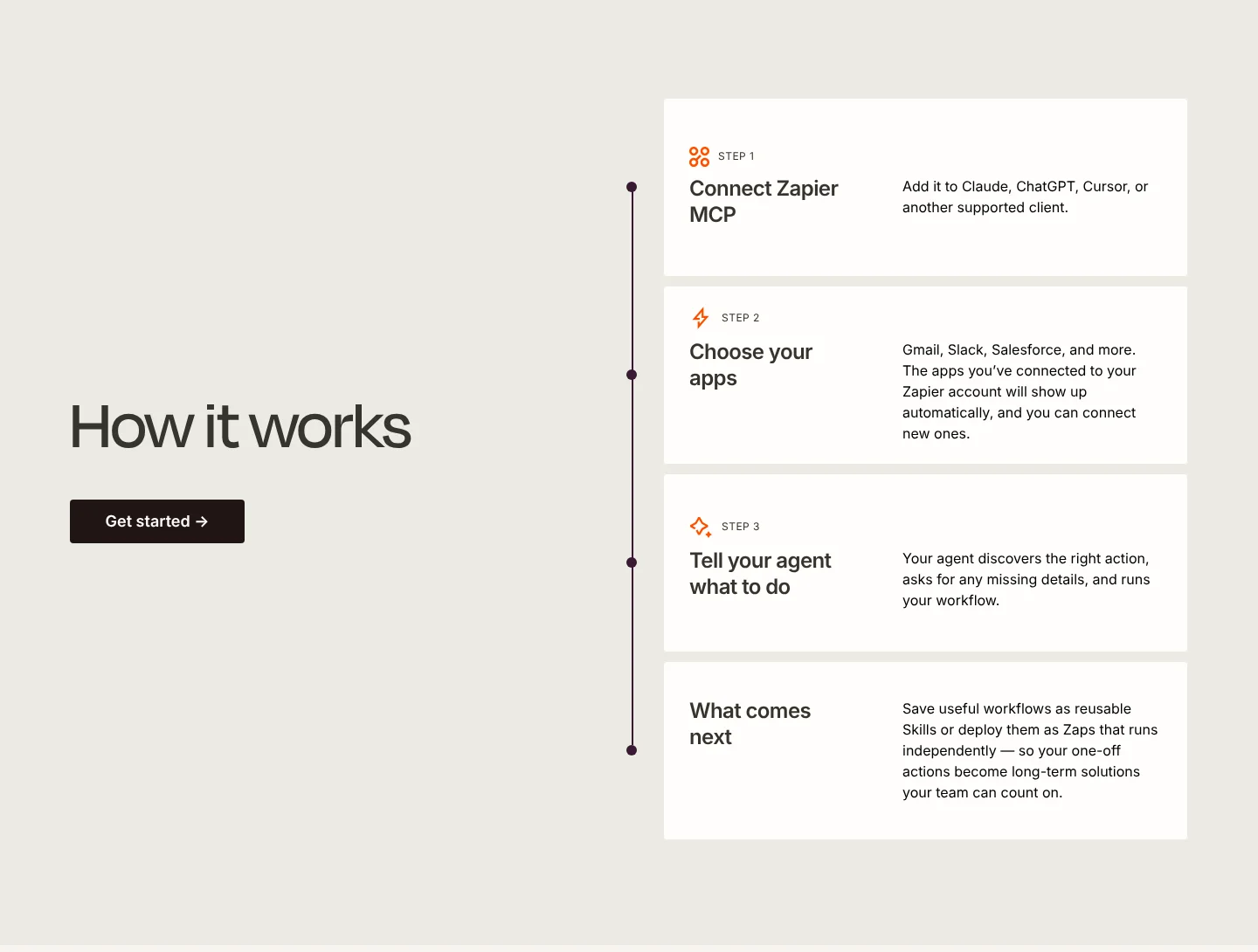
Zapier MCP flips the direction: instead of putting AI inside a Zap, you put Zapier inside your AI chat. Per Zapier’s MCP guide (updated August 2026), you open the Zapier MCP dashboard, click + New MCP Server, choose Claude or ChatGPT, add the app actions you want with + Add tool, then follow the instructions on the Connect tab. On a Claude Team or Enterprise plan, an Owner has to add it. Zapier says ChatGPT supports Zapier MCP only in Developer Mode for now. Zapier is also in Claude’s connector directory, which I cover in my Claude MCP guide.
Tip: Only switch on the actions you want the AI to run. Zapier’s own advice is to allow “draft email” but not “send email”. Every tool call costs 2 tasks, so a chat that runs 25 actions uses 50 tasks, half of a Free plan’s month.
Zapier’s MCP page says you can save a chat workflow that worked as a reusable Skill, or deploy it as a Next Gen Zap (early access). Zapier’s billing article says running Next Gen Zaps is free until 12 pm ET on December 1, 2026, when they start using tasks at the same rates as normal Zaps, with a minimum of 1 task per completed run. From the same date, AI by Zapier run through MCP uses its own tier price, not just the 2 task MCP rate.
What are the limits and gotchas of Zapier AI?
These come from Zapier’s own help center (checked 5 Nov 2026). Most of them cost money if you miss them.
- No AI publishing on Free. The Free plan only lets you preview an AI by Zapier step with the Standard tier. Publishing needs a paid plan or the trial.
- Premium is the default. New AI steps default to the 5x tier. Change it.
- Tool calls multiply. Each tool or knowledge lookup costs the tier rate again. An AI step allowed to call five tools on Premium can use 30 tasks in one run. Zapier caps a run at 75 tasks by default (adjustable up to 500) and pauses it for your approval if it hits the cap.
- Tests cost tasks. Zapier notes that full-Zap tests currently use tasks the same way live runs do.
- AI by Zapier cannot read URLs. It “cannot search and extract information from websites or any URLs”. Use a knowledge source or a web search tool instead.
- No memory between runs. Each run starts fresh, and you can attach at most 20 knowledge sources per step.
- Old AI steps are stuck. Steps created before June 15, 2026 cannot use tools or pick a tier. Since June 30, 2026, old steps using knowledge sources with a Standard model are paused. Rebuild them as new steps.
- Same input, different output. Zapier’s own FAQ puts it down to “non-determinism”. Use drafts and approvals for anything a customer sees.
- Content moderation is always on with Zapier-provided models. Only Bring Your Own Key lets you switch it off.
Max’s take: The trap I see most is not the AI, it is the task bill. Owners build one AI Zap, it works, they add four more on the Premium default, and the 750 task plan runs out in the second week. Set every AI step to Standard first and only move up a tier when the output is not good enough.
Zapier vs n8n vs Make for AI automation
All three can run AI workflows for a small business. The big difference is how they count usage. Zapier counts tasks per step, Make counts credits per module run, and n8n counts one execution per full workflow run, however many steps it has.
| Zapier | n8n | Make | |
|---|---|---|---|
| Free option | Free plan, 100 tasks / month, no published AI steps | Self-hosted Community Edition | Free plan, 1,000 credits / month |
| Paid entry price | Professional from $19.99 / month billed yearly, 750 tasks | Starter $20 / month billed annually, 2,500 executions | Make’s help center example: $9 plan with 10,000 credits |
| How usage is counted | Per step; AI steps 1, 3 or 5 tasks | Per workflow run, unlimited steps | Per module run (credits) |
| AI building blocks | AI by Zapier, Agents, Copilot, MCP, Chatbots | Agents, MCP and AI nodes on Starter | Make AI Agents, “available on all plans” |
| Best for | Fastest setup, most apps, non-technical owners | Long multi-step AI workflows at the lowest running cost | Visual builders who want more logic than Zapier |
Sources, checked 5 Nov 2026: zapier.com/pricing, n8n.io/pricing, Make pricing, Make extra credits help and Make AI Agents. For every n8n plan, see my n8n pricing breakdown, and for the two visual builders head to head, read Make.com vs n8n.
My rule of thumb: if your AI workflow has three or four steps and runs a few hundred times a month, Zapier is worth the premium because you will have it running in an afternoon. If it has ten steps and runs thousands of times, the per-step bill adds up and n8n usually wins on cost. If you were looking at OpenAI’s visual builder instead, note that OpenAI Agent Builder shuts down on November 30, 2026, per OpenAI’s deprecations page. For a wider look at the options, my guide to picking a no code AI agent builder compares more tools.
Is Zapier AI automation worth it for a small business?
For most owners starting out, yes, with two conditions. First, budget for Professional, because the Free plan will not publish an AI step. Second, treat tasks as your real price: set AI steps to Standard, keep tools and knowledge off until you need them, and check Zap history after the first week. Start with the lead reply Zap above. It saves time on the job that makes you money, it keeps a human in the loop with Gmail drafts, and at about 3 tasks a lead it fits inside the cheapest paid tier for most small businesses.
Questions people ask
01Does Zapier have AI?
Yes. As of 5 Nov 2026 Zapier's AI lineup includes AI by Zapier (AI steps inside Zaps, with models from OpenAI, Anthropic, Google Gemini, Azure OpenAI and Amazon Bedrock), Zapier Copilot (builds Zaps, Tables, Forms and chatbots from a plain-English prompt), Zapier Agents, Chatbots, AI fields in Tables, Canvas, and Zapier MCP, which lets Claude, ChatGPT and Cursor run actions in your apps.
02Is Zapier AI free?
Partly. The Free plan includes Copilot, Tables and 100 tasks a month, Agents has a free tier with 400 activities a month, and Chatbots has a free tier with 2 chatbots. But Zapier's help center says you cannot publish a Zap with an AI by Zapier step on the Free plan, so for real AI automation you need Professional ($19.99 a month billed yearly) or the 14-day trial.
03How much does Zapier AI automation cost?
There is no separate AI fee on the main plans. AI steps use tasks from your plan: 1 task per run on Standard models, 3 on Advanced and 5 on Premium, plus the same again for each tool call. Professional starts at $19.99 a month billed yearly for 750 tasks, 2,000 tasks cost $49, and 10,000 cost $129 (zapier.com/pricing, 5 Nov 2026). Agents and Chatbots are priced as add-ons.
04What is the difference between Zapier Agents and AI by Zapier?
Zapier Agents ran as a separate product at agents.zapier.com, billed in activities. AI by Zapier is a step inside a normal Zap, billed in tasks. Zapier's help center says it is migrating Agents into AI by Zapier, where you can add tools to an AI step to make it act like an agent. Zapier has not set a date to turn Agents off and says it will email users first.
05Is Zapier Agents being discontinued?
Zapier is moving it. Its help article Migrating from Agents to AI by Zapier says agents are being converted into Zaps with a trigger and one AI by Zapier step, and that no shutdown date has been set yet (checked 5 Nov 2026). The Agents pricing tab is still live: Free with 400 activities a month, Pro at $33.33 a month billed annually or $50 monthly for 1,500 activities.
06Can Zapier use ChatGPT or Claude?
Both ways. Inside a Zap, AI by Zapier can run OpenAI or Anthropic models with Zapier's built-in connection or your own API key (Bring Your Own Key, billed at 1 task). From the other side, Zapier MCP lets Claude, ChatGPT and Cursor run Zapier actions from a chat, at 2 tasks per tool call. Zapier says ChatGPT currently supports Zapier MCP only in Developer Mode.
07Is Zapier MCP free?
Zapier MCP is included on every Zapier plan, including Free, but it is not free to use: each tool call uses 2 tasks from the same pool your Zaps use. On the 100 task Free plan that is about 50 actions a month. Enterprise accounts have MCP switched off by default until an admin asks Zapier to enable it.
08Is Zapier better than n8n for AI automation?
Zapier is easier and connects more apps, so it is the faster start for a non-technical owner. n8n bills per workflow run rather than per step, so long AI workflows usually cost less on n8n, and it can be self-hosted. If your AI workflow has many steps or runs thousands of times a month, compare both on real numbers before you commit.
More in AI automation