Claude MCP
- Type
- Guide
- Updated
- Nov 5, 2026
- Read
- 13 min
- Written by
- Max Panych

Claude MCP is how you plug Claude into the apps you already run your business on, from Gmail and QuickBooks to tools like Higgsfield. This guide shows every way to add it, what each plan allows, and which connectors are worth turning on first. It is part of my AI automation series.
maxpanychClaude
 Guide
On this page10 sections
- Step by step
- What is Claude MCP, in plain English?
- Claude connectors vs MCP servers: what is the difference?
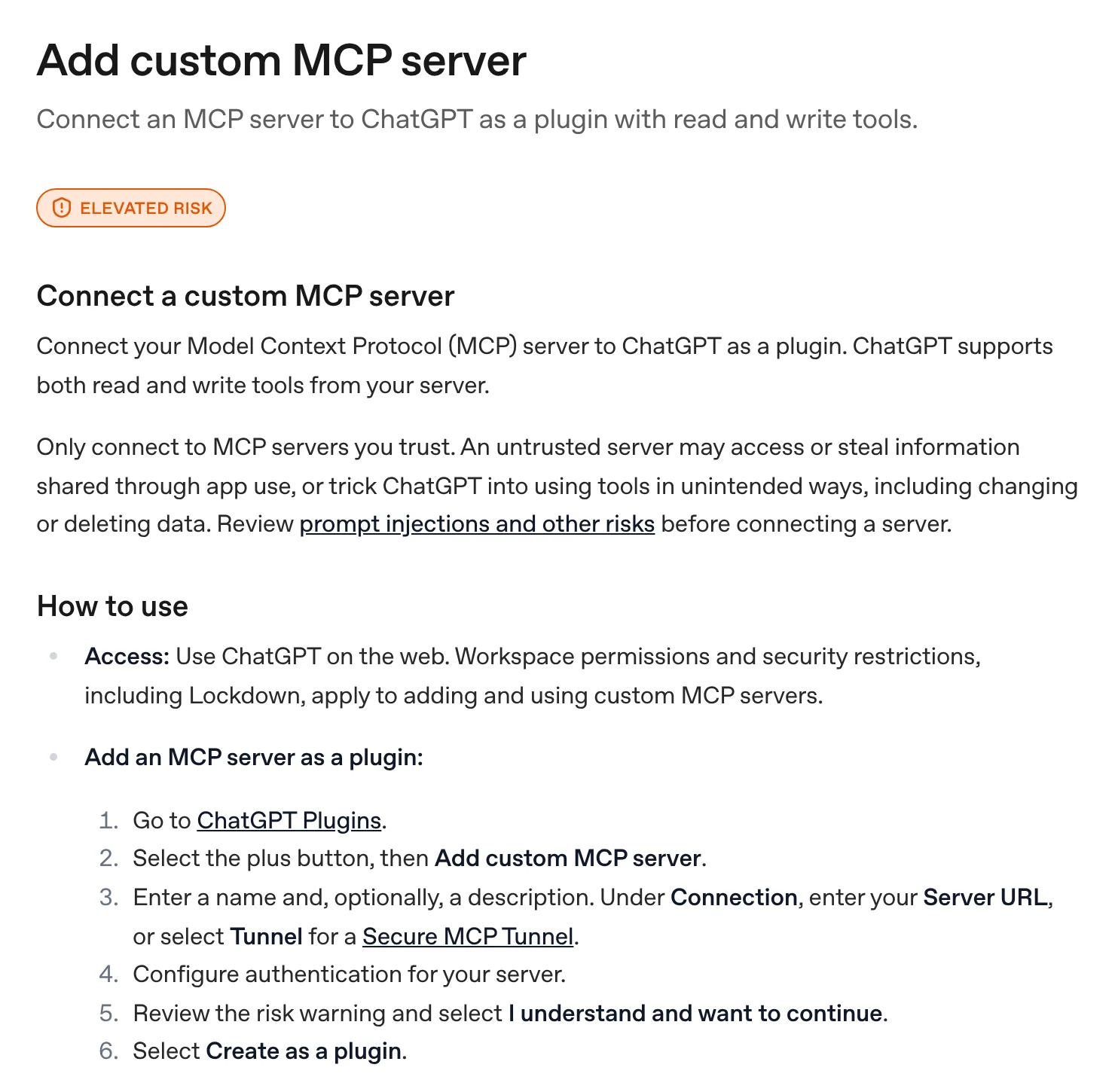
- How to add MCP to Claude (web and desktop app)
- Which Claude plans can use MCP?
- What are the best Claude connectors for a small business?
- A real example: Higgsfield MCP inside Claude
- Is Claude MCP safe?
- Common Claude MCP problems and fixes
- FAQ
- connectors in Anthropic's directory (claude.com/connectors, 5 Nov 2026)
- 1,076
- custom connector allowed on the Free plan
- 1
- ways to add MCP: directory, custom URL, Claude Desktop config, Claude Code
- 4
- Claude account (Free works, Pro or higher for Claude Code)
- Claude web app or Claude Desktop
- A login for each app you connect
- For custom connectors: the app's remote MCP server URL
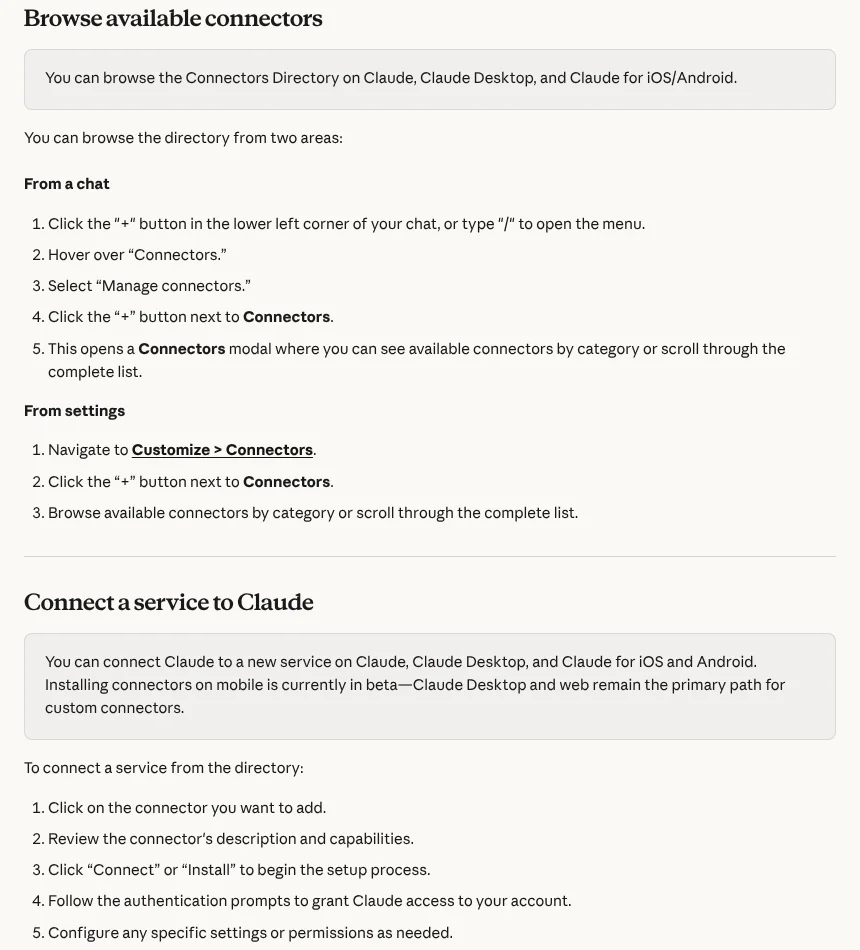
Open Customize > Connectors
In claude.ai or the Claude desktop app, go to Customize > Connectors. From inside a chat you can also click the + button at the lower left (or type /), hover over Connectors and choose Manage connectors.
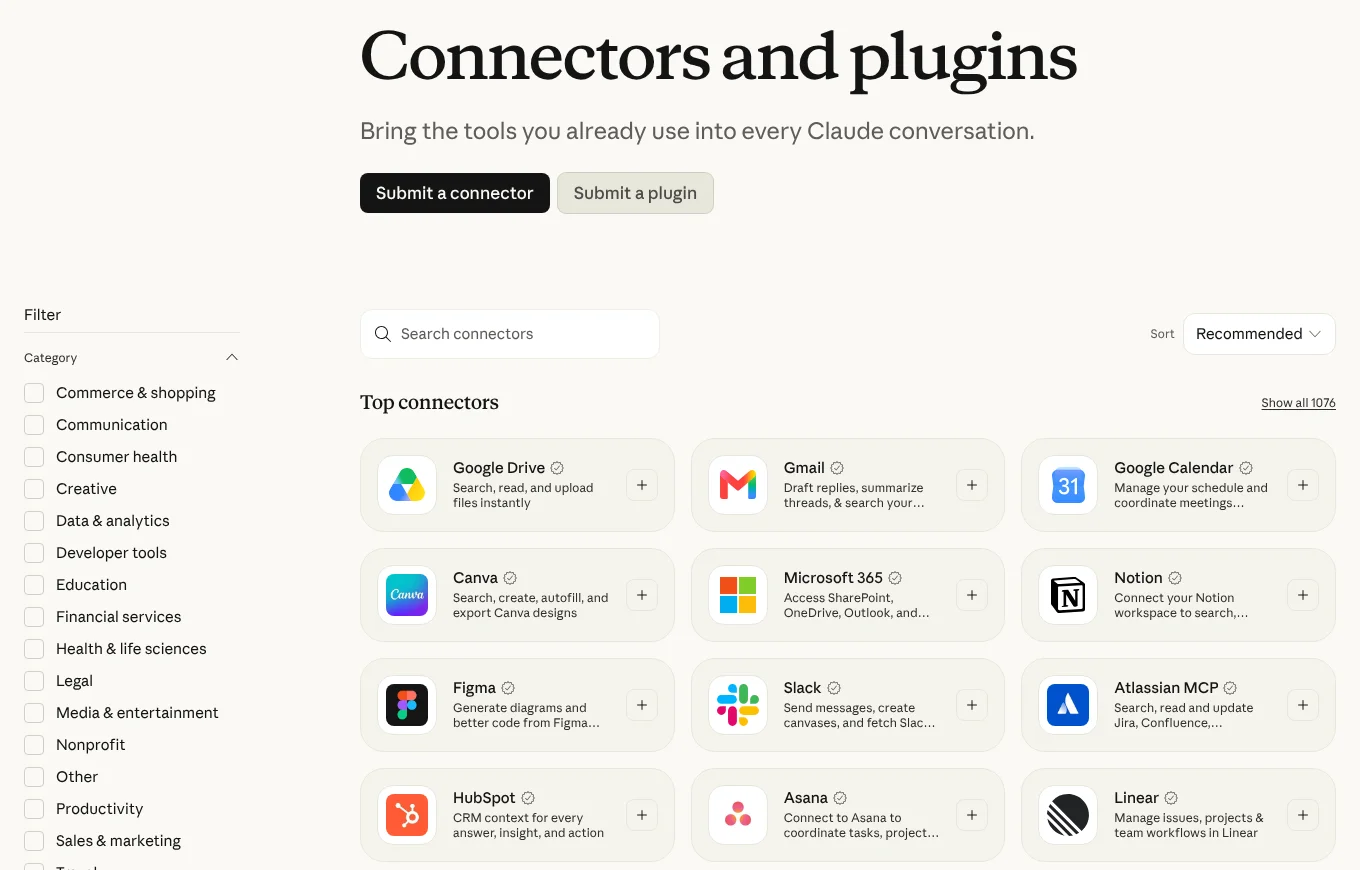
Add a connector from the directory
Click the + next to Connectors to browse by category. Open the one you want, read its description and capabilities, click Connect or Install, and sign in to that service when asked. Claude only gets the access your own account has there.
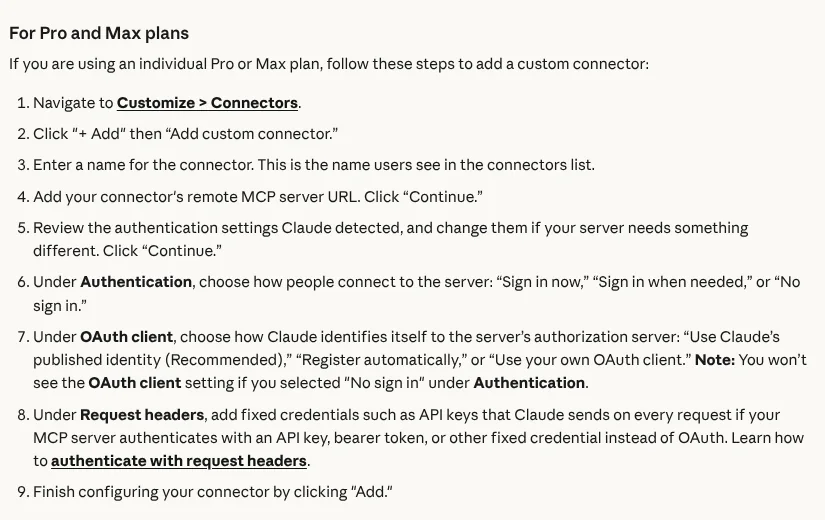
Or add a custom connector by URL
If the app is not in the directory but has a remote MCP server, click + Add, then Add custom connector. Give it a name, paste the server URL, click Continue, check the detected sign-in settings, and click Add. Free plans get one custom connector.
Switch it on in your chat
Start a chat, click +, hover over Connectors and toggle on the services you want for that conversation. If Claude does not use a tool, name the app in your request ("check my Google Calendar for Friday").
Approve tool calls with care
When Claude wants to use a tool, it asks for approval. Approve each call yourself for anything that writes, sends or spends, and keep Allow always for read-only tools you trust. You can turn off tools you do not need in the Search and tools menu.
Claude MCP is the way to let Claude use your other apps: read your inbox, check your calendar, pull a profit and loss report or generate an image, right inside the chat. You add it in Customize > Connectors, either by picking a connector from Anthropic’s directory or by pasting the URL of a remote MCP server, and it works on every Claude plan.
It is the easiest entry point into AI automation for most small businesses, because you do not build anything. You sign in to the app once, and Claude can call its tools from then on. I use Claude every day for the writing around my construction company, Buildme, and I connect the Higgsfield MCP to Claude to make images and cut out backgrounds without opening another tab.
What is Claude MCP, in plain English?
MCP stands for Model Context Protocol. Anthropic introduced it on 25 November 2024 as “a new standard for connecting AI assistants to the systems where data lives.” Think of it as a universal plug. An app publishes an MCP server that lists its tools, such as “create invoice” or “search email”, and any AI assistant that speaks MCP can call those tools.
Three words get used loosely, so here is how I use them in this guide:
- MCP server: the program that exposes an app’s tools. It can run on the internet (remote) or on your computer (local).
- Connector: Claude’s name for a connection to an MCP server. Some are listed in Anthropic’s directory, others you add yourself.
- Tool: one action the server offers, like
create_draftin Gmail orremove_backgroundin Higgsfield.
MCP is no longer just an Anthropic thing. In December 2025 Anthropic donated MCP to the Agentic AI Foundation, a fund under the Linux Foundation, and said at the time that there were more than 10,000 active public MCP servers and that ChatGPT, Cursor, Gemini, Microsoft Copilot and Visual Studio Code had adopted it. That is why the same server often works in both Claude and ChatGPT (I cover the other side in my ChatGPT MCP guide).
The directory has grown fast. In that same December 2025 post, Anthropic said Claude’s directory had “over 75 connectors”. When I checked claude.com/connectors on 5 Nov 2026, it listed 1,076 connectors and 528 plugins.
Connectors in Claude's directory
- Dec 202575+
- Nov 20261,076
Claude connectors vs MCP servers: what is the difference?
Every Claude connector is an MCP server underneath. The difference is who listed it, where it runs and where you add it. There are four routes, and picking the wrong one is the most common reason people get stuck.
| Route | What it is | Where you add it | Runs from | Plans |
|---|---|---|---|---|
| Directory connector | An MCP server Anthropic lists, like Gmail, QuickBooks or Canva | Customize > Connectors, then + | Anthropic’s cloud | All plans |
| Custom connector | Any remote MCP server you add by URL, like Higgsfield | Customize > Connectors, + Add, Add custom connector | Anthropic’s cloud | All plans, Free limited to 1 |
| Local MCP server in Claude Desktop | A server that runs on your own computer, like the Filesystem server | Settings > Developer > Edit Config (claude_desktop_config.json) | Your computer | Claude Desktop only |
| Claude Code | Remote or local servers for the coding agent | claude mcp add in the terminal | Your computer | Pro and higher |
Sources: Anthropic’s connectors guide, custom connector guide, the MCP local server quickstart, Claude Code MCP docs and Claude pricing, all checked 5 Nov 2026.
Note: Custom connectors connect from Anthropic’s cloud, not from your laptop, even in Claude Desktop. Anthropic says a server behind a VPN or company firewall will not connect unless it allowlists Anthropic’s IP ranges. If your server only runs on your machine, it has to be a local server instead.
Anthropic also lists desktop extensions as a separate option for Claude Desktop users. They are local servers packaged for the desktop app, so treat them like the local route above.
How to add MCP to Claude (web and desktop app)
The step cards at the top of this page cover the main path. Here is what each screen looks like and where people trip up.
Add a connector from the directory
This is the route for the big names: Google, Microsoft 365, QuickBooks, HubSpot, Canva, Stripe and the rest. You browse from a chat (+ or /, then Connectors > Manage connectors) or from Customize > Connectors. Each connector has a page showing what it does, who made it and whether it can read, write or both.
When you click Connect, you sign in to that app, not to Anthropic. Anthropic says Claude inherits your permissions in the connected service, so if your account cannot see a file or record, Claude cannot either.
Add a custom connector (remote MCP URL)
Use this when the app has an MCP server but is not in the directory. Higgsfield is a good example: it is not listed in the directory as of 5 Nov 2026, but it publishes the URL https://mcp.higgsfield.ai/mcp, so you add it as a custom connector.
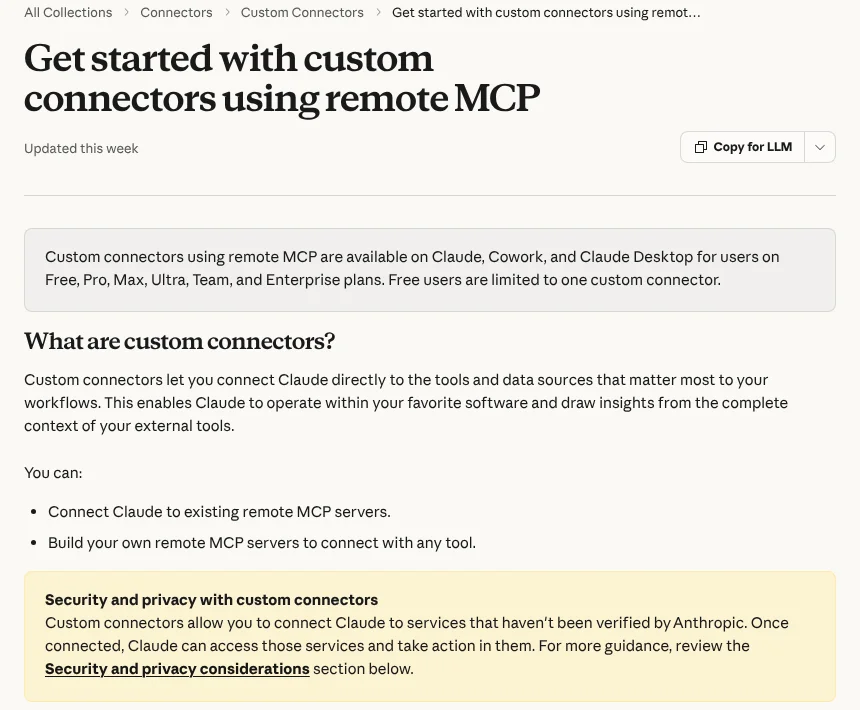
On Pro, Max or Ultra, the flow is Customize > Connectors, + Add, Add custom connector, a name, the URL, then Continue. Claude detects the sign-in method. You then choose under Authentication between “Sign in now”, “Sign in when needed” or “No sign in”, and under OAuth client Anthropic recommends “Use Claude’s published identity”. If the server uses an API key instead of a login, you add it under Request headers. Click Add and you are done.
Tip: You cannot edit a custom connector after you add it. Anthropic’s guide says to remove it and add it again, so double check the URL before you click Add.
On a Team or Enterprise plan
On Team, only Owners and Primary Owners can add connectors. The Owner goes to Organization settings > Connectors, adds the connector (for a custom one: Add, hover over Custom, select Web), and then each member finds it in Customize > Connectors and clicks Connect to sign in with their own account. Adding it for the team does not give anyone access automatically.
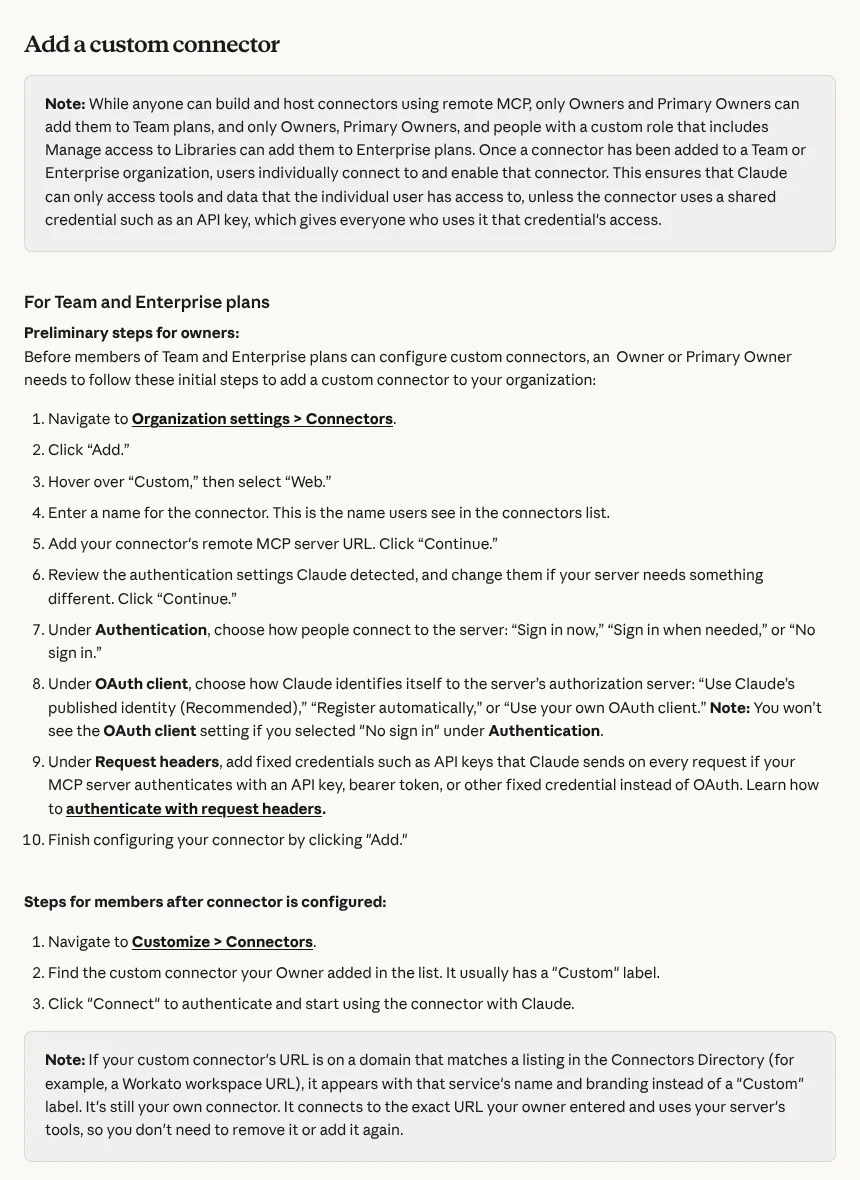
Two Team details worth knowing: Anthropic says connectors only work in private projects on Team and Enterprise, and if an Owner adds a connector with a fixed API key, everyone using it gets that key’s access. Use a key with the smallest permissions that does the job.
Add a local MCP server to Claude Desktop
Local servers run on your computer, which is what you want for things like your own files. The official MCP quickstart walks through the Filesystem server. Open the Claude menu in your system menu bar (not the settings inside the chat window), choose Settings, then Developer > Edit Config. That opens claude_desktop_config.json. On a Mac, an entry looks like this:
{
  "mcpServers": {
    "filesystem": {
      "command": "npx",
      "args": [
        "-y",
        "@modelcontextprotocol/server-filesystem",
        "/Users/username/Desktop"
      ]
    }
  }
}
You need Node.js installed for servers that start with npx. Save the file, fully quit and restart Claude Desktop, and the server shows under + > Connectors > Manage connectors. The quickstart warns that the server runs with your user account’s permissions, so only list folders you are happy for Claude to read and change.
Add MCP servers to Claude Code with claude mcp add
Claude Code, Anthropic’s terminal agent, has its own MCP setup. It is included from the Pro plan up. From the Claude Code docs, checked 5 Nov 2026:
# Remote server (recommended transport is HTTP)
claude mcp add --transport http notion https://mcp.notion.com/mcp

# Local server: everything after -- is the command that starts it
claude mcp add --env AIRTABLE_API_KEY=YOUR_KEY --transport stdio airtable -- npx -y airtable-mcp-server

# Check, inspect and remove
claude mcp list
claude mcp get notion
claude mcp remove notion
Inside a session, run /mcp to see which servers are connected and to finish any browser sign-in. By default a server is added only for the current project. Add --scope user to load it in all your projects, or --scope project to save it in a .mcp.json file your team shares through git. The docs say the older SSE transport is deprecated, so use HTTP where a server offers it.
Which Claude plans can use MCP?
All of them. The real differences are the custom connector limit and Claude Code.
| Plan | Price (monthly billing) | Directory connectors | Custom connectors | Claude Code (claude mcp add) |
|---|---|---|---|---|
| Free | $0 | Yes | 1 | No |
| Pro | $20/mo, or $17/mo billed annually | Yes | Yes | Yes |
| Max | $100/mo | Yes | Yes | Yes |
| Ultra | $200/mo | Yes | Yes | Yes |
| Team | $25/seat/mo, or $20 billed annually (Standard) | Yes, added by an Owner | Yes, added by an Owner | Yes |
Prices and the Claude Code and connectors rows are from claude.com/pricing; the custom connector limit is from Anthropic’s custom connector guide. Both checked 5 Nov 2026. Team also lists “admin controls for remote and local connectors”. For the full plan breakdown, see my guide to Claude for small business.
My take: if you are on Free and want to try one outside tool, that single custom connector is enough to see if MCP is useful. The limit applies to custom connectors, so directory connectors like Gmail or Google Calendar sit outside it.
What are the best Claude connectors for a small business?
With 1,076 connectors in the directory, the useful question is which ones cover the jobs an owner actually does: email, scheduling, money, customers, paperwork and marketing. Every connector below is listed in Anthropic’s directory, and the description is what its directory page says it does (checked 5 Nov 2026). I have not tested all of these myself.
| Connector | What it lets Claude do | Good for |
|---|---|---|
| Gmail | Search your inbox, read full threads, create drafts | Catching up on email, drafting replies |
| Google Calendar | Check availability, find free slots, create and update events | Booking site visits and calls |
| Google Drive | Search, read and upload files | Finding a quote or contract fast |
| Microsoft 365 | Access SharePoint, OneDrive, Outlook and Teams | Businesses on Outlook instead of Gmail |
| Intuit QuickBooks | P&L, cash flow and A/R and A/P aging; create, send and schedule invoices and estimates, with a preview and your confirmation first | Bookkeeping questions, chasing invoices |
| Xero | Read-only P&L, cash position, outstanding invoices and top customers | Xero users who want answers, not edits |
| Stripe | Read and write through the Stripe API, balance summary, analytics, docs search | Online payments and subscriptions |
| Square | Transactions, customer profiles, inventory, payments and sales patterns | Shops and service businesses on Square POS |
| PayPal | Account, transaction and payment details, products and disputes | Businesses paid through PayPal |
| HubSpot | Search and update contacts, companies, deals and tickets, campaign performance | Lead follow-up and pipeline reviews |
| Calendly | Create event types, share links, book meetings, find meeting recaps | Booking consultations |
| Docusign | Search agreements, surface renewal dates and obligations, create envelopes | Contracts and sign-offs |
| Jotform | Build forms from a description, review and analyze submissions | Client intake forms, surveys |
| Canva | Search, create, autofill and export Canva designs | Social posts, flyers |
| Shopify | Manage inventory, create discount codes, review orders, pull store analytics | Online stores |
| Squarespace | Check domain availability and price, manage orders, products and contacts | Squarespace sites and stores |
| Wix | Manage your Wix sites and apps, such as Stores, Bookings and Blog | Wix sites |
| Zapier | Run actions across the 9,000 apps on Zapier | Anything without its own connector |
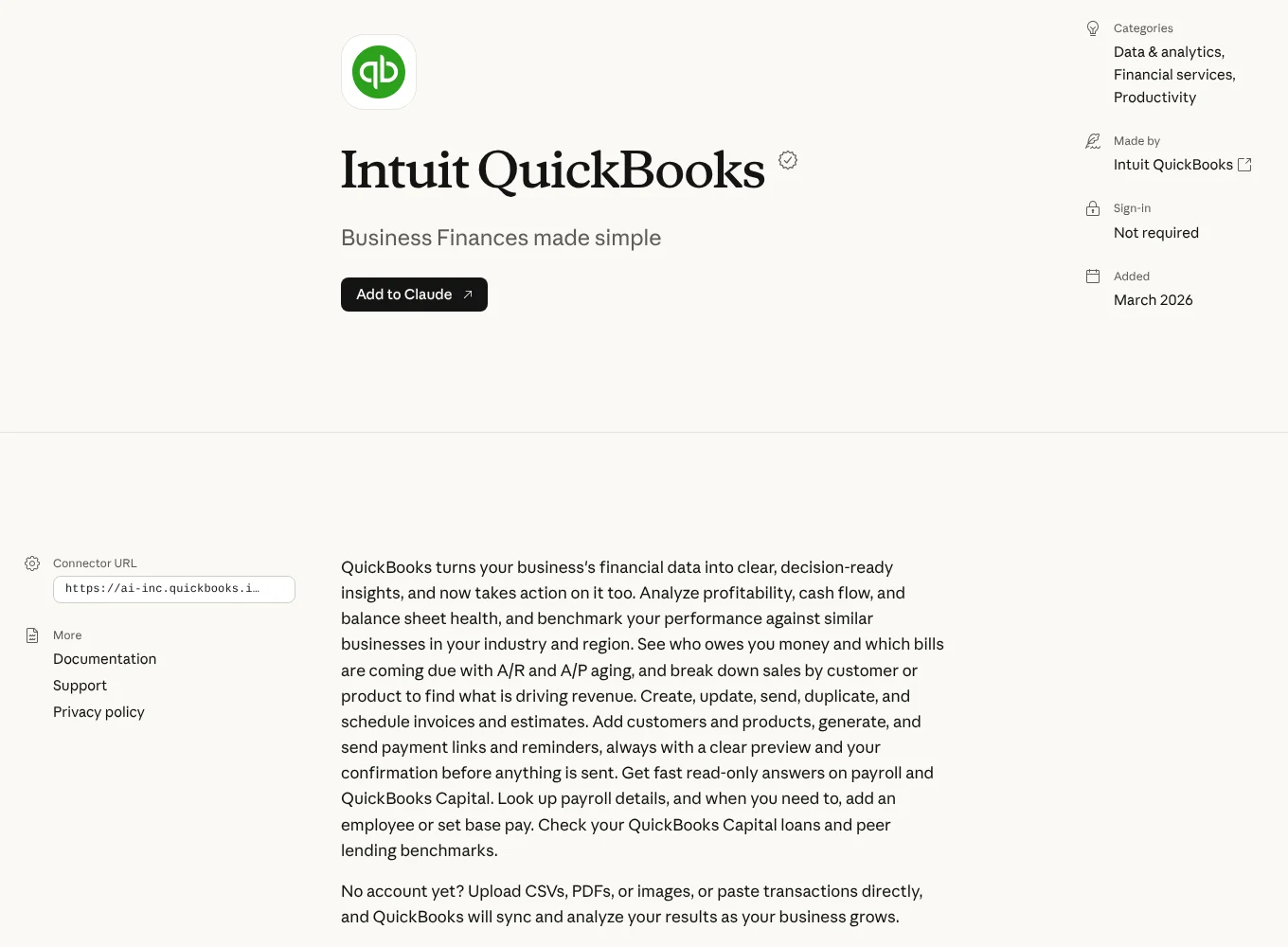
If I were starting from zero, I would connect email and calendar first, then accounting, then the CRM. Gmail and Google Calendar are the two I would tell any owner to switch on first, because they turn “what did that customer say last week and when am I free to visit” into one question. Zapier is the fallback for any tool not on the list.
Max’s take: Do not connect 15 tools on day one. Anthropic itself suggests switching tool access to “On demand” once you have 10 or more connectors active, because every connector uses up room in the conversation. Start with three, use them for a week, then add more.
A real example: Higgsfield MCP inside Claude
Here is how this looks in practice. Higgsfield, the AI image and video platform, is not in the directory, so I added it as a custom connector with its URL. Now I type requests like “remove the background from this photo” or “make a 16:9 image of a finished kitchen with Nano Banana 2.1” into Claude, and Claude calls Higgsfield’s tools and shows the result in the chat.
Use Higgsfield for this chat. Before you generate anything, tell me the credit cost and wait for my yes.
1. Check my Higgsfield credit balance.
2. Remove the background from the photo I upload.
3. Show my balance again and list what this chat spent.
On my Higgsfield Creator plan, according to my own log on 5 Nov 2026, one background removal cost 1 credit and one Nano Banana 2.1 image cost 3 credits. That is the part people miss about MCP: Claude’s side is free, but a connected app can spend real money, which is why I ask for the cost first. The full setup, every tool and a cost table are in my Higgsfield MCP guide.
Is Claude MCP safe?
Mostly yes, if you treat a connector like giving a new employee a login. These are the risks Anthropic itself lists in its custom connector guide, checked 5 Nov 2026:
- Custom connectors are not verified by Anthropic. Once connected, Claude can read and change data in that service within your permissions.
- Prompt injection. A malicious server can hide instructions in its tool results. Only connect servers from companies you trust.
- Tools can change. The server’s developer can change what a tool does without telling you.
- Shared keys on Team. A fixed API key on a team connector gives everyone that key’s access.
- Research mode. Advanced research can call connector tools without asking, so Anthropic suggests turning off write tools before you use it.
Warning: Be careful with Allow always. It is fine for read-only tools like “search email” or “check balance”. For anything that sends, pays, deletes or spends credits, approve each call yourself. You can switch off tools you never use in the Search and tools menu.
For local servers in Claude Desktop, the risk is your own computer: a filesystem server can change any file in the folders you list. Point it at one working folder, not your whole drive. I never set anything that can send email or move money to “Allow always”, even after months of use.
Common Claude MCP problems and fixes
- The connector is added but Claude ignores it. Check the toggle under + > Connectors for that chat, then name the app in your request.
- A custom connector will not connect. The server must be reachable on the public internet from Anthropic’s cloud. Servers on a VPN or office network need Anthropic’s IP ranges allowlisted.
- A local server does not show in Claude Desktop. Fully quit and restart the app, check the JSON for a missing comma, and use absolute file paths, as the MCP quickstart advises.
- The server is in Claude Desktop but not on claude.ai. That is expected. Local servers from
claude_desktop_config.jsondo not appear in claude.ai or Cowork. - Claude Code says a server needs auth. Run
/mcp, pick the server and finish the browser sign-in.
MCP is the piece that turns Claude from a chat window into something that works inside your business. If you want to see which jobs are worth handing to Claude in the first place, start with my guide to Claude for small business.
Questions people ask
01Is Claude MCP free?
Yes, there is no extra charge. MCP itself is an open standard, and Claude's pricing page (checked 5 Nov 2026) lists connectors on every plan, including Free at $0. The limits are on the Claude side: Free allows one custom connector and does not include Claude Code. The connected app may still charge you, for example Higgsfield spends credits on every generation.
02What is the difference between Claude connectors and MCP servers?
An MCP server is the program that exposes an app's tools. A connector is how Claude plugs into one. Directory connectors are MCP servers Anthropic lists at claude.com/connectors, which you add in one click. Custom connectors are remote MCP servers you add by pasting their URL. Local MCP servers run on your own computer and are added in Claude Desktop's config file or in Claude Code.
03Can I use MCP on the Claude free plan?
Yes. Anthropic's help center says web connectors are available to all users, and custom connectors using remote MCP work on Free, Pro, Max, Ultra, Team and Enterprise plans. Free users are limited to one custom connector. Claude Code, where you add servers with claude mcp add, needs Pro or higher.
04Is MCP safe?
It is as safe as the server you connect and the permissions you approve. Anthropic says custom connectors are not verified by Anthropic, that malicious servers can hide prompt injection instructions in tool results, and that developers can change tools without notice. Connect only servers from companies you trust, limit sign-in scopes, and review requests before clicking Allow always.
05How do I add MCP to Claude Desktop?
For remote servers, use Customize > Connectors exactly as in the web app. For a local server, open the Claude menu, then Settings > Developer > Edit Config, add the server to claude_desktop_config.json under mcpServers, and fully quit and restart Claude Desktop. Local servers set up this way do not appear in claude.ai or Cowork.
06How do I add an MCP server to Claude Code?
Run claude mcp add in your terminal. For a remote server: claude mcp add --transport http name https://server-url. For a local one, put the start command after a double dash, for example claude mcp add --transport stdio name -- npx -y package-name. Then run /mcp inside Claude Code to check the status and sign in.
07Do Claude connectors work on the mobile app?
Connectors you add on the web or desktop app appear on iOS and Android the next time you log in. Anthropic says installing connectors directly on mobile is in beta, and the web and desktop apps remain the main way to add custom connectors.
More in AI automation