ChatGPT MCP
- Type
- Guide
- Updated
- Nov 5, 2026
- Read
- 10 min
- Written by
- Max Panych

Yes, ChatGPT supports MCP. In 2026 you add an MCP server as a plugin, and it is one of the simplest ways into AI automation if your tools already offer an MCP server. Here is how to do it, which plans can, and what OpenAI warns you about.
maxpanychChatGPT
 Guide
On this page10 sections
- to add a custom MCP server in ChatGPT Plugins, per OpenAI
- 6 steps
- custom MCP servers are added on ChatGPT for the web, per OpenAI
- Web only
- SSE and streaming HTTP are supported, per OpenAI
- 2 protocols
- ChatGPT on the web (chatgpt.com)
- A plan or workspace that allows custom MCP servers
- The MCP server's URL, ending in /mcp
- An account with the service, if the server uses OAuth
Check your plan and workspace permissions
OpenAI says workspace permissions and security restrictions, including Lockdown, apply to adding and using custom MCP servers. On a Business, Enterprise or Edu workspace, an admin decides whether members can do it. Use ChatGPT on the web: OpenAI's guide does not cover the mobile apps for this.
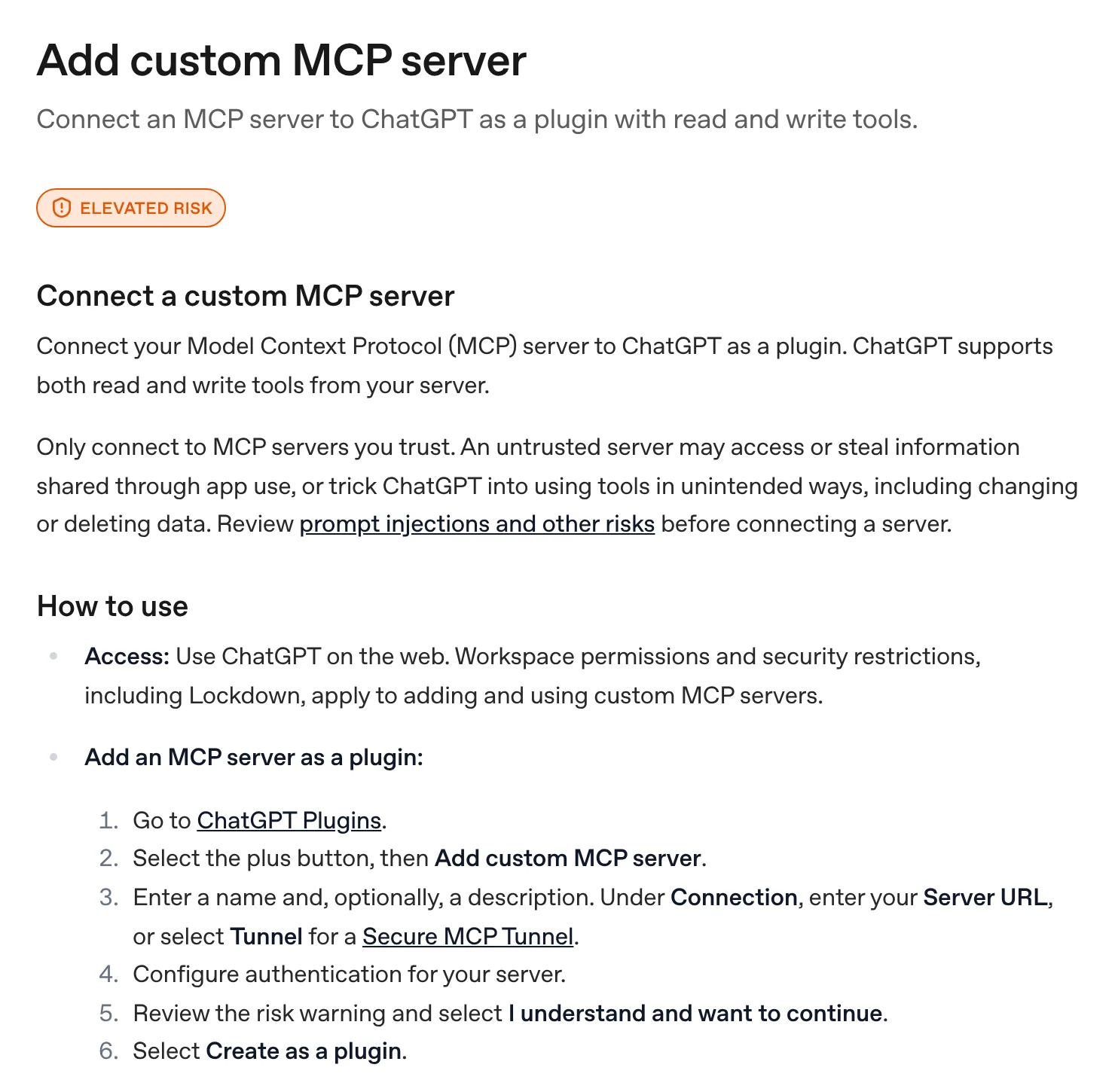
Open ChatGPT Plugins
Go to chatgpt.com/plugins. This is where ChatGPT now keeps both public plugins from the directory and your own personal plugins built from MCP servers.
Select the plus button, then Add custom MCP server
Enter a name and, optionally, a description. Under Connection, paste the Server URL, including the
/mcppath (for examplehttps://mcp.example.com/mcp). If the server is private, behind a firewall or on your own machine, select Tunnel for OpenAI's Secure MCP Tunnel instead.Configure authentication
Pick OAuth, No authentication, or OAuth or no authentication, whichever the server's docs ask for. Most business tools use OAuth, so you will sign in to that tool and approve access. Public test servers usually need no authentication.
Read the risk warning and create the plugin
ChatGPT shows a risk warning. Read it, select I understand and want to continue, then Create as a plugin. ChatGPT reads the server's tools and metadata so you can review them.
Install the plugin and call it with @
Open your personal plugins, open the new plugin and select the plus button to install it. Start a new chat (OpenAI's quickstart uses the Work tab at the top of the homepage), type
@in the prompt box and pick your plugin.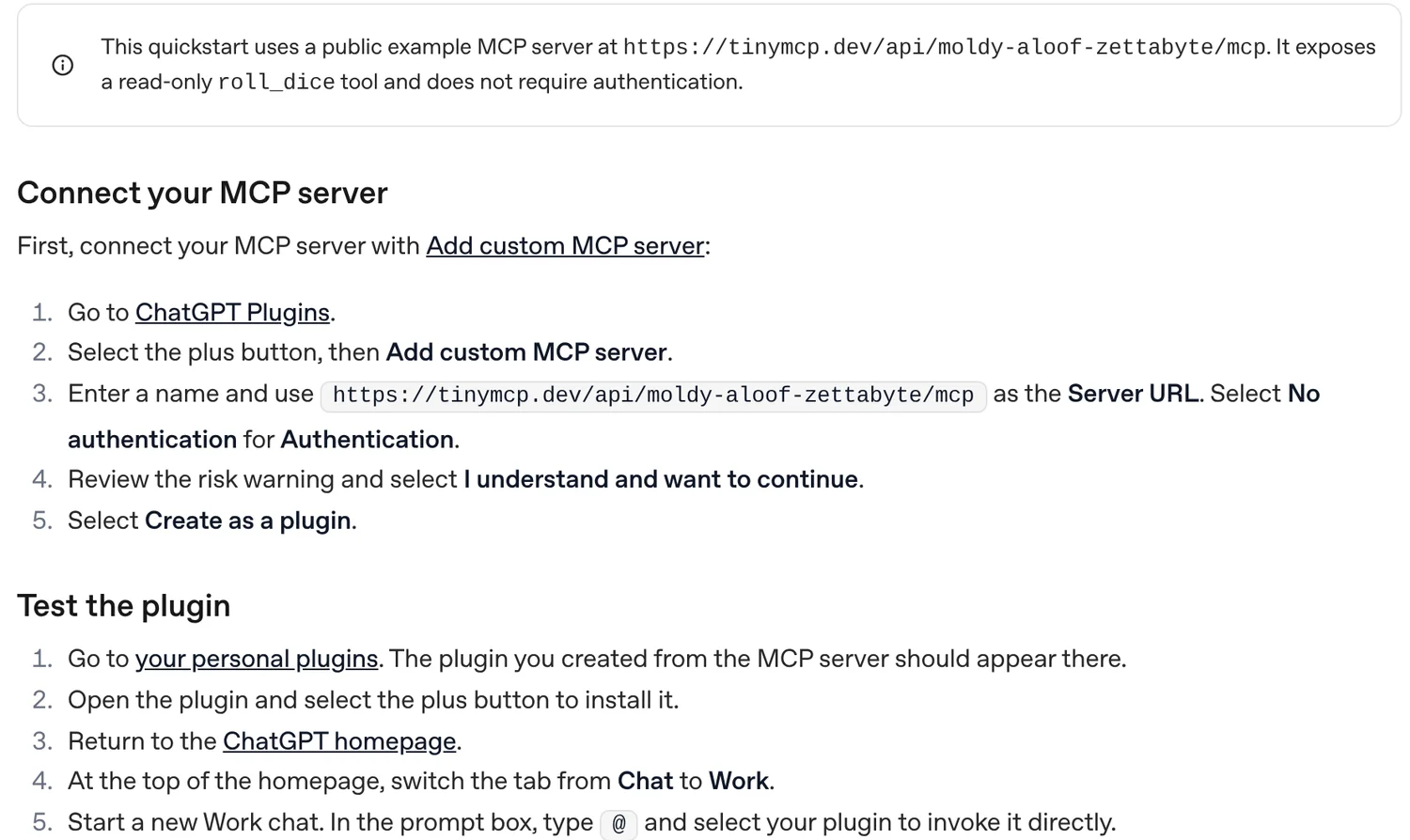
Check every write action before you approve it
OpenAI says write actions need confirmation by default, and any tool not marked read-only is treated as a write action. Expand the tool call to see the exact JSON going to the server. Only let ChatGPT remember an approval for a tool you fully trust.
ChatGPT supports MCP: you connect an MCP server to ChatGPT as a plugin from chatgpt.com/plugins, using Add custom MCP server, and ChatGPT can then call that server’s tools in your chats. Full read and write access is aimed at Business and Enterprise workspaces, and OpenAI puts an “Elevated risk” label on the feature for good reason.
MCP (Model Context Protocol) is the open standard that lets an AI assistant use tools in other apps, and it is a big part of practical AI automation for small businesses. I use the Higgsfield MCP inside Claude to make images and check credits, so I wanted to know exactly how the ChatGPT side works today. Everything below comes from OpenAI’s own developer docs and help center, checked on 5 Nov 2026. I have not run my own MCP servers through ChatGPT yet, so this guide follows OpenAI’s documented flow rather than months of daily use.
Does ChatGPT support MCP?
Yes. OpenAI’s Add custom MCP server guide says: “Connect your Model Context Protocol (MCP) server to ChatGPT as a plugin. ChatGPT supports both read and write tools from your server.” It does not need special search or fetch tools any more: any tool the server exposes, including write actions, is available, subject to confirmation settings.
The names have changed a lot, which is why search results contradict each other. In 2025 you had “connectors”, then “apps” and a developer mode toggle. In OpenAI’s current docs, everything lives under Plugins: public plugins in a directory that ChatGPT and Codex share, and personal plugins you create from your own MCP server. There is no developer mode step in OpenAI’s current guide.
| Term you will see | What it means today |
|---|---|
| MCP server | The service that exposes tools, at a URL like https://mcp.example.com/mcp |
| Plugin | What ChatGPT calls an installed MCP server (plus optional skills and UI) |
| Plugins Directory | The public list of official plugins, shared by ChatGPT and Codex |
| Custom MCP server | A server you add yourself with its URL, saved as a personal plugin |
| Developer mode | The older 2025 switch for custom MCP; not part of OpenAI’s current flow |
| Secure MCP Tunnel | OpenAI’s way to reach a private server without exposing it |
Source: OpenAI developer docs, Plugins quickstart and Secure MCP Tunnel, checked 5 Nov 2026.
How do I add a custom MCP server to ChatGPT?
The step cards above follow OpenAI’s guide exactly. The short version: chatgpt.com/plugins > + > Add custom MCP server, paste the URL, pick the sign-in method, accept the risk warning, select Create as a plugin, then install it and call it with @ in a new chat.
A few details from the same guide that save time:
- Supported protocols: SSE and streaming HTTP. If the server only runs locally over stdio, you need a tunnel.
- Authentication: OAuth, No authentication, or OAuth or no authentication. The mixed option lets a server list its tools without sign-in and ask for OAuth only on the tools that need it.
- Manage tools: each plugin has a details page where you can switch individual tools on or off and click Refresh to pull new tools after the server changes.
- Where it appears: in your personal plugins, or in the workspace where you created it. You must install it before it shows up in a chat.
Tip: OpenAI suggests being explicit in your prompt, for example
Use the "Acme CRM" app's "update_record" tool to..., and adding “Do not use built-in browsing or other tools” when ChatGPT keeps reaching for web search instead of your plugin.
Which ChatGPT plans can use MCP?
This is where most guides go wrong, partly because OpenAI has changed it several times. Here is what OpenAI’s own pages say, checked 5 Nov 2026:
| Plan | Custom MCP server (your own URL) | Who controls it |
|---|---|---|
| Free | Not listed in OpenAI’s help article | You |
| Plus | Not listed in OpenAI’s help article | You |
| Pro | Yes, with read and fetch permissions | You |
| Business | Yes, full MCP with read and write tools | Workspace admin |
| Enterprise and Edu | Yes, full MCP with read and write tools | Workspace admin |
Sources: OpenAI help center, Connecting custom MCP servers in ChatGPT, and OpenAI’s developer docs, checked 5 Nov 2026. I left plan prices out because OpenAI’s pricing page would not load for me on the check date; see chatgpt.com/pricing.
What that means in practice:
- On Business, Enterprise or Edu, your admin decides. Workspace admins can also publish a plugin to the whole workspace and choose which roles get it, so one person sets up the company CRM server and everyone else just installs it.
- On Pro, you can connect your own servers, but OpenAI’s help article describes this as read and fetch access, so tools that create, update or delete may not be usable.
- On Free or Plus, look for an official plugin in the directory instead, like the Higgsfield example below, and check whether your plan can install it. If Add custom MCP server is missing from your plus button, your plan or workspace does not allow it.
Note: OpenAI’s guide says custom MCP servers are added on ChatGPT for the web. Set it up on chatgpt.com, not in the phone app.
What security warnings does OpenAI give?
OpenAI is blunt about the risks. The top of its guide reads: “Only connect to MCP servers you trust. An untrusted server may access or steal information shared through app use, or trick ChatGPT into using tools in unintended ways, including changing or deleting data.” Its MCP risks page goes further, with a table of attack scenarios.
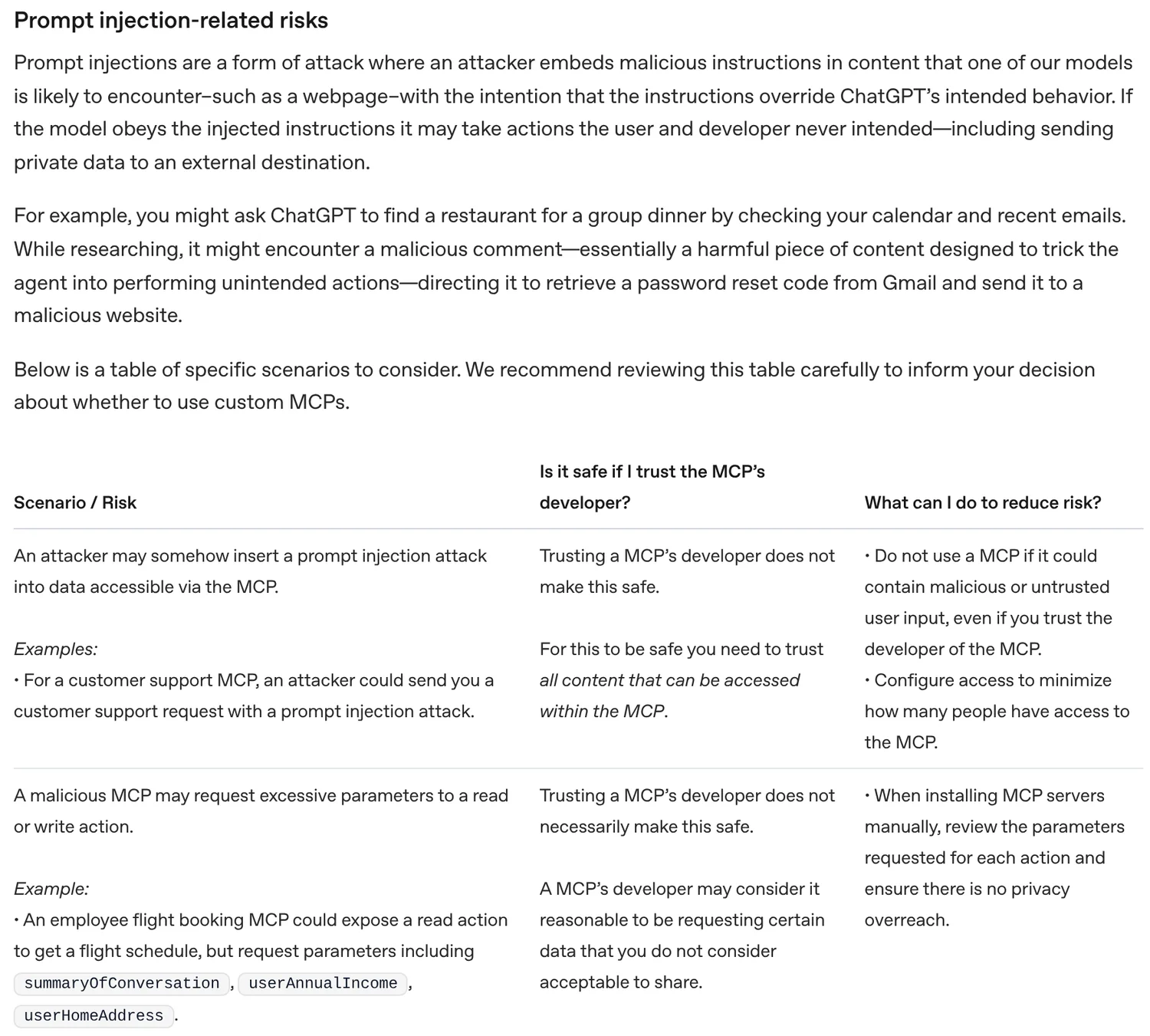
The warnings that matter most for a small business, in OpenAI’s words where it counts:
- Trusting the developer is not enough. For most scenarios OpenAI’s answer to “Is it safe if I trust the MCP’s developer?” is “Trusting a MCP’s developer does not make this safe.” A customer support inbox connected through MCP can carry a prompt injection from any customer who emails you.
- Servers can ask for too much. A malicious server may request extra parameters, like a conversation summary or your home address, on a simple read action. Review what each tool asks for before you connect.
- Write actions are the real danger. ChatGPT requires manual confirmation before write actions, but OpenAI warns that “It is possible for write actions to occur even if the MCP server has tagged the action as read only.”
- Any server sees what you send it. Even an honest server receives whatever ChatGPT passes in a query, which can include sensitive details you mentioned earlier in the chat.
- Prefer official servers. OpenAI’s example: use Stripe’s own server at
mcp.stripe.com, not a third-party Stripe server. Report malicious servers to [email protected].
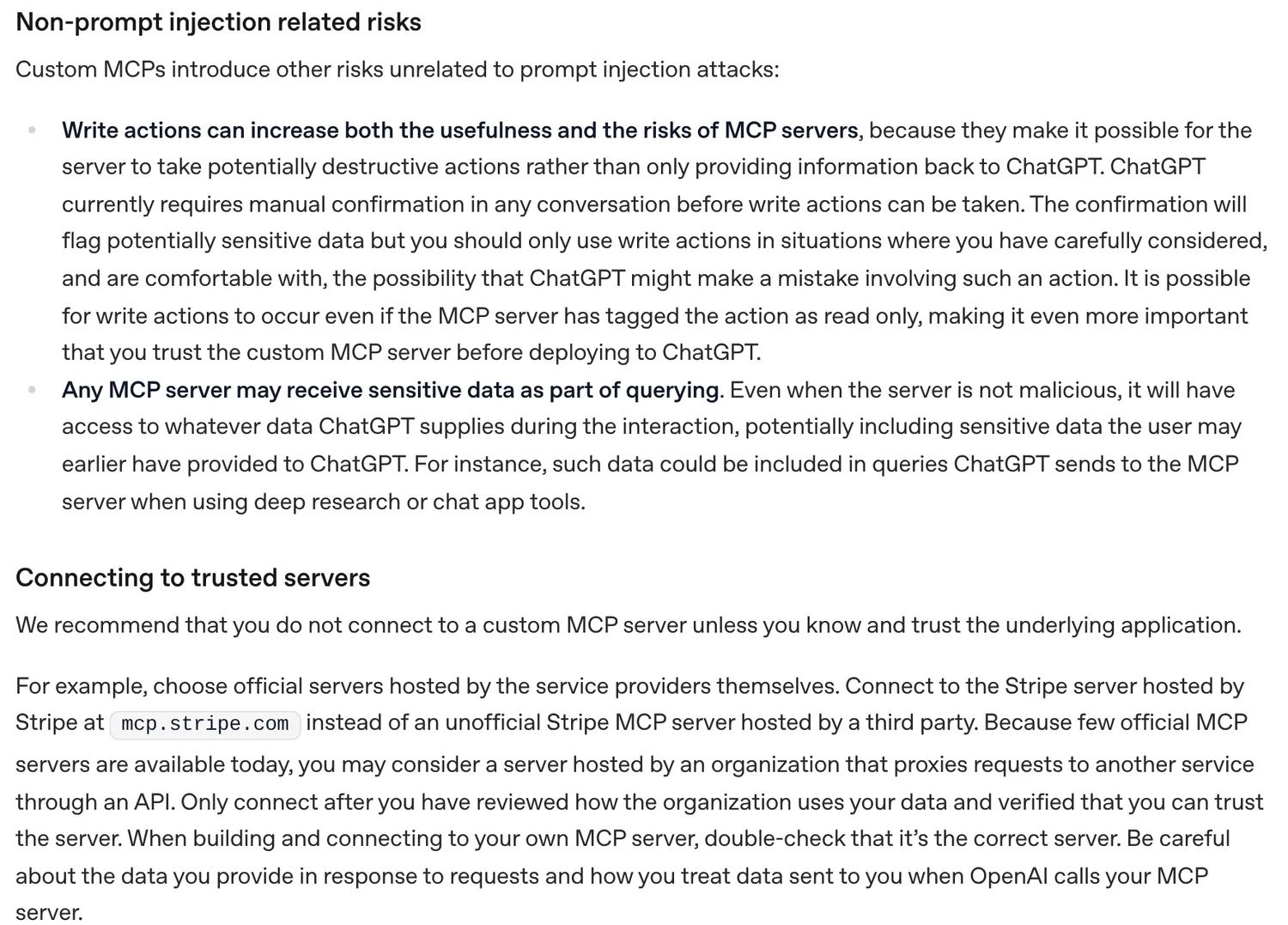
Warning: OpenAI lets you remember an “approve” choice for a tool for the rest of a conversation. Only do that for a tool you fully trust to make further changes without asking. A new chat asks again.
My own rule is simple: read-only tools on by default, write tools off until I need them, and never “remember approval” on anything that sends email, moves money or deletes records.
Worked example 1: OpenAI’s public test server
Before you connect anything that touches real data, test the flow with the public server OpenAI uses in its own quickstart. It exposes one read-only tool, roll_dice, and needs no sign-in, so nothing can go wrong.
- Go to chatgpt.com/plugins, select +, then Add custom MCP server.
- Name it “Dice test” and paste
https://tinymcp.dev/api/moldy-aloof-zettabyte/mcpas the Server URL. - Choose No authentication, accept the risk warning, then Create as a plugin.
- Install it from your personal plugins, start a new chat in the Work tab, type
@and pick it.
Then paste this:
Use the Dice test plugin's roll_dice tool. Roll one 20-sided die and tell me the result. Do not use any other tools.
OpenAI’s check for success is that ChatGPT calls roll_dice once with sides set to 20 and returns a number from 1 to 20. If that works, your plan and workspace allow custom MCP, and the same steps will work for a real server.
Worked example 2: Higgsfield in ChatGPT
Higgsfield, the AI image and video platform, documents a ChatGPT route on its help center (checked 5 Nov 2026). It is a good example of the other path: an official plugin from the directory, rather than pasting a URL yourself.
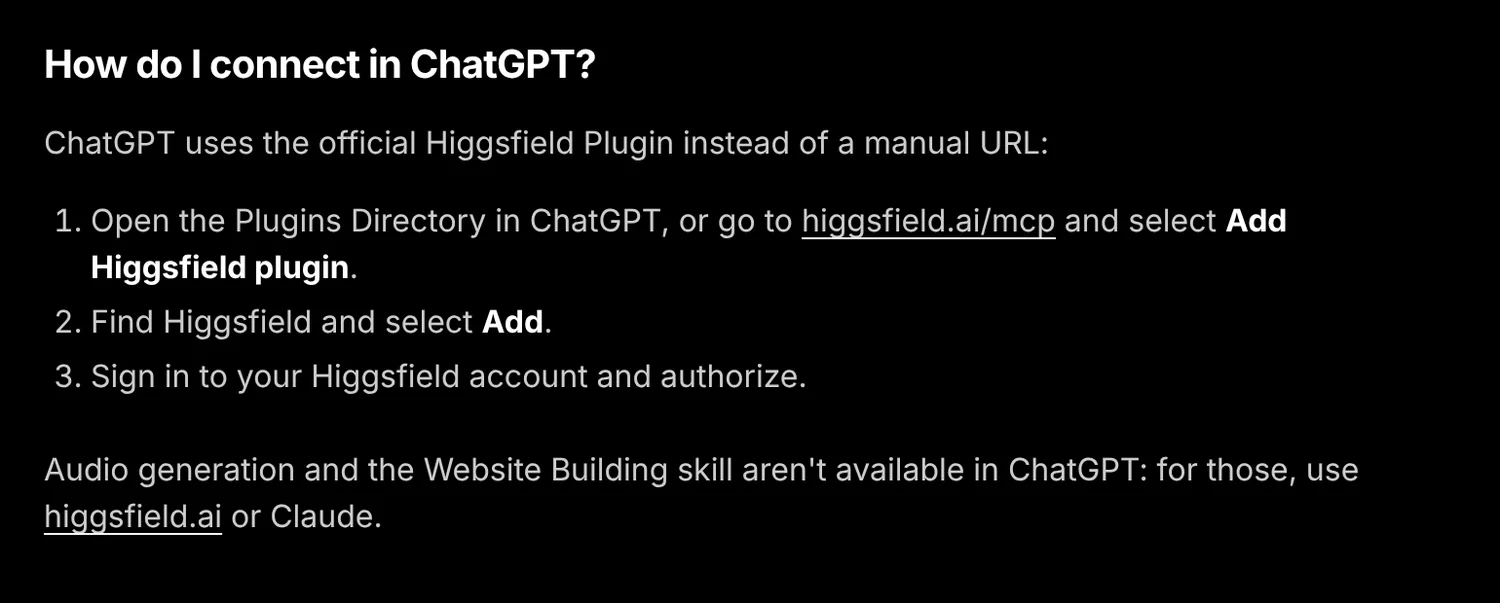
Higgsfield’s steps for ChatGPT:
- Open the Plugins Directory in ChatGPT, or go to higgsfield.ai/mcp and select Add Higgsfield plugin.
- Find Higgsfield and select Add.
- Sign in to your Higgsfield account and authorize.
To check it works, Higgsfield suggests asking “What is my Higgsfield credit balance?” or “List my recent Higgsfield generations.” If ChatGPT answers without calling a tool, reconnect the plugin from Settings > Plugins > Higgsfield.
Two limits worth knowing before you pay for anything. Higgsfield says an active paid subscription is required to connect any AI agent, and that every generation through a connected agent uses credits, regardless of plan. It also says audio generation and the Website Building skill are not available in ChatGPT, only in Claude and its other clients. Here is what Higgsfield lists by assistant:
| Feature (per Higgsfield) | Claude | ChatGPT |
|---|---|---|
| Image and video generation | Yes | Yes |
| Soul characters | Yes | Yes |
| Audio generation | Yes | No |
| Website Building skill | Yes | No |
| Results saved to Higgsfield Assets | Yes | Yes |
I run Higgsfield from Claude myself: on my Creator plan, one background removal cost 1 credit and one Nano Banana 2.1 image cost 3 credits (my log, 5 Nov 2026). The full setup, costs and prompts are in my Higgsfield MCP guide.
ChatGPT MCP vs Claude MCP
Anthropic created MCP, so Claude had it first, and the setup still differs. I keep this short because my full Claude MCP guide covers the Claude side. Facts below are from OpenAI’s docs and Anthropic’s custom connector guide, checked 5 Nov 2026.
| ChatGPT | Claude | |
|---|---|---|
| What it is called | Plugin (custom MCP server) | Custom connector |
| Where you add it | chatgpt.com/plugins > + > Add custom MCP server | Customize > Connectors > Add custom connector |
| Free plan | Custom servers not listed in OpenAI’s help article | Yes, limited to one custom connector |
| Paid individual plans | Pro: read and fetch; Plus not listed | Pro, Max and Ultra |
| Teams | Business, Enterprise, Edu, admin controlled | Team and Enterprise, Owners add it first |
| Apps | Web | Claude web, Claude Desktop and Cowork |
| Private servers | Secure MCP Tunnel | Claude connects from Anthropic’s cloud, so the server must be reachable from the internet |
| Write actions | Confirmation by default | Approval prompts, with an “Allow always” option |
My take: if you are a solo owner on a personal plan, Claude is the easier way into MCP today, because even the Free plan lets you add one custom connector. If your company already runs ChatGPT Business, stay there and get your admin to approve the servers you need.
If you are thinking about using ChatGPT with customers rather than just internal tools, read my guide to ChatGPT for customer service first. Connecting a support inbox is exactly the prompt injection scenario OpenAI warns about.
Problems and fixes
- No “Add custom MCP server” option: your plan or workspace does not allow custom servers. Ask your admin, or use an official plugin from the directory.
- ChatGPT cannot connect: OpenAI suggests testing the URL with MCP Inspector (
npx @modelcontextprotocol/inspector@latest), checking the URL includes/mcp, and fixing any transport or authentication errors. - Plugin installed but never used: start a new chat, type
@and select it, and name the tool in your prompt. - New tools do not show up: open the plugin at chatgpt.com/plugins and select Refresh, then start a new chat.
- Server is on your laptop or office network: use Secure MCP Tunnel or, for a quick test, a tunnel like ngrok, then paste the public HTTPS URL with
/mcp.
Questions people ask
01Does ChatGPT support MCP?
Yes. OpenAI's developer docs say you can connect a Model Context Protocol server to ChatGPT as a plugin, with both read and write tools. You add it from chatgpt.com/plugins with Add custom MCP server, on ChatGPT for the web. ChatGPT supports SSE and streaming HTTP servers, and private servers can connect through OpenAI's Secure MCP Tunnel.
02Which ChatGPT plans can add a custom MCP server?
OpenAI's help article on custom MCP servers says full MCP support (read and write tools) is for Business and Enterprise/Edu customers on the web, and that Pro users can connect custom MCP servers with read and fetch permissions. Free and Plus are not listed for custom servers in that article, checked 5 Nov 2026. Public plugins from the Plugins Directory are a separate route. If you are unsure, open chatgpt.com/plugins and see whether the plus button offers Add custom MCP server.
03Do I still need developer mode to use MCP in ChatGPT?
Not in the current Plugins flow. OpenAI's developer docs now go straight from chatgpt.com/plugins to Add custom MCP server, with no separate developer mode toggle. Older guides from 2025 describe a developer mode switch under Settings, so if you see that on your account, your workspace may still be on the older flow.
04Can ChatGPT connect to a local MCP server on my computer?
Not directly. ChatGPT connects to remote servers over a public HTTPS URL. For a server on your own machine or a private network, OpenAI points you to Secure MCP Tunnel, which runs a small tunnel-client inside your network and opens an outbound connection to OpenAI, so you do not have to expose the server to the internet. For quick tests, OpenAI's quickstart also mentions tunnels such as ngrok.
05What are some good alternatives to ChatGPT?
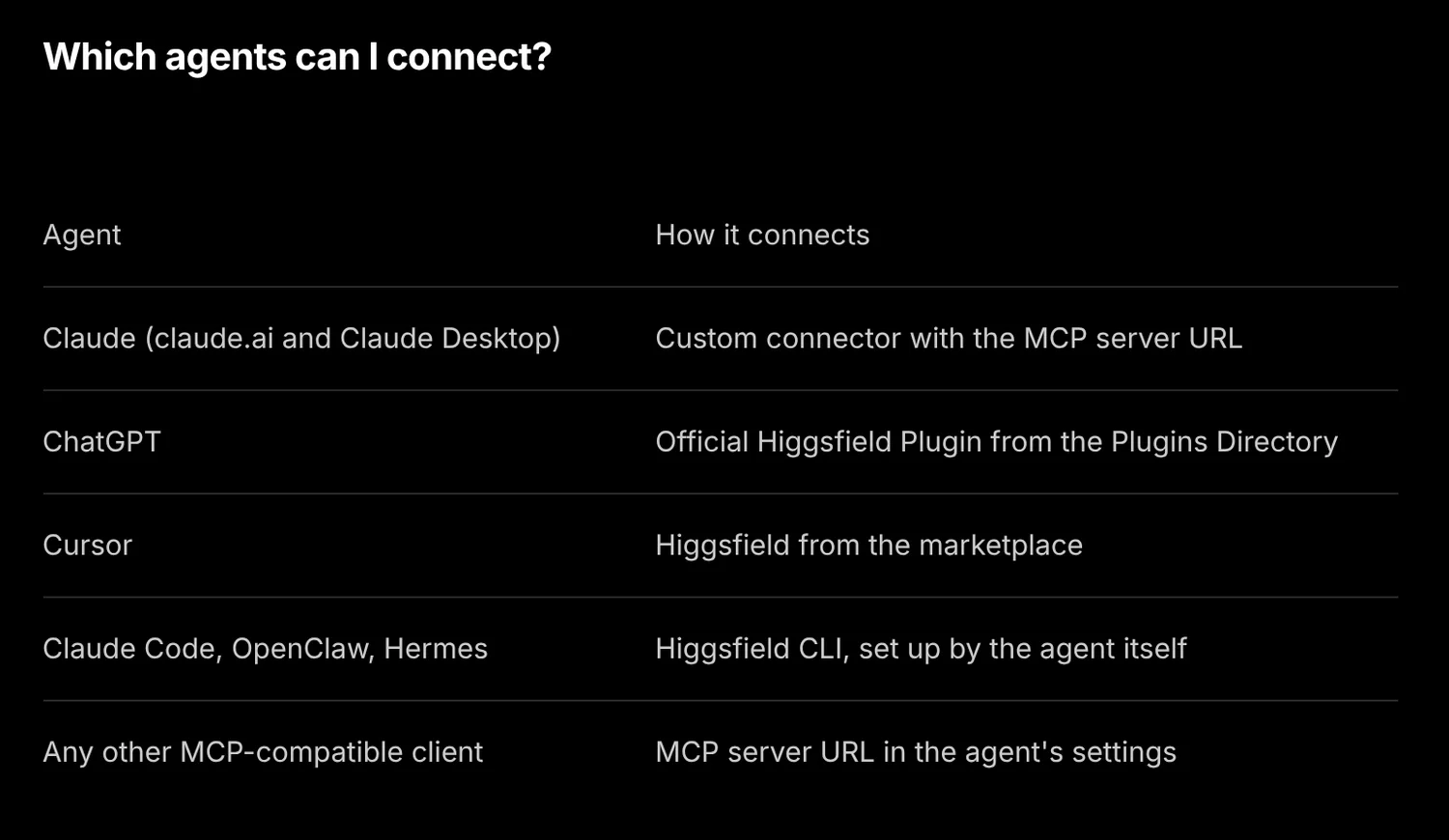
For MCP work, the main alternative is Claude, which created MCP and lets every plan, including Free, add custom connectors (Free is limited to one). Google Gemini and Microsoft Copilot are the other big general assistants. Pick the one your team already pays for, then check that the MCP servers you need list it as a supported client, the way Higgsfield lists Claude, ChatGPT and Cursor.
06Why should we stop using ChatGPT?
You do not have to, but there are fair reasons to be careful once you connect it to your tools. OpenAI itself warns that a connected MCP server can be hit by prompt injection, that a malicious server can ask for more data than it needs, and that write actions can change or delete data. Those risks apply to any AI assistant with tool access, not just ChatGPT. The fix is to connect only official servers, keep write tools switched off where you can, and read every confirmation.
07How much can you use GPT for free?
ChatGPT has a Free plan, but usage limits change often, so check chatgpt.com/pricing for today's numbers. For MCP specifically, OpenAI's help article does not list Free as a plan that can add custom MCP servers, checked 5 Nov 2026. If you want to try MCP without paying for an assistant, Claude's Free plan allows one custom connector.
More in AI automation