ChatGPT for small business
- Type
- Guide
- Updated
- Nov 5, 2026
- Read
- 11 min
- Written by
- Max Panych

ChatGPT can take a big share of the writing, research and admin off a small business owner's plate, but only if you pick the right plan and set it up around your own business. This guide covers the plans, the jobs worth giving it, prompts to copy, and the privacy settings to check first. It is part of my AI for business series.
maxpanychChatGPT
 Guide
On this page9 sections
- Step by step
- Which ChatGPT plan should a small business pick?
- What can ChatGPT do for small business owners?
- How do Projects, custom GPTs and plugins work for a business?
- Ready-to-copy ChatGPT prompts for small business
- Is my business data safe with ChatGPT?
- ChatGPT vs Claude for small business
- How to start using ChatGPT in your business this week
- FAQ
- ChatGPT Plus, the main plan for a solo owner (OpenAI, 5 Nov 2026)
- $20/mo
- ChatGPT Business billed monthly, or $20 billed annually, 2+ users
- $25/user
- ChatGPT Go, the cheapest paid plan, which may include ads
- $8/mo
| Plan | Price | What you get | Best for |
|---|---|---|---|
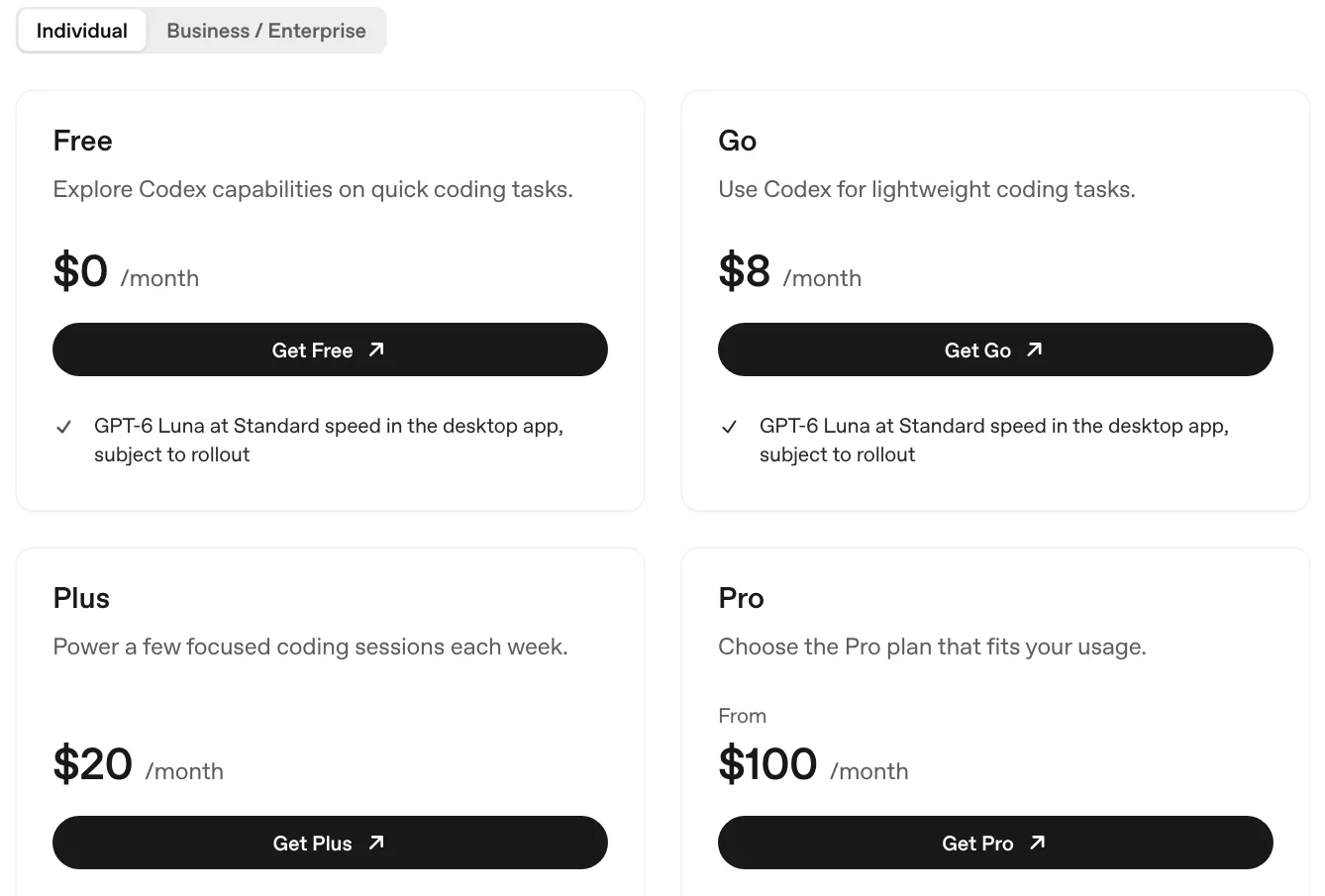
| Free | $0 | Limited uploads, image creation, voice and deep research; Projects; content may be used for training (opt-out available) | Trying it on one real job |
| Go | $8/mo | More messages with tools, uploads, image creation and memory; Projects and scheduled tasks; may include ads | Light, occasional use |
| Plus | $20/mo | Advanced reasoning models, expanded deep research, Projects, scheduled tasks and custom GPTs, ChatGPT Work | Owner using it daily |
| Pro | From $100/mo (plans at $100, $200 or $500) | Everything in Plus with much higher usage, Pro reasoning and unlimited image creation | Very heavy solo users |
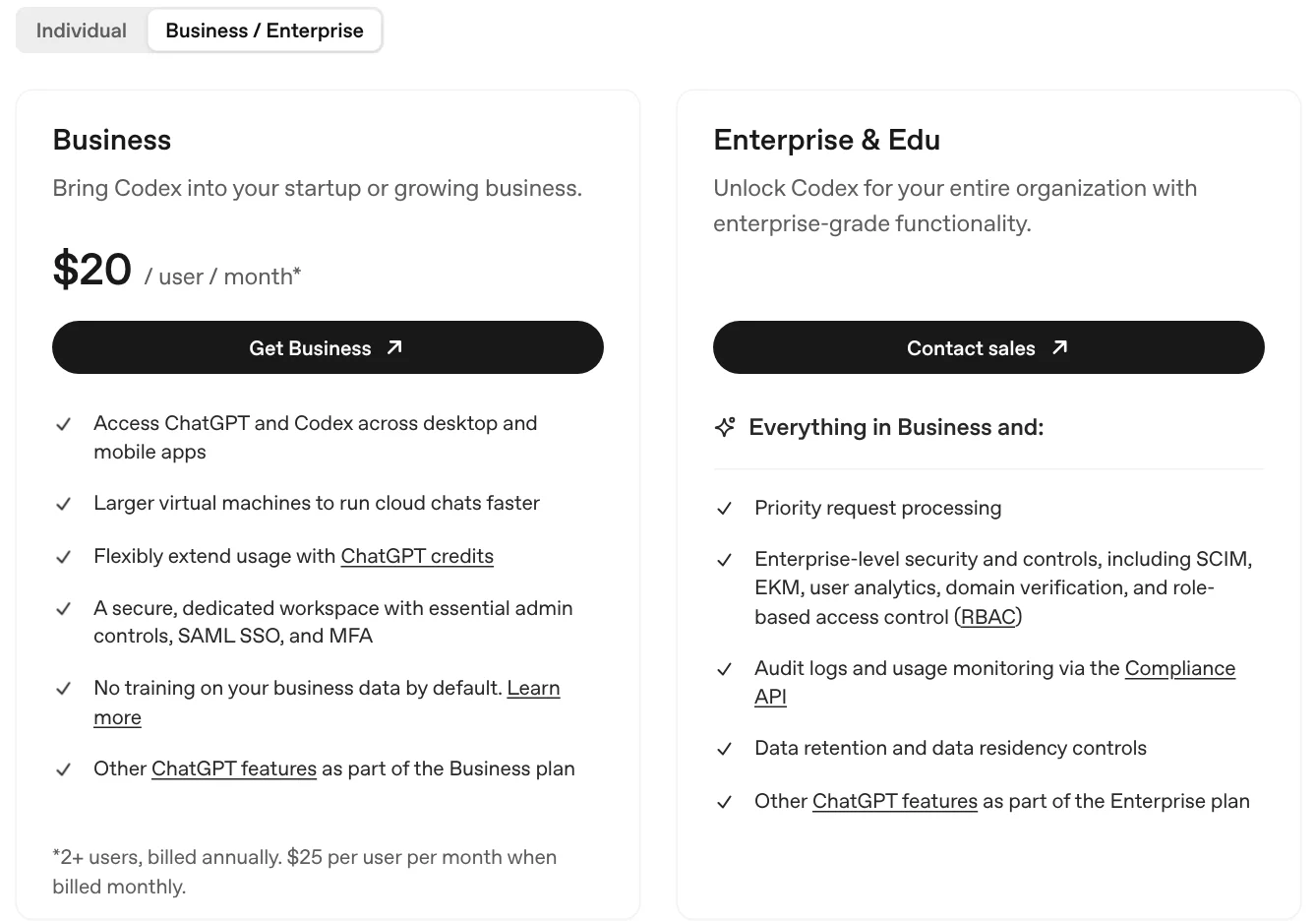
| Business | $25/user/mo, or $20/user/mo billed annually | Shared workspace, admin controls, SAML SSO, MFA, no training on business data by default | Teams of 2 or more |
Prices from OpenAI's pricing docs at learn.chatgpt.com/docs/pricing and plan features from chatgpt.com/pricing, both checked 5 Nov 2026. Enterprise is sold through OpenAI's sales team and is left out. Source
- ChatGPT account (Free to test, Plus for daily use)
- Your price list, terms and two or three past quotes
- Gmail, Google Drive or Slack (optional, via plugins)
- A second person on the team before you pay for Business
Test it on Free with one real job
Sign up at chatgpt.com and hand it a job you would normally do tonight, like replying to a tricky customer email. Free is enough to see if the output is useful, but uploads, image creation and deep research are limited.
Check your data controls before you paste anything
On Free, Go, Plus and Pro, OpenAI's pricing page says your content may be used to train its models, with an opt-out. Open Settings > Data controls and make your choice before you paste customer details.
Upgrade to Plus when you hit the limits
Once you use it most days, move to Plus ($20 a month). That is the plan that adds custom GPTs, scheduled tasks, advanced reasoning models and expanded deep research. Go ($8 a month) is cheaper, but OpenAI says it may include ads.
Build a Project for your business
Create a Project, add your price list, terms, a good past quote and a short note on how you work as Sources, and write project instructions (your tone, your service area, what never to promise). Every new chat in that Project starts with that context.
Install plugins for the tools you already use
Open the Plugins tab and install the ones you need, such as Gmail, Google Drive or Slack. A plugin may ask you to connect the account before its tools work, and it can only see what that account can already see.
Move the team to Business
When a second person starts using ChatGPT for work, set up ChatGPT Business: $25 per user a month, or $20 billed annually, for 2 or more users. You get one bill, admin controls, SAML SSO and MFA, and OpenAI says business data is not used for training by default.
Check every draft before it goes out
Read every quote, number and name before you send it. ChatGPT writes confidently even when it is wrong, so treat its work as a first draft from a fast new hire.
ChatGPT for small business means using OpenAI’s assistant to draft the quotes, emails, job ads, website copy and plans that pile up after the real work is done. For most owners, ChatGPT Plus at $20 a month is the right start, and ChatGPT Business at $25 per user a month (or $20 billed annually) is the plan once a team shares it.
I have spent 15 years in marketing, including time at Google, and I now run a construction company, Buildme, where AI handles a lot of our leads, quotes, emails and admin. This guide is part of my AI for business series. I write mostly from the owner’s side: what to pay, what to hand over, and where it goes wrong.
Claude is my daily driver for writing around jobs, and I cover it in a sister guide, Claude for small business. I also keep a ChatGPT account and use it alongside Claude, mostly for quick research and images, and I have run the same quote and email jobs through both to compare. The plan advice below is from OpenAI’s own pages, checked on 5 Nov 2026.
Which ChatGPT plan should a small business pick?
The plan table above comes from OpenAI’s pricing docs and the feature lists on chatgpt.com/pricing, checked on 5 Nov 2026. Here is how I would read it as an owner:
- Free ($0) is fine for a test. You get Projects, but uploads, image creation, voice and deep research are limited.
- Go ($8 a month) gives more messages with tools, more uploads, more image creation and longer memory. OpenAI’s pricing page says the plan “may include ads.” Good for light use, not for running your business on.
- Plus ($20 a month) is where a working owner should be. It adds advanced reasoning models, expanded deep research, expanded memory, “Projects, scheduled tasks, and custom GPTs,” and expanded access to ChatGPT Work on desktop, web and mobile.
- Pro (from $100 a month) comes in $100, $200 and $500 tiers. OpenAI’s docs say Pro plans currently have no five-hour limit on Codex and ChatGPT Work usage. Only worth it if Plus limits stop you most days.
- Business ($25 per user a month, or $20 billed annually) starts at 2 users. It adds a dedicated workspace with admin controls, SAML SSO and MFA, and no training on your business data by default.
ChatGPT monthly cost for a small business, USD
- Free$0
- Go$8
- Plus (1 owner)$20
- Business, 2 users, annual$40
- Business, 2 users, monthly$50
- Pro, lowest tier$100
- Pro, middle tier$200
My rule is simple. One person, Plus. Two or more people putting customer information into it, Business, because of how the data is handled. The smallest Business team, two users, costs $50 a month billed monthly or $40 a month ($480 a year) billed annually.
ChatGPT Plus for small business: is it enough?
For a solo owner, yes. Plus covers the three things that matter most for business use: Projects to hold your company context, custom GPTs and scheduled tasks for repeat jobs, and the stronger reasoning models for longer documents like proposals or plans. The thing Plus does not give you is a shared workspace. If your office manager logs into your personal Plus account, your chats, memory and billing are all mixed together, and you have no admin controls. That is the point to move to Business.
Tip: ChatGPT Business is cheaper per user on annual billing: $20 instead of $25. That saves $60 per user a year. Pay monthly for the first couple of months until you know the team actually uses it, then switch.
What can ChatGPT do for small business owners?
ChatGPT is best at work where you already know the answer and just hate writing it out. These are the jobs I would hand it first:
| Job | What you give ChatGPT | What you get back |
|---|---|---|
| Quotes and estimates | Your notes, measurements and price list | A tidy written quote with scope and exclusions |
| Customer replies | The customer’s message and the facts | A calm, clear reply you can edit and send |
| Review replies | The review text and what actually happened | A short, specific public reply |
| Job ads | The role, pay range, hours and must-haves | A job post plus screening questions |
| Website copy | Your services, area and a few real jobs | Service page drafts and FAQs |
| Business plan | What you sell, prices, costs, competitors | A first-draft plan with assumptions flagged |
| Numbers | A CSV of invoices or expenses | Totals, trends and anything odd |
Warning: ChatGPT will fill gaps with confident guesses. Never let it invent a price, a measurement or a legal term. If you work in the trades, my piece on whether ChatGPT can do construction estimates covers that risk, and my guide to AI for construction shows where it does help on site.
In my own side-by-side runs, ChatGPT was quick and good on short replies and review responses, and I still needed to correct prices and wording on longer quotes, the same as with Claude.
How do Projects, custom GPTs and plugins work for a business?
These three features are what turn ChatGPT from a generic chatbot into something that knows your company.
Projects: your business context in one place
OpenAI’s Projects docs describe a project as a place to “keep related chats, files, instructions, and sources together.” Each project has a Chats section and a Sources section, and the project instructions apply to every chat inside it. OpenAI suggests a project when work “will continue over time, produce more than one output, or depend on the same files and sources.” That describes almost every recurring job in a small business.
What I would put in a business Project: your price list, standard terms, two or three past quotes you were happy with, a short “how we work” note, and instructions like “write in plain US English, never promise a start date, always list what is not included.”
Custom GPTs: useful today, but on their way out
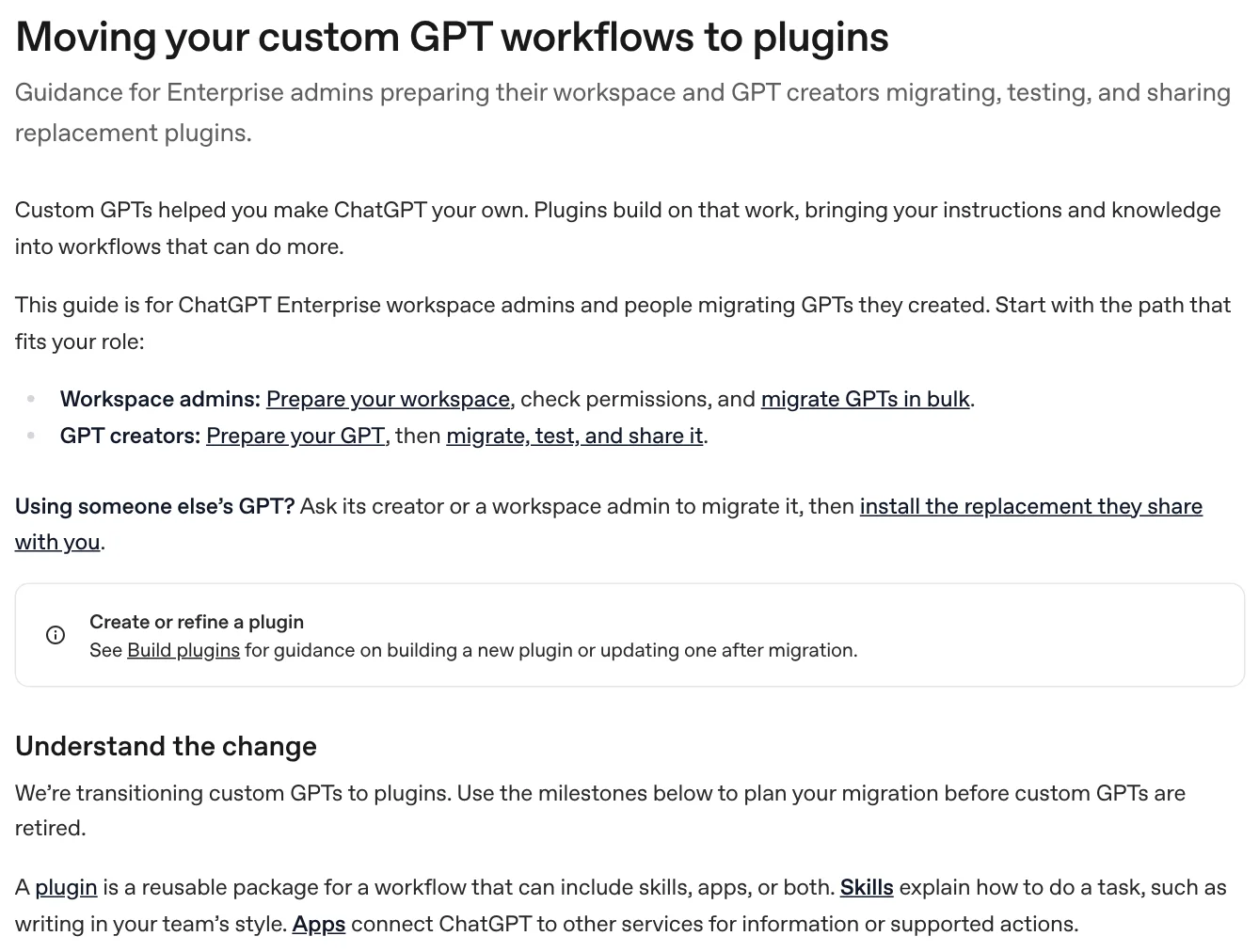
Custom GPTs are listed on Plus and Pro. But OpenAI’s docs say it is “transitioning custom GPTs to plugins” and that custom GPTs will be retired. Its migration guide is written for Enterprise workspaces and notes that timelines for other plans may differ, but the direction is clear.
My advice: do not build anything important on a new custom GPT now. Put your instructions in a Project, and use plugins for repeat workflows.
Plugins and apps: connect the tools you already use
OpenAI’s plugins docs explain that a plugin bundles skills (reusable instructions for a type of work) and connections to outside tools. The examples OpenAI gives include a Gmail plugin, a Google Drive plugin that works across Drive, Docs, Sheets and Slides, and a Slack plugin to summarize channels or draft replies. You install them from the Plugins tab, and a plugin may ask you to connect an account first.
The part owners should know: OpenAI says plugins respect your existing access, so connecting Google Drive only lets ChatGPT see the files your account can already open. On Business, OpenAI’s Business page shows plugins for tools like Slack, Asana, Figma and Gmail, and names Canva among other integrations.
Ready-to-copy ChatGPT prompts for small business
Paste these into your business Project, so ChatGPT already has your price list and terms. Swap everything in square brackets for your own details.
1. Written quote from rough notes
Act as the office manager for [business name], a [type of business] serving [area].
Turn my rough notes below into a written quote for [customer name].

Rules:
- Use only prices from the price list in this project's sources. If an item has no price, write [ADD PRICE] and keep going.
- Sections: short greeting, what we will do (numbered), what is not included, timing, payment terms, how to accept.
- Plain English, friendly, no hype. Max 350 words.

My notes:
[paste notes]
2. Reply to a Google review
Write a public reply to this Google review for [business name].
Review: "[paste review]"
What actually happened: [one or two lines of facts]

Keep it under 70 words. Thank them by first name, mention one specific detail from the job, and do not argue or share private details.
If the review is negative, acknowledge it, give one fact, and invite them to call [phone] or email [email].
Give me 2 options: one warmer, one more formal.
For more on tone and what to avoid, see my guide on how to respond to Google reviews.
3. Job ad with screening questions
Write a job ad for a [role] at [business name] in [city].
Pay: [range]. Hours: [hours]. Must have: [list]. Nice to have: [list].
Tone: direct and honest about the work, no corporate language.
Then write 5 screening questions I can send applicants by text, each answerable in one line, that help me spot people who will actually show up on time.
4. One-page business plan draft
Help me write a one-page business plan for [business idea or existing business] in [city].
Here is what I know:
- What we sell and the price: [details]
- Who buys it: [details]
- Monthly costs: [details]
- Main local competitors: [names]

Write: summary, customers, offer and pricing, marketing plan for the first 90 days, costs and break-even, top 3 risks.
Mark every number you did not get from me with [ASSUMPTION] and list those at the end so I can check them.
5. Monthly expenses check
Attached is a CSV export of our business expenses for [month or quarter].
1. Group the spending by category and give me totals in a table.
2. List any subscriptions or recurring charges, with the monthly cost of each.
3. Flag anything that looks duplicated, unusually high, or possibly personal.
Use only numbers that are in the file. If a category is unclear, say so instead of guessing.
Max’s take: The prompt matters less than the context. A short prompt inside a Project that holds your real prices beats a clever prompt typed into a blank chat every time.
Is my business data safe with ChatGPT?
It depends on your plan, so check this before staff start pasting in customer details. From OpenAI’s own pages, checked 5 Nov 2026:
| Free, Go, Plus, Pro | Business | |
|---|---|---|
| Content used to train OpenAI models | May be, with an opt-out available | Not by default |
| Encryption | TLS 1.2 in transit, AES-256 at rest | TLS 1.2 in transit, AES-256 at rest |
| Admin controls, SAML SSO, MFA | No | Yes |
| Shared billing and seat management | No | Yes |
Sources: the plan comparison and FAQ on chatgpt.com/pricing, the Business card on OpenAI’s pricing docs, and OpenAI’s ChatGPT Business page, which says “Your data is never used for training our models.” OpenAI’s docs also say the information ChatGPT uses while completing a task follows the data control settings you choose, which you can review under Settings > Data controls on web and mobile.
My practical rules, whatever the plan: never paste card numbers, bank logins or passwords. Strip names and home addresses you do not need. And if more than one person uses ChatGPT for customer work, put them on Business instead of personal accounts.
ChatGPT vs Claude for small business
I use both, so here is the honest side-by-side on what owners ask about. ChatGPT figures are from chatgpt.com/pricing and OpenAI’s pricing docs; Claude figures are from claude.com/pricing. All checked 5 Nov 2026.
| ChatGPT | Claude | |
|---|---|---|
| Free plan | Yes | Yes |
| Cheapest paid plan | Go, $8/mo (may include ads) | Pro, $20/mo or $17/mo billed annually |
| Main solo plan | Plus, $20/mo | Pro, $20/mo |
| Heavy-user plans | Pro at $100, $200 or $500/mo | Max $100/mo, Ultra $200/mo |
| Team plan | Business, $25/user monthly or $20 annually, 2+ users | Team, $25/seat monthly or $20 annually, 2 to 150 seats |
| Trains on team plan data by default | No | No |
| Reusable business context | Projects (Free through Pro) | Projects |
| Built-in image creation | Yes, limited on Free | Not built in; use connected tools |
| Small business package | No dedicated package | Claude for Small Business plugin |
On cost they are almost identical: $20 a month for one owner, $25 per seat monthly or $20 annually for a team. ChatGPT’s edges are the $8 Go plan and image creation built in. Claude’s edge for owners is a dedicated small business plugin. I lean on Claude for long proposals and writing in my own voice, and reach for ChatGPT for quick research, images and short replies. For the full feature-by-feature test, see my Claude vs ChatGPT comparison.
How to start using ChatGPT in your business this week
Pick the one job you put off most, usually quotes, follow-ups or review replies. Set up a Project with your real prices and terms, run that one job through ChatGPT every day for a week with the prompts above, and keep count of the time it saves. If it works, add the next job. If you would rather have someone build the whole setup for you, some AI automation companies do this for small businesses, but a well-built Project on a $20 Plus plan gets most owners most of the way there.
Questions people ask
01Can ChatGPT do a business plan?
Yes, it can write a solid first draft of a business plan if you give it the real inputs: what you sell, who buys it, your prices, your costs and your local competitors. Use the business plan prompt in this guide and ask it to mark every assumption. It cannot know your market numbers, so check any figure it gives you, and treat the result as a draft you edit, not a finished document for a bank.
02What is the cost of a ChatGPT business plan?
As of 5 Nov 2026, ChatGPT Business costs $25 per user a month billed monthly, or $20 per user a month billed annually, and it starts at 2 users, so the smallest team pays $50 a month or $480 a year. OpenAI's Business page also mentions Standard and Premium seats; the Premium seat price was not shown on the pages I checked. Enterprise pricing is through OpenAI's sales team.
03Can I put ChatGPT as a business expense?
Usually, if you use it for the business. The IRS says a deductible business expense must be both ordinary (common and accepted in your field) and necessary (helpful and appropriate for your business), and if something is partly personal you separate out the personal part, which is generally not deductible. A Business plan billed to the company is the cleanest case. Confirm with your accountant, because I am not a tax advisor.
04What is the future of OpenAI?
Nobody outside OpenAI knows, but its own documentation shows where ChatGPT is heading. As of November 2026, OpenAI's docs push ChatGPT Work for delegating whole tasks, plugins that bundle skills and app connections, and a migration away from custom GPTs, which its migration guide says will be retired. For a small business, that means building your workflows around Projects and plugins rather than custom GPTs.
05Is ChatGPT Plus worth it for a small business owner?
If you use it on real work most days, yes. At $20 a month it pays for itself if it saves you about an hour a month at almost any owner's hourly rate. If you only open it a few times a month, Free or Go ($8 a month) is enough.
06Does ChatGPT use my business data for training?
On Free, Go, Plus and Pro, OpenAI's pricing page says your content may be used to train its models, with an opt-out available in your data controls. On ChatGPT Business, OpenAI says it does not train on your business data by default. OpenAI's pricing FAQ also says data is encrypted in transit (TLS 1.2) and at rest (AES-256).
07Is there a ChatGPT discount for nonprofits?
Yes. OpenAI's pricing FAQ says nonprofits can get up to a 75% discount on ChatGPT Business or ChatGPT Enterprise through OpenAI for Nonprofits.
08Is ChatGPT or Claude better for a small business?
They cost the same where it counts: $20 a month for the main solo plan and $25 per seat monthly, or $20 annually, for a team. ChatGPT has a cheaper $8 Go plan and built-in image creation. Claude has a dedicated Claude for Small Business plugin. Run the same real job through both before paying for a year.
More in AI for business