AI for ecommerce
- Type
- Guide
- Published
- Nov 11, 2026
- Read
- 14 min
Written by
I always test the tools I write about, and always check prices and features against the official websites.

AI for ecommerce is about getting the repetitive jobs off your plate: product descriptions, photos, ad creative, support replies and email flows, plus getting found in ChatGPT and Google AI answers. Start with the AI already inside tools you pay for, like Shopify's Sidekick.
Running an ecommerce store means dealing with a hundred little jobs that somehow eat up your entire day. Writing product descriptions, editing photos, answering customer emails, creating ads, updating listings. Most of it isn't particularly difficult, but it all takes time.
This is where AI can make a real difference. We use it in our own ecommerce business to handle first drafts, clean up product photos and speed up customer communications. Not everything goes straight from AI to the customer, of course. There's still a human checking the work.
I've spent over 10 years working in SEO and now spend a lot of time exploring how AI is changing the way people discover products online. There's a lot more to ecommerce AI than generating product descriptions. In this guide, I'll walk through the tools actually worth using, what they cost, where AI can save you time, and how to make sure your products show up in Google and ChatGPT results.
On this page10 sections
- What can AI do for an ecommerce business?
- The best AI tools for ecommerce
- What ecommerce tasks can you automate with AI?
- How to implement AI in your ecommerce store
- How to get your products recommended by ChatGPT and Google
- 5 AI prompts for ecommerce store owners
- Where AI goes wrong in ecommerce
- How much does AI for ecommerce cost?
- How to measure the ROI of AI in ecommerce
- FAQ
At a glance
- forecast rise in AI-referred traffic to US retail sites this holiday season (Adobe, Sept 2026)
- 130%
- extra for Shopify's Sidekick AI assistant and the Shopify Flow automation app (Nov 2026)
- $0
- jobs in an ecommerce business AI can take on, ranked by how fast they pay off
- 9
What can AI do for an ecommerce business?
Here’s the angle most “AI for ecommerce” guides miss: this isn’t about AI tools. It’s about running the business with fewer hours wasted on jobs nobody enjoys. AI is brilliant at the repetitive work that piles up once the product exists, and pretty useless at the decisions that actually make you money. (This page is part of my AI by industry series.)
Here’s where I’d point it, ranked by how fast each job pays off. The time-saved column is my own estimate from running a store. Vendors will promise you more.
| Job | What AI does | Time saved per week (my estimate) |
|---|---|---|
| Product descriptions and SEO | Drafts copy from your specs | 3 to 5 hours |
| Product photos and video | Cleans up shots, makes lifestyle images | 2 to 4 hours |
| Marketing and ad creative | Writes and varies hooks and visuals | 2 to 3 hours |
| Customer service | Answers the repeat questions | 4 to 8 hours |
| Email marketing and personalisation | Drafts flows, picks products | 2 hours |
| Inventory and demand forecasting | Predicts sell-through and reorders | 1 to 2 hours |
| Customer insights and analytics | Finds your best and lapsing buyers | Not hours, better decisions |
| Recommendations and merchandising | Cross-sells and bundles | Hard to measure, watch average order value |
| Pricing and competitor research | Tracks what others charge | Not hours, better margins |
What AI is bad at: deciding what to sell, setting your final prices and calming down a customer who’s already furious. Keep those jobs. They’re the business.
Product descriptions and SEO
The best first job, because everything else reads from it: your ads, your emails, Google Shopping and every AI shopping answer. AI turns a spec sheet into a clean description in seconds. The catch is that it fills gaps with confident nonsense, so it only gets the facts you give it.
Product photography and video
AI cleans backgrounds, fixes lighting and puts your product into lifestyle scenes you’d never pay a photographer for. Use it to make more of the photos you already have, not to replace the truth. If the AI version looks better than the thing in the box, you’ve just bought yourself a return.
Marketing and ad creative
Ads need volume: ten hooks, five visuals, three headlines, test, repeat. That’s exactly the work AI makes cheap. Your job shrinks to picking what fits the brand and killing what doesn’t.
Customer service
Most support tickets are the same five questions: where’s my order, can I return this, what size, when will it ship, do you ship to me. An AI agent trained on your real policies can answer those in seconds, day or night, and hand everything else to a person.
Email marketing and personalisation
Your flows (welcome, abandoned cart, post-purchase) send every day whether you look at them or not. AI drafts them, writes subject line variations and drops the right products into each email. That last bit is where personalisation actually earns money.
Inventory and demand forecasting
Running out of a bestseller in December hurts. So does a shelf of stock nobody wants. Paste a sales export by SKU into an AI assistant, or ask your platform’s built-in AI, and you get a 90-day sell-through forecast and a reorder list. It’s a first pass: it doesn’t know about your upcoming promotion or that your supplier takes six weeks.
Customer insights and analytics
This is the one store owners skip, and it’s where the money is hiding. Shopify’s customer segments are dynamic lists that update themselves, and once a store passes 100 sales Shopify adds a “predicted spend tier” (High, Medium or Low) based on how often and how much each customer buys. Pair that with an AI assistant reading your order export and you can answer questions like “who bought twice last year and nothing since?” in minutes instead of an afternoon of spreadsheets.
Product recommendations and merchandising
“Bought together” blocks, bundles and post-purchase cross-sells are old ideas. AI just picks the products better. Turn on what your platform and email tool already include before paying for a separate personalisation app.
Pricing and competitor research
AI can check competitors’ public prices, summarize their offers and flag where you’re far above or below the market. Use it to spot opportunities. Don’t let it change your prices automatically. A pricing bot racing a competitor’s pricing bot to the bottom is a great way to sell more and make less.
The best AI tools for ecommerce
Slightly annoying truth: you probably already pay for half of them. Most store owners have three or four AI features sitting switched off inside software they open every day. Turn those on before you add another subscription. Prices below come from each vendor’s own pricing page, checked Nov 2026.
Shopify Sidekick and built-in AI
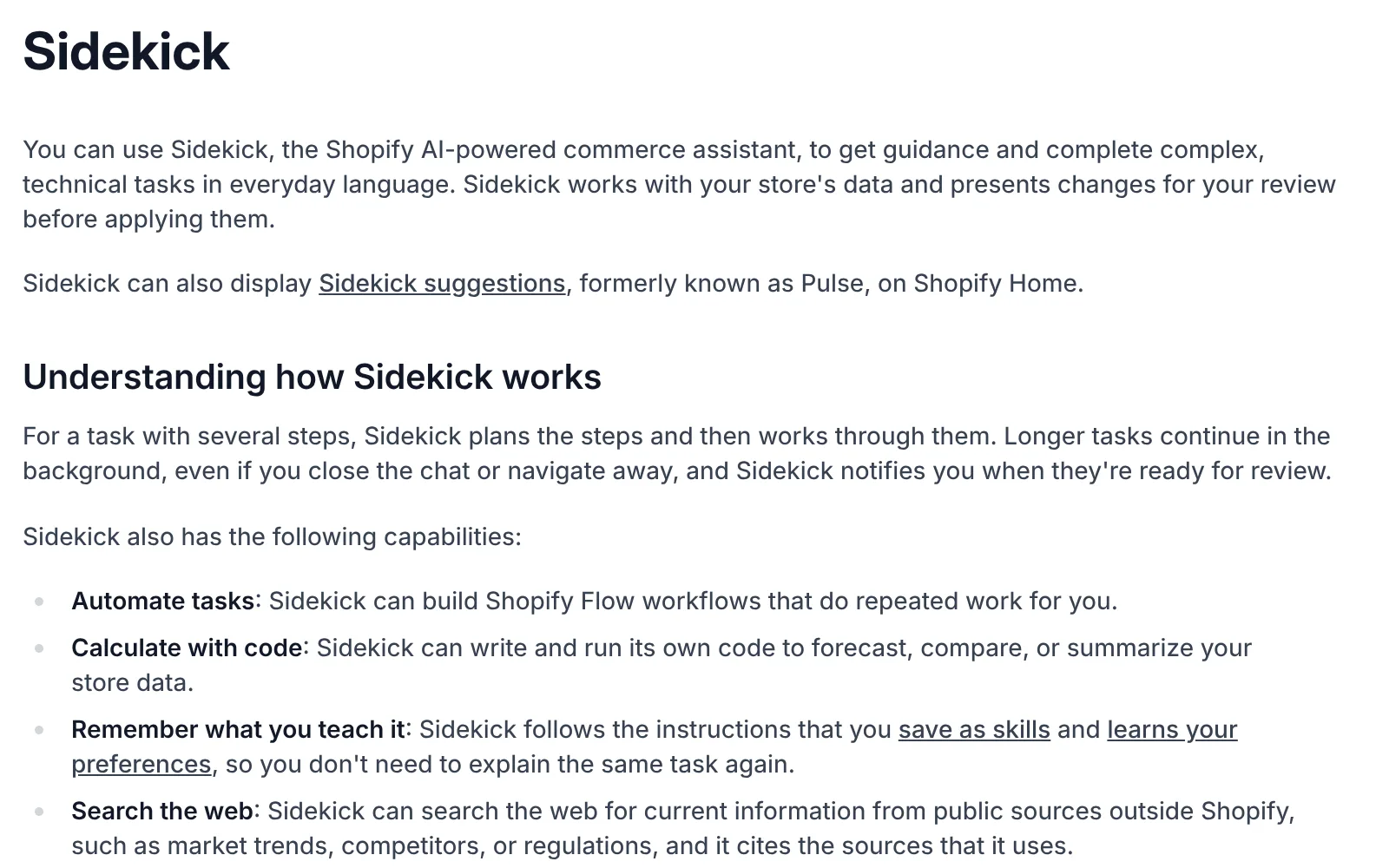
On Shopify that’s Sidekick, and it costs nothing extra. Shopify’s pricing page lists it on every plan, from Basic at $29 a month billed yearly ($39 monthly). Its Sidekick page adds that features and usage limits vary by plan. Shopify’s help center says it can create product descriptions and images, build Shopify Flow automations, and “write and run its own code to forecast, compare, or summarize your store data.” In plain English: it writes, it edits images, it automates and it crunches your sales numbers. Not bad for free.
ChatGPT vs Claude
ChatGPT Plus and Claude Pro are both $20 a month, and Claude Pro drops to $17 a month on annual billing. Both have free plans, enough to test every prompt on this page. Pick one, not both. I use Claude for most writing and ChatGPT for quick research and images, but a store only needs one. I compared them for business writing in ChatGPT for small business and Claude for small business.
AI tools for product photography
Sidekick handles basic image edits for free. For lifestyle shots and short product videos I’d look at Higgsfield, which bundles several image and video models on one credit balance. Plans start at $19 a month for Starter. Great for lifestyle shots, less great if the AI quietly changes the color of what you sell (more on that below). My Higgsfield AI pricing breakdown has the cost per image and per video.
AI email marketing tools
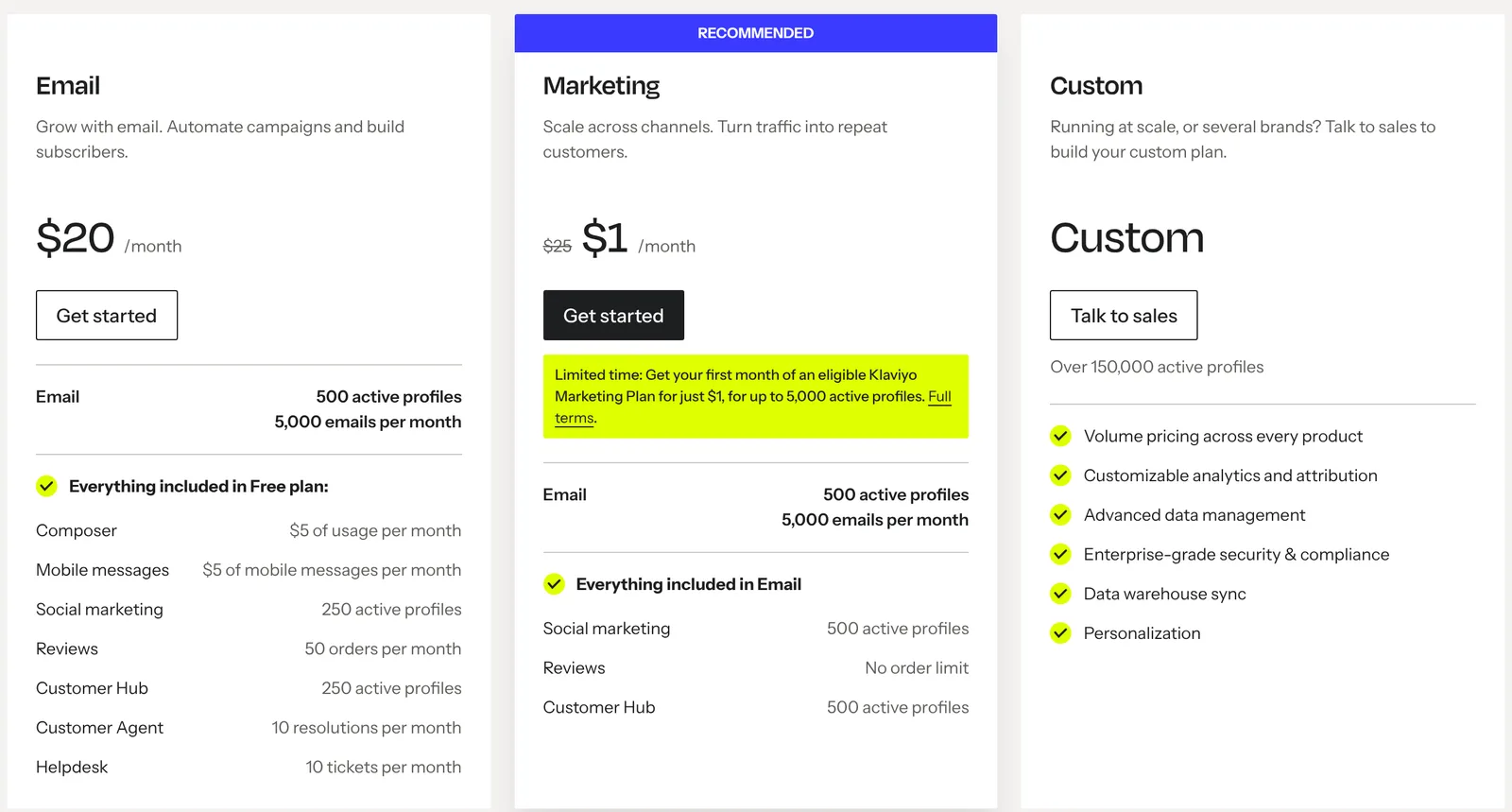
Klaviyo’s free plan covers 250 active profiles and 500 emails a month. The Email plan is $20 a month for 500 profiles and 5,000 emails, and includes $5 a month of Composer, Klaviyo’s AI marketing agent, plus a Customer Agent with 10 resolutions a month. SMS is an add-on.
Omnisend has a free plan for 250 contacts. Its AI product recommender, which Omnisend says “analyzes your audience’s browsing and purchase behavior to insert the right products into each email,” sits on the Pro plan: $177 for three months (about $59 a month), or $41.30 a month while the current 30% prepay discount runs.
AI customer support platforms
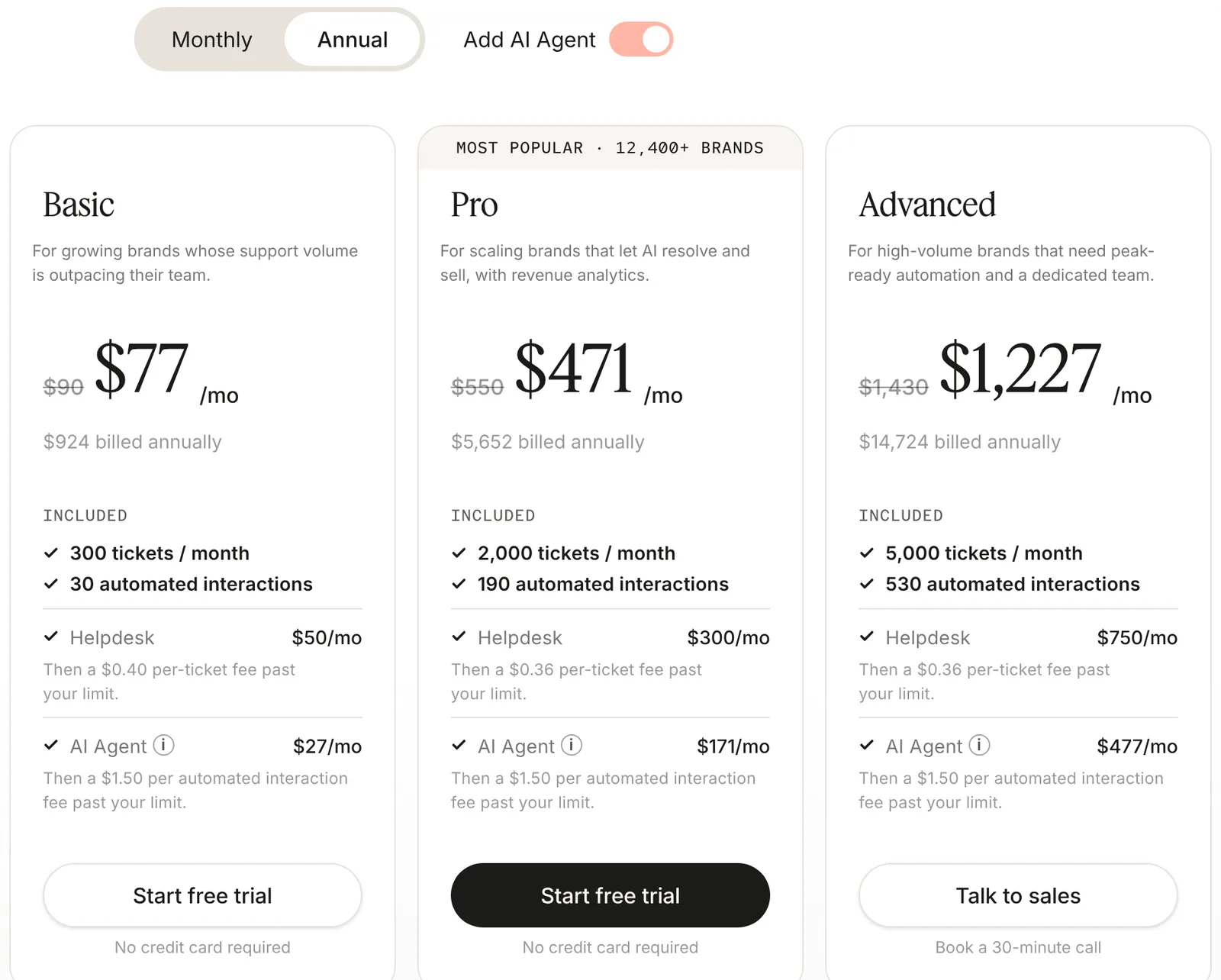
Gorgias puts an AI Agent on every plan. With the AI Agent switched on and annual billing, Basic is $77 a month for 300 tickets and 30 automated interactions, then $1.50 per extra automated interaction. That math works once you’ve got real ticket volume. At 40 tickets a month, you’re paying $77 to skip a job you could do over a coffee.
AI automation tools
Start with Shopify Flow. Shopify’s help center calls it “an ecommerce automation platform” and says it’s a free app on the Basic, Grow, Advanced and Plus plans. It handles anything that happens inside your store: tagging orders, flagging stock, alerting you.
For anything that crosses apps, use Zapier or n8n. Zapier Professional is $19.99 a month billed yearly for 750 tasks, and its Free plan can’t publish a Zap with an AI step, so budget for paid. n8n Cloud Starter is €20 a month billed annually for 2,500 executions, or free if you self-host. My Zapier AI automation guide and n8n pricing breakdown go deeper. My rule: Flow first, Zapier when you want it easy, n8n when the volume makes Zapier expensive.
What ecommerce tasks can you automate with AI?
This is where AI stops being a writing tool and starts changing how the business runs. Writing a product description saves you ten minutes once. An automation saves you ten minutes every single day, forever. The ones I’d build first:
- Sorting customer enquiries. AI reads each new email and tags it: order status, return, wholesale, complaint. The urgent ones jump the queue.
- Order updates and follow-ups. A personal thank-you and a review request after delivery, written by AI, sent automatically.
- Low-stock alerts. A message the moment a bestseller drops below two weeks of stock, not when it hits zero.
- A daily sales summary. Yesterday’s orders, revenue, top products and anything odd, in your inbox before you’ve had coffee. On n8n that’s one scheduled run a day, about 30 executions a month.
- Marketing content on a schedule. Product-of-the-week posts drafted from your catalog, waiting for your approval.
- Keeping your CRM in sync. New customers and orders flow into your CRM without anyone copying and pasting.
Here’s one real workflow, end to end:
Example: an order that handles its own follow-up
- 1A customer places an order in Shopify.
- 2Shopify Flow, Zapier or n8n catches the new order.
- 3AI reads it and tags it: first-time buyer, repeat customer, gift, or wholesale-sized.
- 4The customer gets a post-purchase email written for that tag, not a generic one.
- 5Your CRM updates the customer record and segment.
How to implement AI in your ecommerce store
The sections above explain the why. This is the order. Product data comes first because everything after it reads from it. Skip it and every step inherits the mess.
You'll need
- Your store platform's built-in AI (Shopify Sidekick and Shopify Flow on Shopify)
- ChatGPT or Claude (free plan to start)
- Your email tool (Klaviyo, Omnisend or similar)
- A support helpdesk with an AI agent, if you get 300+ tickets a month
- Zapier or n8n, for anything your platform can't automate
- Google Merchant Center account
Start with your product data
Clean titles, full attributes (size, material, color, use case) and one honest description per product. Every other step, and every AI shopping answer, reads this data. Do it in batches of 20 so you actually check what AI writes.
Improve product listings and images
Rewrite your top sellers first with the product description prompt below, then upgrade their photos. Keep one real, unedited photo per product so buyers see what actually arrives.
Automate customer support
Export your last 200 tickets, find the questions that repeat (order status, returns, sizing, shipping times) and let an AI agent answer only those, from your real policies. Everything else goes to a person.
Build automated marketing workflows
Start with the flows that run every day: welcome, abandoned cart, browse abandonment and post-purchase. Let your email tool's AI draft them, then you edit the subject lines and offers.
Introduce personalisation
Turn on product recommendations in emails and on product pages, then split customers into a few real segments (first-time buyers, repeat buyers, lapsed) and give each one different messages.
Automate inventory and reporting
Set a low-stock alert, a weekly reorder forecast and a daily sales summary. These are boring to build and the ones you'll be most glad you did.
How to get your products recommended by ChatGPT and Google
This is the part most store owners ignore, and it’s the one I’d worry about. Everything else on this page saves you time. This one brings you customers. It’s also where my agency spends most of its time now. Adobe expects AI traffic to US retail sites to rise 130% year over year this holiday season, according to its September 2026 forecast.
ChatGPT. OpenAI’s merchant page says Shopify and Etsy sellers’ catalogs are “already integrated, and no additional setup or application is required.” Other stores apply to share a product feed, and purchases are completed on your own site, with “no fees on purchases that start in ChatGPT.”
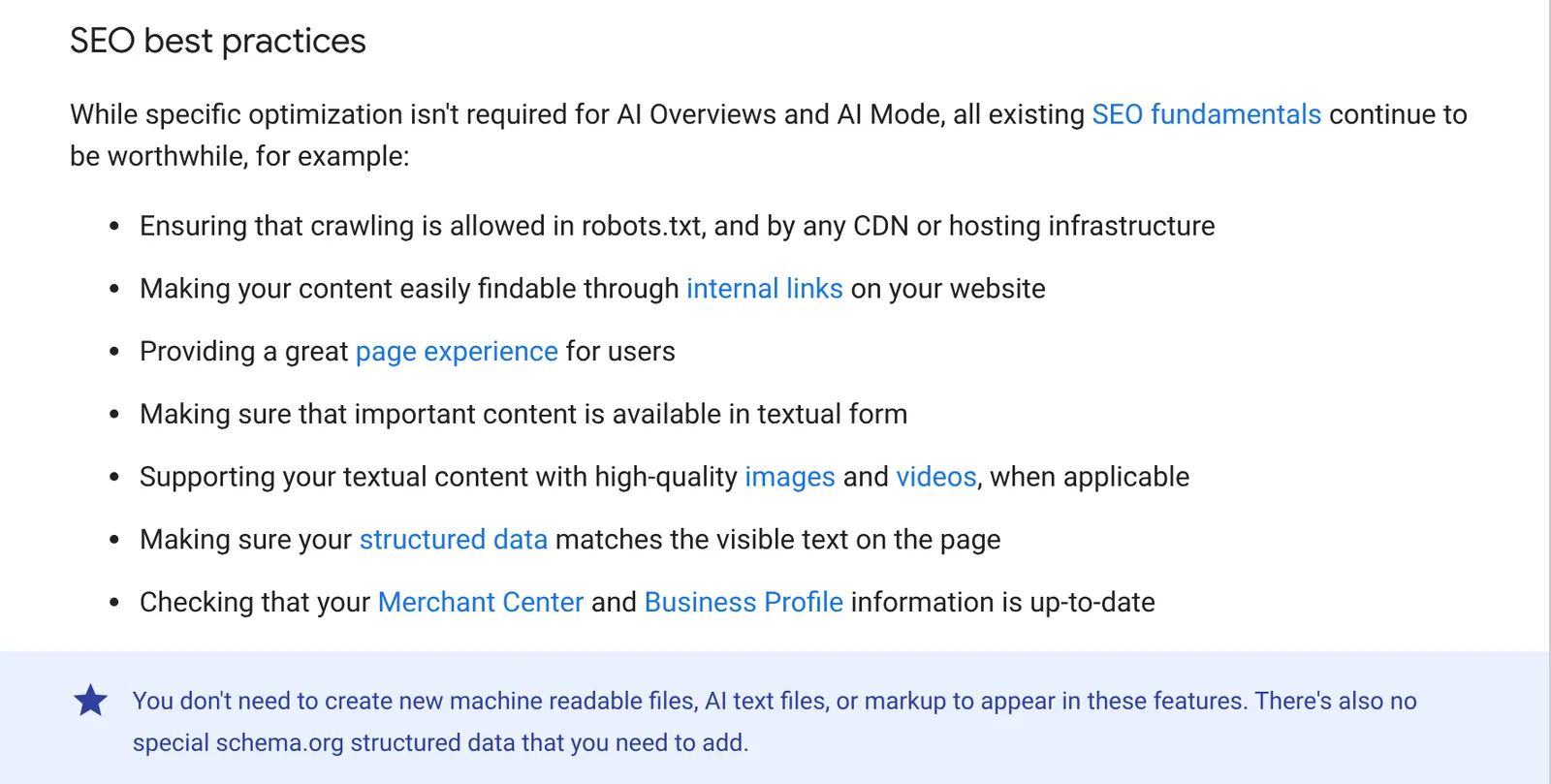
Google AI Overviews and AI Mode. Google’s AI features guide says there are no extra requirements beyond being indexed with a snippet. Its list of what still matters reads like a store owner’s checklist.
What I’d do, in order:
- Fill your product feed and Merchant Center completely. Price, stock, GTIN, shipping and return policy. Gaps here are the most common reason I see products left out of shopping answers.
- Match product structured data to the visible page. Price and availability in your Product markup must equal what a shopper sees.
- Write product descriptions that answer questions. AI answers pull specifics: “Is it machine washable?”, “Does it fit a 15-inch laptop?” If the answer isn’t in text on the page, it can’t be quoted.
- Earn reviews and third-party mentions. AI answers lean on reviews, comparison articles and Reddit threads. Ask happy customers for reviews and reply to every one, my guide on how to respond to Google reviews has templates.
- Check your AI search visibility. Make sure robots.txt and your CDN’s bot settings don’t block AI crawlers. I’ve seen stores block OAI-SearchBot, OpenAI’s search crawler, and then wonder why ChatGPT never mentions them. Then ask ChatGPT and Google’s AI Mode the questions your customers ask, and see who gets named.
And skip anyone selling you an “llms.txt for AI rankings” package. Google says outright you don’t need new AI text files. Spend the money on better product photos.
5 AI prompts for ecommerce store owners
Paste these into ChatGPT, Claude or Sidekick and replace the brackets. Each one forces the AI to work from your facts, which is the whole trick.
1. Product description
Write a product description for [product name] for our store, [brand], which sells [what you sell] to [who buys it].

Facts (use only these, do not add features):
[paste specs, materials, dimensions, care, what is in the box]

Rules:
- First line answers what it is and who it's for.
- Then 4 bullet points: the specific benefits, each tied to a fact above.
- Then a short "Good to know" section answering the 3 questions buyers ask most: [sizing / compatibility / shipping].
- Plain US English, no hype words, under 180 words.
- List any question you could not answer from the facts at the end, so I can fill it in.
Nobody ever bought a candle because the description called it “luxurious and versatile.” Specifics sell, and they’re also what AI answers quote.
2. Product photography brief
I sell [product] to [who buys it]. Write 5 lifestyle photo concepts for it.

For each one give: the scene, the setting, the light, the props, who (if anyone) is in the shot, and one line on why this buyer would care.

Rules:
- The product must look exactly like the real one: [color, size, material]. Never change it.
- Realistic, not glossy stock photo.
- Then write each concept as a ready-to-use image prompt.
3. Ad creative
Write ad variations for [product], priced at [price], for [platform: Meta / TikTok / Google].

Audience: [who they are and what they're struggling with].
Proof we can use: [reviews, numbers, guarantees, only real ones].

Give me 10 hooks (under 10 words each), 5 headlines and 3 short scripts of 15 seconds. Mix angles: problem, result, objection, social proof. No claims beyond the proof above.
4. Customer support reply
You answer customer emails for [store name]. Tone: [friendly, short, no corporate phrases].

Our policies (only use these):
[shipping times, returns window, refund rules, exchanges]

Customer email:
[paste email]

First tell me in one line what they want and how they feel. Then draft the reply. If the policy doesn't cover it, don't invent anything, say "NEEDS A HUMAN" and why.
5. Product research
I'm considering adding [product idea] to my store, [brand], which sells [what you sell] to [who buys it].

Help me decide. Cover:
- Who would buy it and why, in their words.
- The 5 most common complaints buyers have about similar products (from reviews you can find).
- How competitors price and position it.
- What it would need to cost me to make a [target]% margin at a typical price.
- Your honest verdict: add it, test it, or skip it, and why.

Mark anything you are guessing.
Where AI goes wrong in ecommerce
- Invented product facts. AI will happily add a feature, a material or a certification your product doesn’t have. That’s a return, a chargeback or worse.
- Photos that oversell. AI can put your hoodie on a model in Lisbon. It can’t make it the right size. Edited images must still show the real color and fit.
- Support bots without limits. A chatbot that promises next-day delivery to Alaska is a refund with extra steps. Restrict it to questions your policies actually answer.
- Same copy as everyone. Unedited AI text across 500 products reads identical to your competitors’. Add one detail only you know per product.
- Customer data. Don’t paste order exports with names, emails and addresses into free AI tools. Strip them first or use a business plan with the right data settings.
My own early mistake was letting AI rewrite all our descriptions in one go. A dozen had small factual errors, and we only caught them when customers asked. Do 20 products, check them properly, then scale.
How much does AI for ecommerce cost?
Less than one part-time hire, by a long way. Here’s what a realistic stack costs at three stages, using the prices above:
| Stage | What you use | Monthly cost |
|---|---|---|
| Just starting | Sidekick, Shopify Flow, free ChatGPT or Claude, Klaviyo free | $0 on top of Shopify |
| Growing store | Add ChatGPT Plus or Claude Pro, Klaviyo Email, Zapier Professional | About $60 |
| Busy store | Add Gorgias Basic with AI Agent and Higgsfield Starter | About $156 |
What these AI tools cost a store per month, USD
- Shopify Sidekick and Flow (with any plan)$0
- Claude Pro, annual billing$17
- Higgsfield Starter$19
- Zapier Professional, billed yearly$19.99
- ChatGPT Plus or Claude Pro$20
- Klaviyo Email plan$20
- Omnisend Pro, full price$59
- Gorgias Basic with AI Agent, annual$77
The tools are the cheap part. The real cost is the hours you spend setting them up and checking their work in the first month. Budget for that, not just the subscriptions.
How to measure the ROI of AI in ecommerce
My rule: pick one number per job before you start, and write it down.
| Job | The number to watch |
|---|---|
| Product listings | Hours per week spent on listings |
| Customer service | First-response time and tickets handled by a person |
| Revenue per recipient | |
| Product photos | Conversion rate and return rate on those products |
| Forecasting | Stockouts on bestsellers |
| AI search | Visits and orders from chatgpt.com and AI answers in your analytics |
Check it again after 30 days. If nothing moved, cancel the tool, no matter how clever the demo looked. For a different industry’s take on the same approach, see AI for construction.
Questions people ask
01How is AI used in ecommerce?
For product copy and photos, ad variations, support replies, email flows, recommendations, customer insights, forecasting and pricing research. The table at the top ranks them by how fast they pay off.
02What is the best AI tool for ecommerce?
There isn't one. Start with the AI built into your platform (Sidekick and Flow on Shopify), add ChatGPT or Claude for writing, then your email tool's AI. Pay for a support AI agent only once ticket volume justifies it.
03How much does AI for ecommerce cost?
You can start for $0. A growing store's stack runs about $60 a month, a busy one about $156. The cost section above breaks it down tool by tool.
04Can AI write my product descriptions?
Yes, and it's the best first job. Give it real specs, materials and sizing, ask for your brand voice, and check every claim against the product. Unchecked AI copy is how stores end up promising features they don't have.
05How do I get my products to show up in ChatGPT?
OpenAI says Shopify and Etsy catalogs are already integrated. Other merchants apply to share a product feed. Either way, clean product data and crawlable product pages matter most. The AI search section above has the checklist.
06Can AI run an ecommerce store on its own?
No. It can take most of the repetitive work, but deciding what to sell, setting prices and handling an upset customer are still your job. Treat AI like a fast new hire whose work you check.
More in Industries