Free AI for construction estimating
- Type
- Pricing
- Published
- Nov 11, 2026
- Read
- 8 min
Written by
I always test the tools I write about, and always check prices and features against the official websites.

Yes, free AI for construction estimating exists: ChatGPT, Claude and Gemini's free plans draft line items and scopes from your notes. AI takeoff tools mostly offer 7 to 30 day trials, then cost $100 to $300 a month. STACK keeps a limited free version.
Estimating is the job nobody on site wants. You've walked the house, you know roughly what it'll take, and now there's an evening of typing line items, scope wording and exclusions before the client sees a number.
I run several companies, including a construction company, and I use Claude every day, ChatGPT too. Our estimates still start with a site visit and our own price list. I use Claude to turn site notes into line items and clear scope wording, never to set the price.
Below: which AI estimating tools are actually free, what each trial gives you, a prompt to copy and how to check the result before it goes out.
On this page6 sections
At a glance
- ChatGPT, Claude and Gemini free plans, enough to draft an estimate from your notes
- $0
- PlanSwift's free trial, with every AI takeoff tool switched on (checked Nov 2026)
- 14 days
- Handoff Flex billed annually, the lowest entry price of the AI estimating apps I checked
- $119/mo
Is there free AI for construction estimating?
Yes, but “free” means three different things here, and only one of them lasts. Vendors are happy to let you blur them. This page is part of my AI by industry series. If you want the wider picture of where AI helps a contractor, start with my guide to AI for construction.
- Free AI assistants. ChatGPT, Claude and Gemini all have a $0 plan. They turn your notes into a tidy estimate, scope and exclusions. They can’t measure a drawing or know today’s lumber price.
- Free versions of estimating software. Rare. STACK has a free version of its takeoff tool, capped hard, and Houzz Pro has a free plan that includes estimates.
- Free trials. This is what most “free AI estimating software” means: 7, 14 or 30 days with the real tool, then a bill.
So drafting estimates with AI is free forever. AI that reads your plans and counts fixtures costs money after the trial.
AI tools for construction estimating: free plans, trials and prices
I checked every vendor’s own pricing page on 11 Nov 2026. If a tool hides its price, it isn’t in the table.
| Tool | Free option | Paid entry price | What free actually gives you |
|---|---|---|---|
| ChatGPT | Free plan | Go $8/mo, Plus $20/mo | Unlimited text chats, limited uploads, about 12 pages of text per input on the fast model |
| Claude | Free plan | Pro $20/mo, or $17/mo billed annually | Usage limits every 5 hours and every week, file creation, up to 5 Projects |
| Gemini | Free with a Google account | Google AI Plus $4.99/mo, AI Pro $19.99/mo | Flash-Lite model, Deep Research, Canvas and Gems |
| STACK | Free version of Takeoff & Estimate | As low as $299/user/mo | Up to 2 projects at a time for 7 days, 10 takeoffs per project, no cost data, API or export |
| Houzz Pro | Free plan, plus a 30-day trial | Pro $199/mo | Free plan lists 3D Floor Planner, Estimates and Invoicing. AI takeoffs are on paid plans |
| PlanSwift | 14-day trial, no card | Essential $2,000/yr per seat, Core $3,000/yr | Full PlanSwift Core, including Auto Takeoff and the other AI tools |
| Handoff | 7-day trial on Flex | Flex $119/mo billed annually | Flex: 50 AI usage credits a month, AI proposals, voice-to-estimate, 2 users |
| Kreo | 7-day trial | Essential $100/user/mo, billed annually only ($1,200/yr) | Test the product on your own drawings |
| Buildxact | 14-day trial | Foundation $199/mo, Blu Estimate Generator +$99/mo | Trial contents not listed on the pricing page |
| Joist | 14-day trial (free plan discontinued) | Basics $10/mo, up to 5 documents a month | Full access to every Joist Run feature for 14 days |
| Togal.AI | None listed, demo first | Growth $299/user/mo billed yearly | Nothing free |
From each vendor's own pricing page, checked 11 Nov 2026. Procore doesn't publish estimating prices (quote on request), and Beam AI lists annual licenses from $8K per trade with no free trial, so both are left out. Source
A few things the table doesn’t show:
- ChatGPT Free takes about 12 pages of text per message on its fast model, against about 40 on Go and Plus. Fine for notes, tight for a spec book.
- STACK’s free version is a test drive with a parking brake on: no export means you can’t send the takeoff anywhere useful. Its paid Takeoff & Estimate plan starts at $299 per user a month.
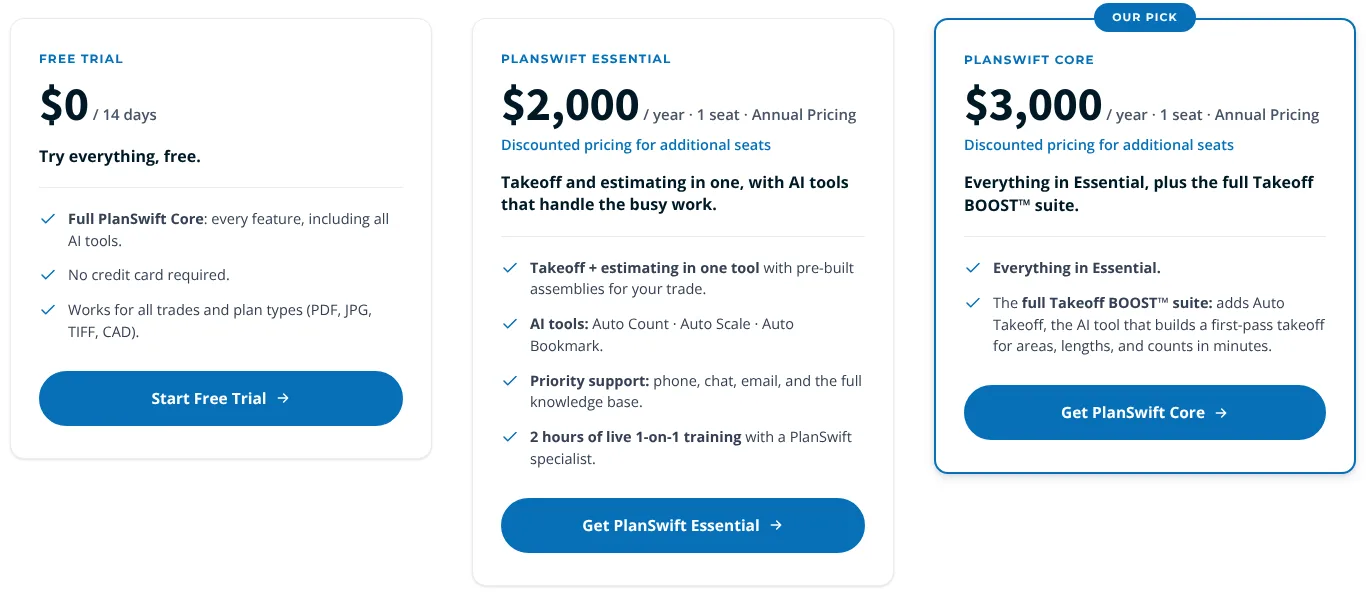
- PlanSwift gives the most honest trial of the lot. The trial card says “every feature, including all AI tools,” no credit card. After that, Essential is $2,000 a year for one seat (about $167 a month), with Auto Count, Auto Scale and Auto Bookmark. Core is $3,000 a year (about $250 a month) and adds Auto Takeoff, which PlanSwift says builds a first-pass takeoff for areas, lengths and counts in minutes.
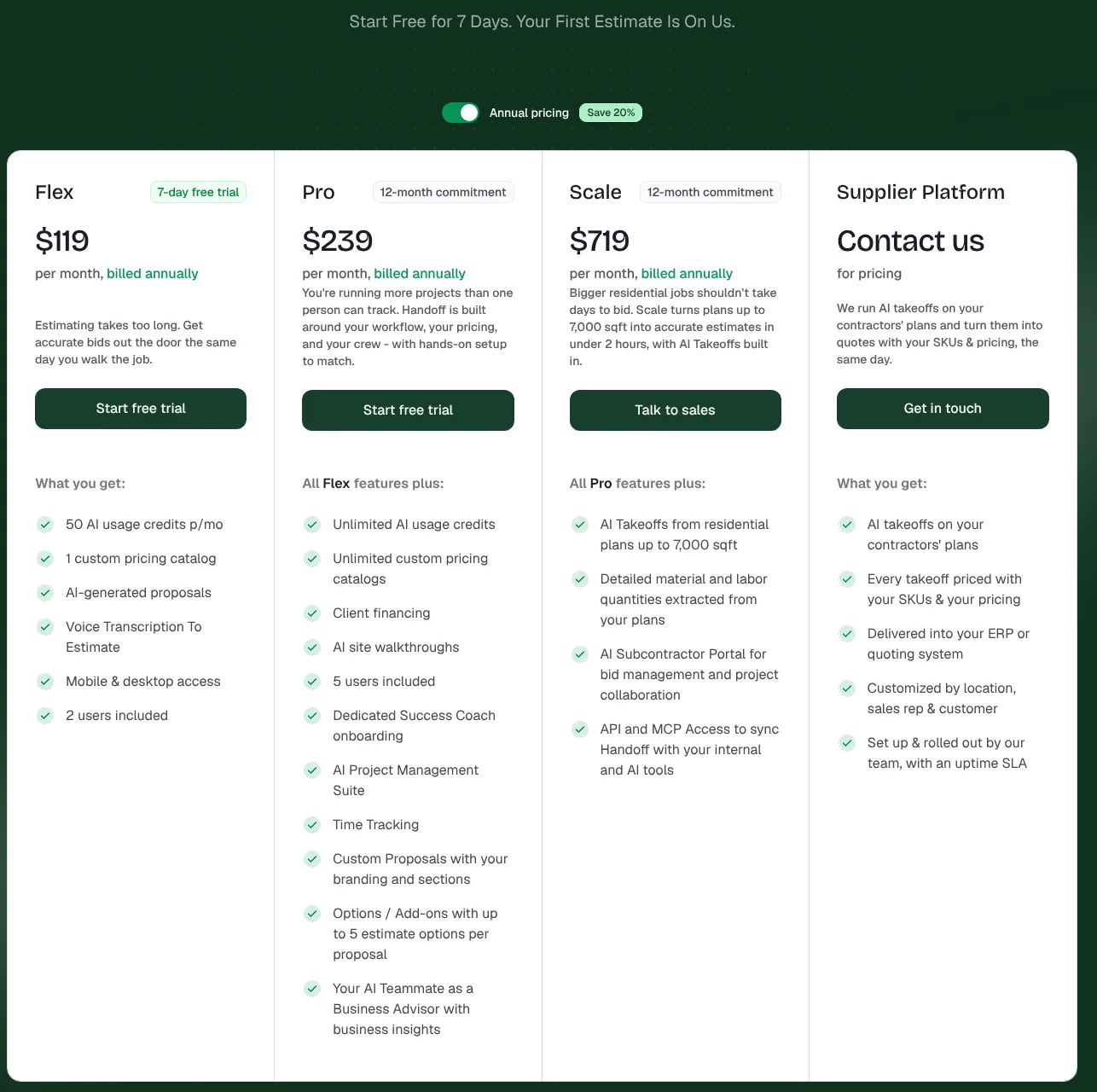
- Handoff is built for residential remodelers and pitches “Your First Estimate Is On Us.” The 7-day trial sits on Flex, which is $119 a month billed annually and includes 50 AI usage credits a month and 2 users. Pro is $239 a month on a 12-month commitment. AI takeoffs from plans (up to 7,000 sq ft) only come with Scale at $719 a month.
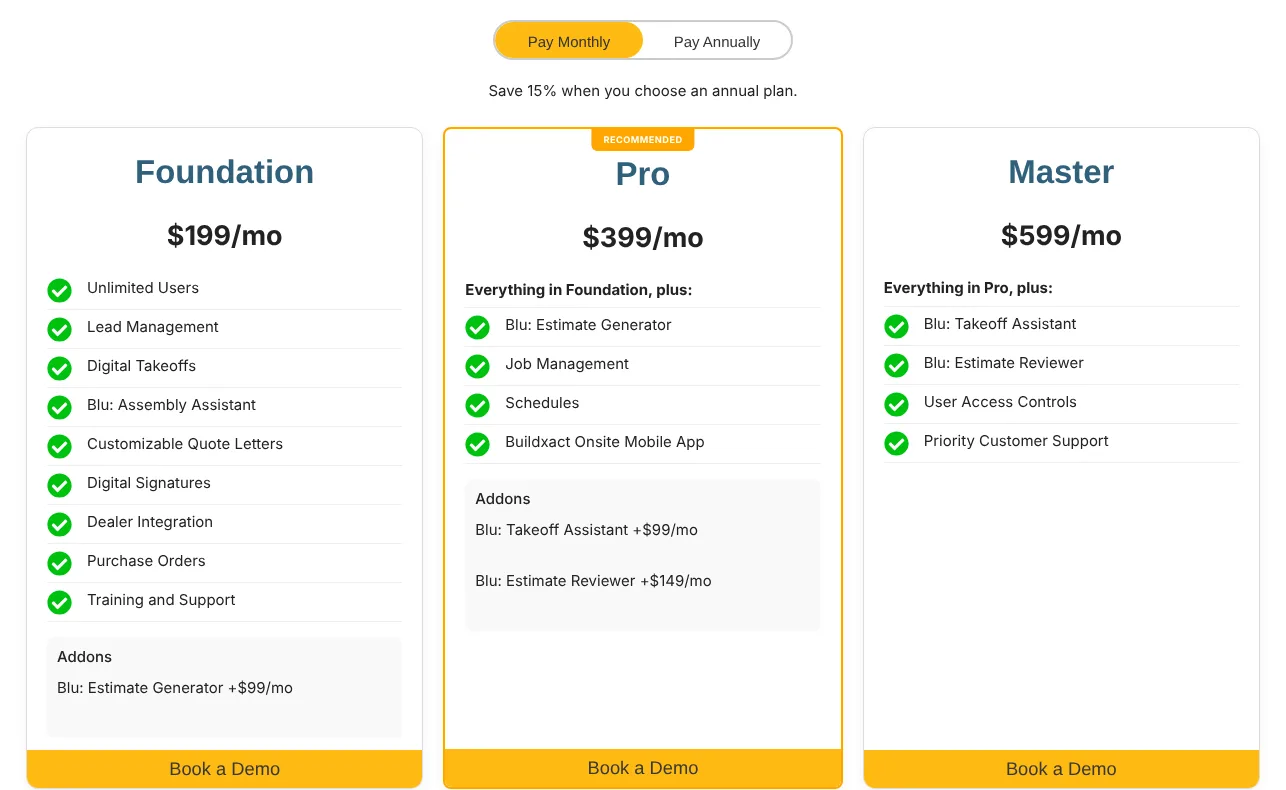
- Buildxact has a 14-day trial, then Foundation at $199 a month. Its AI is called Blu, and the parts you’d want for estimating are extras: Blu Estimate Generator is a $99 a month add-on on Foundation (included on Pro at $399), and Blu Takeoff Assistant ($99) and Blu Estimate Reviewer ($149) are add-ons on Pro, included on Master at $599.
- Houzz Pro is the one paid platform with a real free plan. Its pricing page lists 3D Floor Planner, Estimates and Invoicing on it, with no credit card. The AI-tagged estimates and takeoffs are shown on Pro ($199 a month) and up, and the page doesn’t say whether free-plan estimates use Houzz AI. The FAQ also offers 30 days of Houzz Pro free.

- Kreo and Togal.AI are built for estimators doing big plan takeoffs. Kreo has a 7-day trial and annual-only plans from $100 per user a month. Togal lists no trial, just a demo, then $299 per user a month billed yearly.
Entry price of AI estimating, per month, USD
- ChatGPT, Claude or Gemini, free plan$0
- ChatGPT Plus or Claude Pro$20
- Kreo Essential, per user, annual$100
- Handoff Flex, annual$119
- PlanSwift Essential ($2,000/yr)$167
- Houzz Pro$199
- Buildxact Foundation + Blu Estimate Generator$298
- Togal.AI Growth, per user, yearly$299
- STACK Takeoff & Estimate, per user$299
When is free enough, and when should you pay?
Free is enough when you price from your own list and just hate the paperwork. If you already know the quantities, a free assistant turns them into a clean estimate in minutes. That covers most small remodelers, handymen and single-trade contractors.
Pay for AI estimating software when takeoff is the bottleneck: you’re measuring plans for hours, bidding several jobs a week, or losing bids because you’re slow. That’s the one job general chatbots can’t do and the paid tools can.
The only question that matters is whether the hours saved cover the bill. Put in your own numbers, not the vendor’s. The “hours AI saves” box is your honest guess, because no vendor publishes an independent figure.
Does paid AI estimating pay for itself?
Time saved: 8 hours a month, worth $600.
- ChatGPT Plus or Claude Pro, $20/mo
- Handoff Flex, $119/mo billed annually
- PlanSwift Essential, about $167/mo ($2,000/yr)
- PlanSwift Core, $250/mo ($3,000/yr)
- Buildxact Foundation + Blu Estimate Generator, $298/mo
- Togal.AI Growth or STACK Takeoff & Estimate, $299/mo per user
Which AI estimating software is best for a small contractor?
My pick: start free, then trial one takeoff tool on a job you’ve already priced.
- You price from your own list and don’t do plan takeoffs: stay on a free AI assistant. Move to ChatGPT Plus or Claude Pro ($20 a month) when you hit the limits. My guides to ChatGPT for small business and Claude for small business cover the plans.
- Residential remodeler, estimates from site walks: trial Handoff. It’s built around voice notes and your own pricing catalog.
- You do takeoffs from PDF plans: trial PlanSwift for 14 days. The trial switches every AI tool on, and the full price is on the page before you sign up.
- Commercial estimator, big plan sets: compare Togal.AI and Kreo, and book the demo with a real plan set in hand.
Run the trial on a bid you’ve already finished. You know the right answer, so you’ll see in an hour whether the AI’s quantities hold up.
How to estimate with ChatGPT or Claude for free
The trick is to give it your numbers and ban it from making up its own. Paste this into the free plan of either one and replace the brackets. (Whether ChatGPT can do construction estimates on its own is a separate question, and mostly no.)
You are an estimator for a [trade] contractor in [city, state].
Turn my site notes and quantities into a line-item estimate.

Rules:
- Use ONLY the unit prices from my price list below. If an item has no price, write [PRICE NEEDED] and keep going. Never invent a price.
- Use my quantities. Add 10% waste only to [materials you want waste on].
- Group lines as: demolition, materials, labor, subcontractors, disposal, permits.
- Show quantity, unit, unit price and line total for every line, then a subtotal, my markup of [X]% and a total.
- After the table, list: what is not included, assumptions you made, and items I may have forgotten for this kind of job.

My price list:
[paste item, unit, price]

Site notes and quantities:
[paste notes or a voice-note transcript]
It works because the AI only does what it’s good at: structure, arithmetic you can check, and the “did you forget the dumpster?” list.
Where the free assistants fall down:
- Takeoff from PDFs. They can read text on a plan but don’t measure drawings to scale. Wall lengths, areas and counts they give you from a drawing are guesses. Measure, or use a takeoff tool.
- Material prices. Any price the AI suggests on its own comes from old training data, not today’s supplier. Lumber, copper and drywall move too often for that.
- Your labor. It doesn’t know your crew’s speed, your region’s rates or that the client’s basement floods.
Strip client names and addresses before you paste. The AI doesn’t need them to price a bathroom.
How to check an AI estimate before it goes out
Treat it like a draft from a fast new hire who has never seen the site.
- Every price matches your price list or a current supplier quote. Search the draft for anything you didn’t give it.
- Quantities match your takeoff, not the AI’s reading of the plan. Spot-check the three biggest lines by hand.
- Redo the math on two or three lines and the subtotal. AI arithmetic is usually right, and “usually” isn’t a standard you’d accept from a supplier.
- Compare the total with a similar job you’ve done. If a bathroom comes out 30% under your last three, something is missing.
- Read the exclusions and assumptions out loud. That’s where scope fights start.
- Delete lines you didn’t ask for, unless you agree they belong.
On my construction company’s jobs, the misses I see most are permits, disposal and the cleanup day nobody wanted to price. Those are exactly what the “items I may have forgotten” line in the prompt is for.
A sharp estimate only wins if someone answers the phone and follows up. If calls go to voicemail while you’re on site, see what an AI receptionist costs, and once the job’s done, reply to every review with my guide on how to respond to Google reviews.
Questions people ask
01Is there a completely free AI for construction estimating?
The free plans of ChatGPT, Claude and Gemini, and STACK's limited free takeoff version. Houzz Pro also has a free plan with estimates. Everything else in the price table is a 7 to 30 day trial.
02Can ChatGPT do a takeoff from my PDF plans?
Not reliably. It can read text and notes on a plan, but it doesn't measure drawings to scale. Free ChatGPT also caps uploads. For quantities, use a takeoff tool's trial or measure yourself, then let AI write the estimate.
03What is the best AI estimating software for construction?
For a small residential contractor, I'd trial PlanSwift or Handoff first, since both show prices and let you test on your own plans. Commercial estimators doing big takeoffs should also look at Togal.AI and Kreo. See the pick section above.
04How accurate are AI construction estimates?
As accurate as the prices and quantities you feed them. Free assistants guess material prices from old training data, so treat any price they invent as wrong until you check it against a current supplier quote.
05Do I need to pay for ChatGPT or Claude to estimate?
Not to start. The free plans handle one estimate at a time from typed notes. Pay $20 a month when you hit the limits or want to upload bigger documents, like long specs or supplier price lists.
More in Industries